# Anthropic Prompt Caching
Automatic Anthropic prompt caching lets AISIX add cache markers to eligible requests for a direct Claude model on the Anthropic API, Amazon Bedrock, or Vertex AI. Callers can receive provider cache discounts without adding the markers themselves. This is provider-side caching for repeated prompt prefixes, not gateway-side [Response Caching](https://docs.api7.ai/ai-gateway/traffic-controls/caching.md), which stores and reuses complete responses.
Enable automatic prompt caching on a direct Claude model, choose a lifetime, then send two requests with a stable prefix to confirm cache creation and reads.
## How Automatic Prompt Caching Works[](#how-automatic-prompt-caching-works "Direct link to How Automatic Prompt Caching Works")
Claude prompt caching requires a `cache_control` marker on each eligible request. Callers can place markers themselves, or AISIX can add them automatically for a configured model. The provider can serve a marked prefix from cache at a reduced input rate on later requests; without a marker, it processes the prompt at the standard input rate.
When automatic prompt caching is enabled on a model, AISIX adds up to two markers to requests that contain no caller-supplied markers:
* If the request has a nonempty system block, AISIX marks its last block to cache the tools and system prefix.
* If the final message has a nonempty last content block, AISIX marks that block to cache the conversation prefix. Because the marker is attached to the final turn, the cached prefix advances and new content is cached incrementally as the conversation grows.
AISIX adds at most these two markers, and only to a request that carried none of its own, so the provider's four-breakpoint-per-request limit is not exceeded.
If the caller already sent any `cache_control` marker, AISIX respects the caller's strategy and adds nothing. Provider adapters can still translate marker fields as described in [Scope and Limitations](#scope-and-limitations).
## Prerequisites[](#prerequisites "Direct link to Prerequisites")
Before starting, prepare the following:
* A provider key for [Anthropic](https://docs.api7.ai/ai-gateway/providers/anthropic.md), [AWS Bedrock](https://docs.api7.ai/ai-gateway/providers/aws-bedrock.md), or [Gemini Enterprise Agent Platform](https://docs.api7.ai/ai-gateway/providers/google-vertex-ai.md), a direct Claude model on it, and a caller API key that is allowed to use the model.
* A real provider credential for verifying provider cache creation and reads. The configuration shape can be validated without sending a live provider request.
* `curl` and `jq` for the verification requests.
* For AISIX Enterprise or AISIX Cloud, prepare an environment with an attached gateway. For AISIX Enterprise, follow the [AISIX Enterprise getting-started guide](https://docs.api7.ai/ai-gateway/getting-started/aisix-cloud-quickstart.md); to request AISIX Cloud access, [contact API7](https://api7.ai/contact).
* For Dashboard workflows, sign in with permission to update models.
* For Admin API workflows, obtain the direct model's resource ID and a write-scoped token from an identity allowed to update models.
* For AISIX OSS, prepare a gateway that loads a complete declarative [`resources.yaml`](https://docs.api7.ai/ai-gateway/reference/resources-file.md) file. For verification through exported telemetry, configure an [observability exporter](https://docs.api7.ai/ai-gateway/observability/exporters.md); alternatively, inspect the OpenAI-compatible response fields described below.
## Enable Automatic Prompt Caching[](#enable-automatic-prompt-caching "Direct link to Enable Automatic Prompt Caching")
Automatic prompt caching is a model-level setting and is disabled by default. Choose either the control-plane or AISIX OSS configuration path below.
Automatic prompt caching is supported only on direct Claude models:
* On the Anthropic API, a model whose provider key uses the `anthropic` adapter.
* On Amazon Bedrock, a model whose `model_name` starts with `anthropic.` after any region or cross-region inference-profile prefix such as `us.` or `global.`. For an ARN, AISIX reads the model ID in its last segment.
* On Vertex AI, a model whose `model_name` starts with `claude-`.
AISIX Enterprise and AISIX Cloud reject automatic prompt caching with HTTP 400 for unsupported models. These include Amazon Nova, other Bedrock and Vertex AI publishers, and routing, ensemble, semantic, or embedding models. An open-source gateway ignores the setting on those models. A gateway at 1.6.0 or earlier loads the setting but adds markers only for the Anthropic API.
* AISIX Enterprise or Cloud
* AISIX OSS
Update the direct Claude model that serves the application.
* Dashboard
* Admin API
1. Open the environment and select **Models**.
2. Select **Edit** on the direct Claude model, then expand **Automatic prompt caching**.
3. Select **Enable automatic prompt caching**. Keep the default **5 minutes** lifetime for this example.
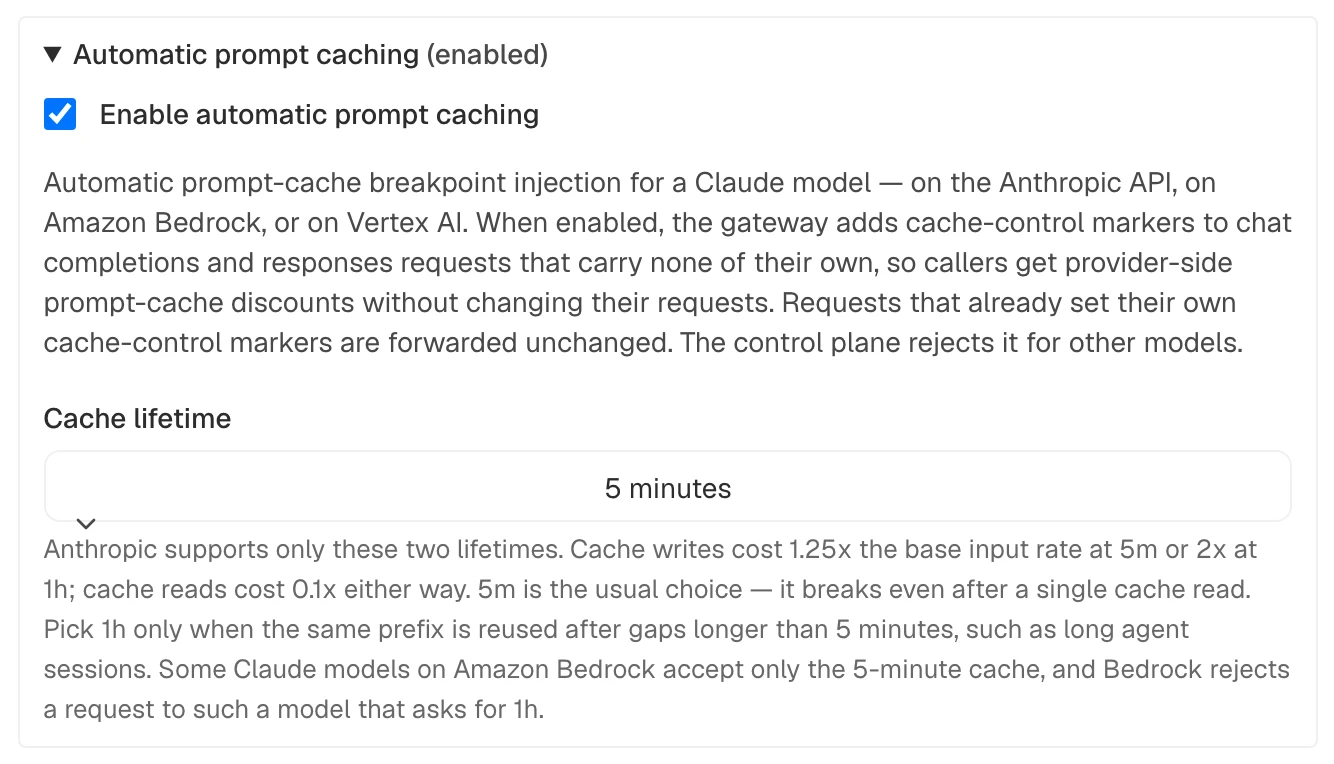
4. Select **Save changes**.
To disable it later, edit the model, expand the same section, and clear **Enable automatic prompt caching**.
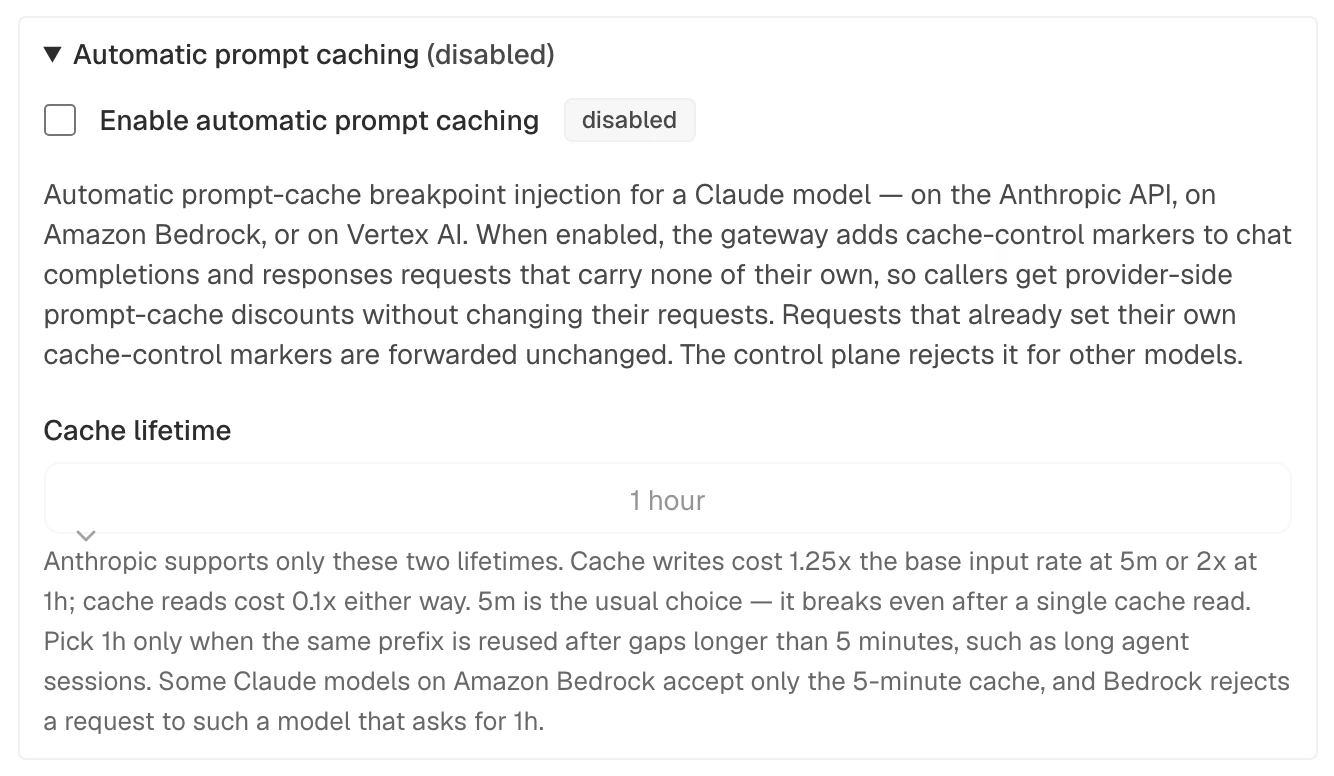
Select **Save changes**.
Export the control-plane connection values and the ID of the direct Claude model:
```
# AISIX_CP includes /api and has no trailing slash.
# The local AISIX Enterprise quickstart uses http://localhost:8080/api.
export AISIX_CP="YOUR_AISIX_CONTROL_PLANE_API_URL"
export AISIX_TOKEN="YOUR_ADMIN_TOKEN"
export ENV_ID="YOUR_ENVIRONMENT_ID"
export MODEL_ID="YOUR_DIRECT_MODEL_ID"
```
Enable automatic prompt caching on the model:
```
curl -sS -X PATCH "$AISIX_CP/environments/$ENV_ID/models/$MODEL_ID" \
-H "Authorization: Bearer $AISIX_TOKEN" \
-H "Content-Type: application/json" \
-d '{
"auto_prompt_caching": {
"enabled": true,
"ttl": "5m"
}
}' | jq -e \
'.model.auto_prompt_caching.enabled == true and .model.auto_prompt_caching.ttl == "5m"'
```
The command prints `true` when automatic prompt caching is enabled with the five-minute lifetime.
To clear the setting, send `auto_prompt_caching` as `null` or as an empty object in another `PATCH` request. A `PATCH` that omits the field leaves the setting unchanged.
Add `auto_prompt_caching` to the direct Anthropic model in `resources.yaml`:
resources.yaml (model prompt caching)
```
models:
- id: 8407c067-9459-4b9d-8625-4dafcd9c00c7
display_name: claude-prod
provider: anthropic
model_name: claude-sonnet-4-5
provider_key_id: f0c00e72-288c-4777-aee6-eb7c35d7bda9
auto_prompt_caching:
enabled: true
ttl: 5m
```
The `provider_key_id` value must be the `id` of an Anthropic entry under `provider_keys`. A Claude model on a Bedrock or Vertex AI provider key takes the same `auto_prompt_caching` block. Validate the complete resources file, then reload the gateway. See [Reload a Resources File](https://docs.api7.ai/ai-gateway/deployment/configuration-propagation.md#reload-a-resources-file) for the runnable Docker workflow.
### Configuration Fields[](#configuration-fields "Direct link to Configuration Fields")
Both configuration paths use the fields below. `enabled` is required whenever the object contains configuration fields.
| Field | Type | Description |
| --------- | ------- | ---------------------------------------------------------------------------------------------------------------------------------------------------------------------------------------------------------------- |
| `enabled` | boolean | Whether AISIX injects prompt-cache markers for this model. |
| `ttl` | string | Cache lifetime for injected markers: `5m` (default when omitted) or `1h`. Some Claude models on Amazon Bedrock accept only the 5-minute cache, and Bedrock rejects a request to such a model that asks for `1h`. |
## Choose a Cache Lifetime[](#choose-a-cache-lifetime "Direct link to Choose a Cache Lifetime")
Anthropic supports two cache lifetimes, and AISIX injects the one you select:
| Lifetime | `ttl` | Cache creation cost | Cache read cost |
| ------------------- | ----- | ------------------------- | ------------------------------------ |
| 5 minutes (default) | `5m` | 1.25x the base input rate | Model-specific discounted input rate |
| 1 hour | `1h` | 2x the base input rate | Model-specific discounted input rate |
For a given model, the cache-read rate is the same for both lifetimes. Check the [provider pricing](https://platform.claude.com/docs/en/about-claude/pricing#prompt-caching) for its model-specific discount. The difference is the cache creation cost and how long the prefix remains cached. A cache read also refreshes the entry, extending its lifetime while the prefix remains active.
Use `5m` by default. It has the lower cache creation cost and breaks even after a single cache read. Choose `1h` only when the same prefix is reused after gaps longer than five minutes. For example, the higher creation cost can be worthwhile for long agent sessions with idle periods between turns because it avoids repeatedly creating the cache entry.
* AISIX Enterprise or Cloud
* AISIX OSS
- Dashboard
- Admin API
Change **Cache lifetime** to **1 hour** in the model's **Automatic prompt caching** section.
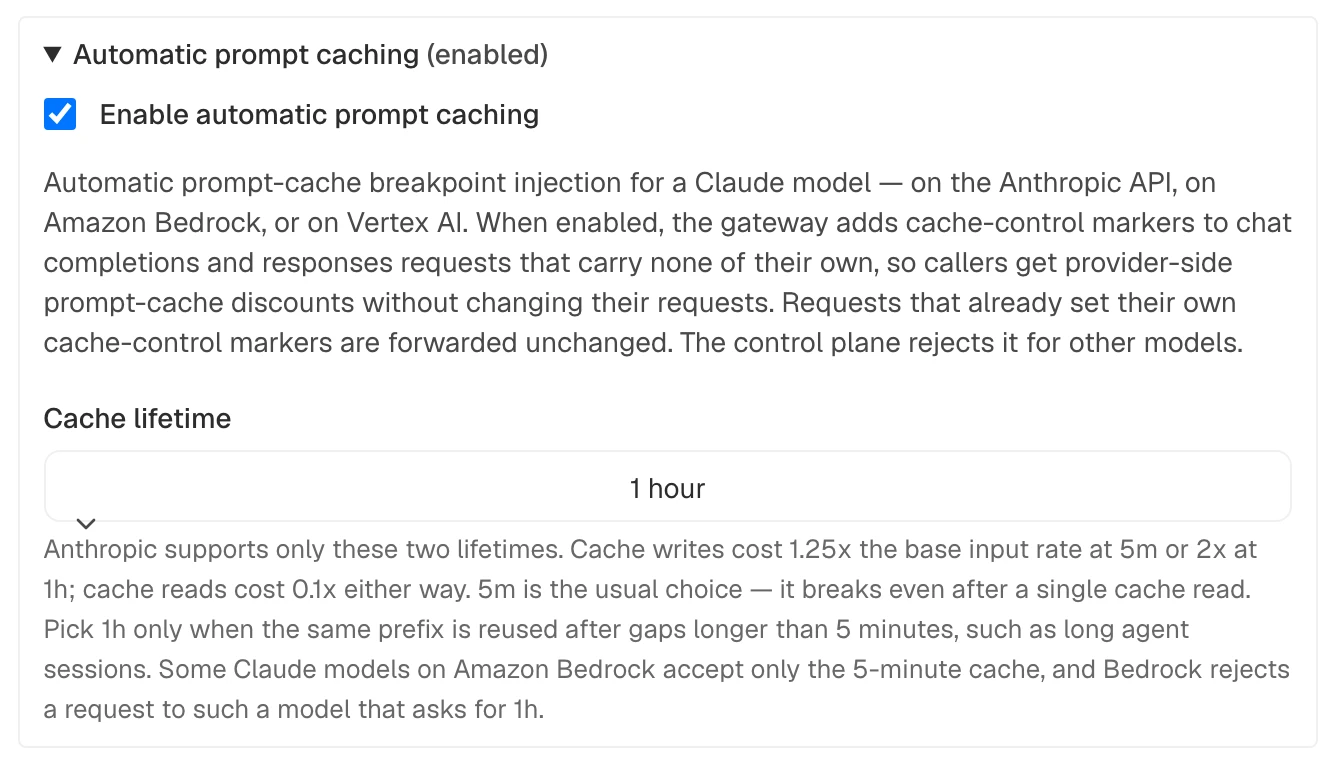
Select **Save changes**.
Set the Admin API connection values and direct model ID, then update the existing model with the longer lifetime:
```
# AISIX_CP includes /api and has no trailing slash.
export AISIX_CP="YOUR_AISIX_CONTROL_PLANE_API_URL"
export AISIX_TOKEN="YOUR_ADMIN_TOKEN"
export ENV_ID="YOUR_ENVIRONMENT_ID"
export MODEL_ID="YOUR_DIRECT_MODEL_ID"
curl -sS -X PATCH "$AISIX_CP/environments/$ENV_ID/models/$MODEL_ID" \
-H "Authorization: Bearer $AISIX_TOKEN" \
-H "Content-Type: application/json" \
-d '{
"auto_prompt_caching": {
"enabled": true,
"ttl": "1h"
}
}' | jq -e \
'.model.auto_prompt_caching.enabled == true and .model.auto_prompt_caching.ttl == "1h"'
```
The command prints `true` when the one-hour lifetime is saved.
Set `ttl: 1h` in the model's existing `auto_prompt_caching` block. Preserve its other settings and the rest of the complete resources file, then validate and reload it.
Some Claude models on Amazon Bedrock support only the 5-minute lifetime. Bedrock rejects `ttl: 1h` for those models, whether the caller supplied it or AISIX injected it. AISIX forwards the configured lifetime without changing it.
When the provider reports a lifetime split, the usage event records how many cache creation tokens were written at each lifetime.
For a Claude-family platform price, AISIX Enterprise and AISIX Cloud bill one-hour writes at twice the input rate unless that price defines a one-hour write rate. A sale or model-group price without its own one-hour rate instead uses its active cache-write rate. See [Model Pricing](https://docs.api7.ai/ai-gateway/cloud/model-pricing.md#add-a-pricing-override) and [Cache Creation by Lifetime](https://docs.api7.ai/ai-gateway/observability/metrics-and-usage-events.md#cache-creation-by-lifetime).
For current multipliers and supported lifetimes, see the [Anthropic prompt caching documentation](https://platform.claude.com/docs/en/build-with-claude/prompt-caching).
## Verify Cache Creation and Reads[](#verify-cache-creation-and-reads "Direct link to Verify Cache Creation and Reads")
Automatic prompt caching pays off when a large, stable prefix is reused. To verify it, send two requests that share the same prefix and inspect the cache creation and read tokens.
Anthropic requires a model-specific minimum prompt length for caching. A shorter prefix is processed without caching and returns no error, so use a prefix that meets the minimum for the selected Claude model.
Export the gateway connection and request values:
```
# AISIX_PROXY has no trailing slash or endpoint path such as /v1.
# The local quickstarts use http://127.0.0.1:3000.
export AISIX_PROXY="YOUR_AISIX_GATEWAY_URL"
export AISIX_API_KEY="YOUR_CALLER_API_KEY"
export AISIX_MODEL="YOUR_DIRECT_MODEL_ALIAS"
```
Send the first request with a sufficiently long, stable system prompt. Replace the placeholder with a real prompt, and use the exact same text in the second request:
```
curl -sS -X POST "$AISIX_PROXY/v1/chat/completions" \
-H "Authorization: Bearer ${AISIX_API_KEY}" \
-H "Content-Type: application/json" \
-d '{
"model": "'"${AISIX_MODEL}"'",
"messages": [
{"role": "system", "content": ""},
{"role": "user", "content": "First question"}
]
}' | jq
```
The first request should record cache creation tokens. Send a second request that keeps the exact same system prompt:
```
curl -sS -X POST "$AISIX_PROXY/v1/chat/completions" \
-H "Authorization: Bearer ${AISIX_API_KEY}" \
-H "Content-Type: application/json" \
-d '{
"model": "'"${AISIX_MODEL}"'",
"messages": [
{"role": "system", "content": ""},
{"role": "user", "content": "Second question"}
]
}' | jq
```
The second request should usually record cache read tokens. On Amazon Bedrock, provider placement or overlapping requests can produce another cache write instead of a hit; see [Prompt caching for faster model inference](https://docs.aws.amazon.com/bedrock/latest/userguide/prompt-caching.html).
OpenAI-compatible clients can inspect the response directly. Chat Completions returns the counters under `usage.prompt_tokens_details`:
Chat Completions usage (partial)
```
{
"prompt_tokens_details": {
"cached_tokens": 800,
"cache_creation_tokens": 200
}
}
```
On `/v1/responses`, the same fields appear under `usage.input_tokens_details`. These fields project the provider's counters into the client response. Exported usage records retain the provider's accounting; see [Token Usage](https://docs.api7.ai/ai-gateway/endpoints/openai-client-to-anthropic.md#token-usage).
* AISIX Enterprise or Cloud
* AISIX OSS
- Dashboard
- Admin API
Open the environment's **Logs** page and expand each request. The first request shows **Cache creation tokens**, while the second shows **Cache read tokens**. A request can report both when it reads a cached prefix and creates a new suffix. Counters appear when their values are greater than zero.
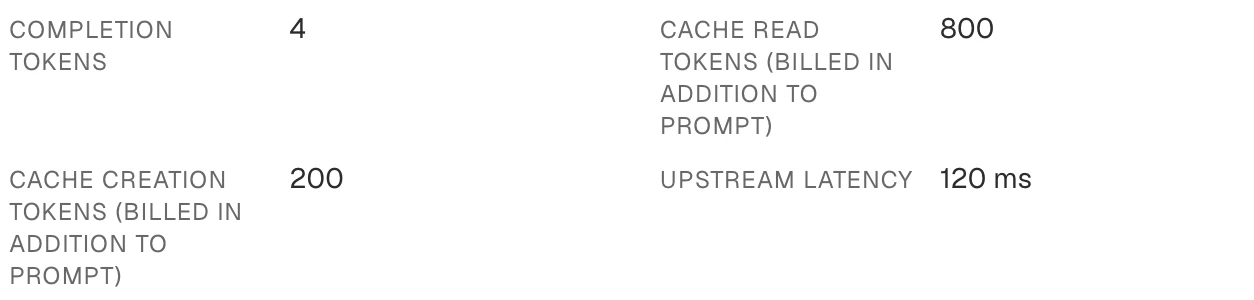
Set the Admin API connection values and a UTC window covering both inference requests:
```
# AISIX_CP includes /api and has no trailing slash.
export AISIX_CP="YOUR_AISIX_CONTROL_PLANE_API_URL"
export AISIX_TOKEN="YOUR_ADMIN_TOKEN"
export ENV_ID="YOUR_ENVIRONMENT_ID"
export USAGE_FROM="START_TIME_IN_RFC3339"
export USAGE_TO="END_TIME_IN_RFC3339"
```
Poll until both asynchronously reported usage events arrive, then confirm that one records cache creation and another records a cache read:
```
for attempt in $(seq 1 15); do
USAGE_RESPONSE=$(curl -sS --get \
"$AISIX_CP/environments/$ENV_ID/usage_events" \
-H "Authorization: Bearer $AISIX_TOKEN" \
--data-urlencode "from=$USAGE_FROM" \
--data-urlencode "to=$USAGE_TO" \
--data-urlencode "requested_model=$AISIX_MODEL" \
--data-urlencode "requested_model_exact=true" \
--data-urlencode "limit=20")
if printf '%s' "$USAGE_RESPONSE" | jq -e \
'any(.data[]; .cache_creation_tokens > 0) and any(.data[]; .cache_read_tokens > 0)' \
>/dev/null; then
break
fi
sleep 2
done
printf '%s' "$USAGE_RESPONSE" | jq -e \
'any(.data[]; .cache_creation_tokens > 0) and any(.data[]; .cache_read_tokens > 0)'
```
The final command prints `true` when the result includes both accounting outcomes.
Inspect the configured observability exporter:
| Exporter | Cache token fields |
| --------------------- | -------------------------------------------------------------------------------------- |
| Object storage or SLS | `cache_creation_tokens`
`cache_read_tokens` |
| Datadog | `aisix.cache_creation_tokens`
`aisix.cache_read_tokens` |
| OTLP | `gen_ai.usage.cache_creation.input_tokens`
`gen_ai.usage.cache_read.input_tokens` |
The OTLP input-token count already includes both cache categories, so do not add them to `gen_ai.usage.input_tokens`. A gateway at 1.6.0 or earlier does not export cache counts over OTLP.
When the provider reports writes by lifetime, object-storage and SLS records also include `cache_creation_5m_tokens` and `cache_creation_1h_tokens`. Datadog and OTLP use the same names with the `aisix.` prefix.
The `token_type="total"` gateway metric also includes Anthropic cache creation and read tokens, but it does not separate them.
AISIX records cache creation and read tokens separately from ordinary input tokens. In AISIX Enterprise and AISIX Cloud, provider-discounted cache reads are reflected in budgets and spend reporting. Both cache token types count toward AISIX token-based rate limits.
## Scope and Limitations[](#scope-and-limitations "Direct link to Scope and Limitations")
| Request path or provider | Prompt-cache behavior |
| -------------------------------------------------------------------- | ------------------------------------------------------------------------------------------------------------------------------------------------------------------------------------------------------------------- |
| `/v1/chat/completions` or `/v1/responses` to supported Claude models | AISIX can add automatic markers to streaming and non-streaming requests. |
| `/v1/messages` to Claude on Anthropic, Bedrock, or Vertex AI | AISIX does not add automatic markers. Caller-supplied markers pass through the platform conversion described below. |
| Claude through Amazon Bedrock | AISIX keeps only `type` and `ttl` on each caller-supplied or injected marker. |
| Claude through Vertex AI | AISIX removes the marker's `scope` field. |
| Bedrock Converse | A marker becomes a `cachePoint` after the marked content. Amazon Nova receives checkpoints in `system` and `messages` without a `ttl`; other publishers receive none. Automatic prompt caching does not cover Nova. |
* Anthropic isolates caches by its organization and workspace boundaries, not by AISIX organization or caller API key. Callers that share one Anthropic provider key can therefore share the same provider-side cache. For cache isolation between tenants, use provider keys from separate Anthropic workspaces.
* Cache read tokens do not count toward Anthropic's input-token-per-minute rate limit. This provider behavior is separate from AISIX token-based rate limits, which include cache read and cache creation tokens.
## Next Steps[](#next-steps "Direct link to Next Steps")
You have enabled automatic prompt caching and verified cache creation and reads. Next:
* In AISIX Enterprise and AISIX Cloud, track the resulting cost in [Budgets](https://docs.api7.ai/ai-gateway/traffic-controls/budgets.md).
* Add gateway-side [Response Caching](https://docs.api7.ai/ai-gateway/traffic-controls/caching.md) when identical requests can reuse the complete response.