# Proxy Amazon Bedrock Requests

[Amazon Bedrock](https://aws.amazon.com/bedrock/) is a managed service that provides access to foundation models through a common set of APIs.

This guide shows how to use the [`ai-proxy`](https://docs.api7.ai/hub/ai-proxy.md) plugin to send requests directly from APISIX to the Amazon Bedrock [Converse API](https://docs.aws.amazon.com/bedrock/latest/APIReference/API_runtime_Converse.html). APISIX constructs the Bedrock endpoint from the configured AWS region and model ID and signs each request with AWS Signature Version 4 (SigV4).

## Prerequisite(s)[​](#prerequisites "Direct link to Prerequisite(s)")

* Install [Docker](https://docs.docker.com/get-docker/).
* Install [cURL](https://curl.se/) to send requests for validation.
* Follow the [Getting Started Tutorial](https://docs.api7.ai/apisix/getting-started.md) to start an APISIX instance in Docker or on Kubernetes.
* If Admin API key authentication is enabled, export a valid key as `ADMIN_API_KEY`.
* Have an AWS account with permission to invoke the selected Amazon Bedrock model.
* Obtain [temporary AWS credentials](https://docs.aws.amazon.com/IAM/latest/UserGuide/id_credentials_temp.html) for an IAM role that has the required permissions.

## Select a Model and Configure Permissions[​](#select-a-model-and-configure-permissions "Direct link to Select a Model and Configure Permissions")

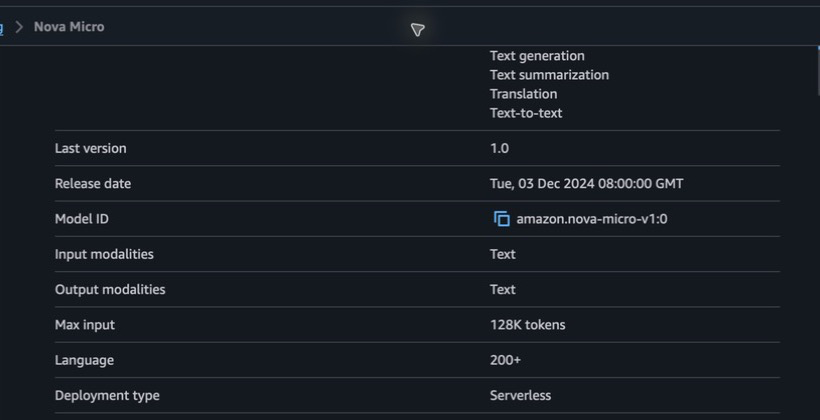
This guide uses the Amazon Nova Micro model in the Sydney region.

In the Amazon Bedrock model catalog, select the model and note its model ID:
![Amazon Nova Micro model details in the Amazon Bedrock model catalog](https://static.api7.ai/uploads/2026/07/21/GAiiwYib_bedrock-nova-micro-model.png)

<br />

Export the region and model ID:

```
export AWS_REGION=ap-southeast-2

export BEDROCK_MODEL_ID=amazon.nova-micro-v1:0
```

APISIX passes `BEDROCK_MODEL_ID` to Bedrock as the Converse API `modelId`. You can use a base model ID or ARN, or an [inference profile ID or ARN](https://docs.aws.amazon.com/bedrock/latest/APIReference/API_runtime_Converse.html#API_runtime_Converse_RequestParameters). If you use an inference profile, update the IAM policy resources for the profile and the models to which it routes.

Amazon Bedrock enables model access by default when the caller has the required permissions. Some third-party models have additional AWS Marketplace or provider onboarding requirements. The Amazon Nova model used here does not require that third-party onboarding.

Grant the IAM role permission to invoke the selected model:

```
{

  "Version": "2012-10-17",

  "Statement": [

    {

      "Effect": "Allow",

      "Action": [

        "bedrock:InvokeModel",

        "bedrock:InvokeModelWithResponseStream"

      ],

      "Resource": "arn:aws:bedrock:ap-southeast-2::foundation-model/amazon.nova-micro-v1:0"

    }

  ]

}
```

❶ Allow Converse requests.

❷ Allow ConverseStream requests.

❸ Restrict access to the selected model. If you use an inference profile, include the profile and the models to which it routes.

Export the temporary credentials for the role:

```
export AWS_ACCESS_KEY_ID="<your-access-key-id>"

export AWS_SECRET_ACCESS_KEY="<your-secret-access-key>"

export AWS_SESSION_TOKEN="<your-session-token>"
```

Temporary credentials expire. For a long-running deployment, automate credential rotation and update the APISIX route before the credentials expire.

## Create a Route to Amazon Bedrock[​](#create-a-route-to-amazon-bedrock "Direct link to Create a Route to Amazon Bedrock")

APISIX identifies Bedrock Converse requests from the `messages` field together with an incoming URI ending in `/converse`. The URI can have a custom prefix, but it must keep that suffix.

Create a route and configure the `ai-proxy` plugin:

* Admin API
* ADC

```
curl "http://127.0.0.1:9180/apisix/admin/routes" -X PUT \

  -H "X-API-KEY: ${ADMIN_API_KEY}" \

  -H "Content-Type: application/json" \

  --data-binary @- <<EOF

  {

    "id": "bedrock-converse",

    "uri": "/bedrock/converse",

    "methods": ["POST"],

    "plugins": {

      "ai-proxy": {

        "provider": "bedrock",

        "auth": {

          "aws": {

            "access_key_id": "${AWS_ACCESS_KEY_ID}",

            "secret_access_key": "${AWS_SECRET_ACCESS_KEY}",

            "session_token": "${AWS_SESSION_TOKEN}"

          }

        },

        "provider_conf": {

          "region": "${AWS_REGION}"

        },

        "options": {

          "model": "${BEDROCK_MODEL_ID}"

        },

        "timeout": 60000

      }

    }

  }

EOF
```

❶ Set the provider to `bedrock`.

❷ Configure temporary AWS credentials. The session token is required when you use temporary credentials.

❸ Set the AWS region used to construct the Bedrock Runtime endpoint and sign requests.

❹ Set the Bedrock model ID. The configured model takes precedence over a model supplied in a request body.

❺ Allow up to 60 seconds for Bedrock to return a response.

adc.yaml

```
services:

  - name: Amazon Bedrock Service

    routes:

      - uris:

          - /bedrock/converse

        methods:

          - POST

        name: bedrock-converse

        plugins:

          ai-proxy:

            provider: bedrock

            auth:

              aws:

                access_key_id: ${AWS_ACCESS_KEY_ID}

                secret_access_key: ${AWS_SECRET_ACCESS_KEY}

                session_token: ${AWS_SESSION_TOKEN}

            provider_conf:

              region: ${AWS_REGION}

            options:

              model: ${BEDROCK_MODEL_ID}

            timeout: 60000
```

❶ Set the provider to `bedrock`.

❷ Configure temporary AWS credentials. The session token is required when you use temporary credentials.

❸ Set the AWS region used to construct the Bedrock Runtime endpoint and sign requests.

❹ Set the Bedrock model ID. The configured model takes precedence over a model supplied in a request body.

❺ Allow up to 60 seconds for Bedrock to return a response.

Preview the service change. These options compare only this tutorial's service, so other gateway resources stay unchanged:

```
adc diff -f adc.yaml \

  --include-resource-type service \

  --label-selector docs-example=bedrock
```

Review `diff.yaml` and confirm that it contains only the intended service and route changes. Then synchronize the reviewed configuration with the same scope:

```
adc sync -f adc.yaml \

  --include-resource-type service \

  --label-selector docs-example=bedrock
```

The route configuration contains AWS credentials. When [data encryption with a keyring](https://docs.api7.ai/apisix/production/security/data-encryption-with-keyring.md) is enabled, APISIX encrypts the secret access key and session token before saving the route to etcd. Configure a custom keyring in production.

## Verify the Route[​](#verify-the-route "Direct link to Verify the Route")

Send Converse and ConverseStream requests to verify the route.

### Send a Converse Request[​](#send-a-converse-request "Direct link to Send a Converse Request")

Send a request in the Bedrock Converse format:

```
curl -i "http://127.0.0.1:9080/bedrock/converse" -X POST \

  -H "Content-Type: application/json" \

  -d '{

    "messages": [

      {

        "role": "user",

        "content": [

          {

            "text": "Explain what an API gateway does in one sentence."

          }

        ]

      }

    ],

    "inferenceConfig": {

      "maxTokens": 128,

      "temperature": 0

    }

  }'
```

You should receive an HTTP `200` response in the Bedrock Converse response format. The generated text is available under `output.message.content` and can vary between requests:

```
{

  "output": {

    "message": {

      "role": "assistant",

      "content": [

        {

          "text": "An API gateway provides a single entry point for routing, securing, and managing requests to backend services."

        }

      ]

    }

  },

  "stopReason": "end_turn",

  "usage": {

    "inputTokens": 12,

    "outputTokens": 21,

    "totalTokens": 33

  }

}
```

APISIX preserves Bedrock's native `usage` object. For access logs, Prometheus metrics, and token-based rate limiting, the normalized prompt total includes input, cache-read, and cache-write tokens. The separate cache fields remain available for custom accounting.

### Send a ConverseStream Request[​](#send-a-conversestream-request "Direct link to Send a ConverseStream Request")

Send a ConverseStream request:

```
curl -sS "http://127.0.0.1:9080/bedrock/converse" -X POST \

  -H "Content-Type: application/json" \

  -d '{

    "stream": true,

    "messages": [

      {

        "role": "user",

        "content": [

          {

            "text": "Respond with a short greeting."

          }

        ]

      }

    ]

  }' \

  --dump-header /tmp/bedrock-stream-headers \

  --output /tmp/bedrock-stream-response
```

APISIX uses the highlighted field to select the Bedrock ConverseStream endpoint and removes it before forwarding the request because Bedrock selects streaming by the endpoint path.

The response should be non-empty and use the AWS EventStream content type:

```
grep -i "content-type: application/vnd.amazon.eventstream" /tmp/bedrock-stream-headers

test -s /tmp/bedrock-stream-response && echo "Received a streaming response"
```

AWS EventStream uses binary framing. Use an EventStream-compatible client when the application needs to decode individual streaming events.

Remove the temporary response files:

```
rm /tmp/bedrock-stream-headers /tmp/bedrock-stream-response
```

## Clean Up[​](#clean-up "Direct link to Clean Up")

Delete the APISIX route when you no longer need it so that the temporary AWS credentials are removed from the route configuration:

```
curl "http://127.0.0.1:9180/apisix/admin/routes/bedrock-converse" -X DELETE \

  -H "X-API-KEY: ${ADMIN_API_KEY}"
```

Remove the temporary credentials from the shell:

```
unset AWS_ACCESS_KEY_ID AWS_SECRET_ACCESS_KEY AWS_SESSION_TOKEN
```

If you used ADC, remove the AWS credentials from `adc.yaml` or protect the file according to your organization's secret-handling policy.

## Next Steps[​](#next-steps "Direct link to Next Steps")

You have now configured APISIX to authenticate and send Converse and ConverseStream requests directly to Amazon Bedrock.

You can add [rate limiting](https://docs.api7.ai/apisix/how-to-guide/traffic-management/rate-limiting.md) to control model request volume.
