# Use Wasm Plugins in APISIX
APISIX supports [WebAssembly (Wasm)](https://webassembly.org) plugins developed following the [Proxy-Wasm specification](https://github.com/proxy-wasm/spec), a specification that extends Wasm capabilities to proxies.
There are several benefits to using Wasm to develop APISIX plugins:
* The ability to compile many programming languages to Wasm. This allows you to leverage the capabilities of your existing technology stack when developing APISIX plugins.
* Running Wasm plugins natively within APISIX but in a separate VM. Even if a plugin crashes, APISIX can continue to operate.
* The continuous support for Wasm in APISIX. This avoids maintaining multiple external plugin runners for different programming languages.
This guide will help you understand how APISIX supports Wasm and how to develop a sample Wasm plugin in Go using the [Proxy-Wasm Go SDK](https://github.com/tetratelabs/proxy-wasm-go-sdk), as well as loading the plugin into APISIX.
## How APISIX Supports Wasm[](#how-apisix-supports-wasm "Direct link to How APISIX Supports Wasm")
APISIX implements the [Proxy-Wasm specification](https://github.com/proxy-wasm/spec/tree/main). The specification was initially developed for the Envoy proxy and has evolved to be the standard for writing Wasm plugins for proxies. Any plugin written using the Proxy-Wasm SDKs can be run in APISIX.
APISIX uses the following programming model to work with Wasm plugins. All these interfaces should be implemented while writing custom Wasm plugins.
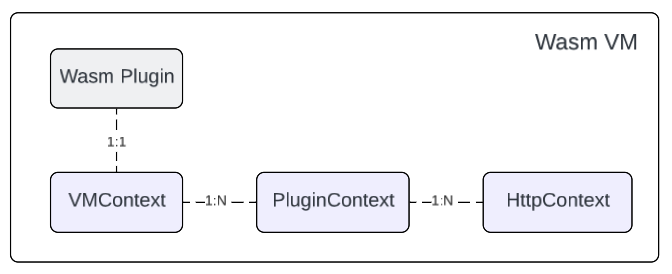
Each plugin has its own `VMContext`, which can create multiple `PluginContext` for each route. For example, each `PluginContext` corresponds to an instance of a plugin, so if a service is configured with a Wasm plugin and two routes inherit from the service, each route will have its own `PluginContext`.
Similarly, a `PluginContext` is the parent of multiple `HTTPContext`. Each HTTP request that hits the configuration will also have its own `HttpContext`. For example, if you configure both global rules and route, the HTTP request will have two `HTTPContext`, one for the `PluginContext` from global rules and the other one for the `PluginContext` from route.
## Build and Load Wasm Plugins into APISIX[](#build-and-load-wasm-plugins-into-apisix "Direct link to Build and Load Wasm Plugins into APISIX")
In this section, you will learn how to build a minimal Wasm plugin in Go that logs a warning message in the proxy whenever there is an incoming request, compile the source code to Wasm, and load the Wasm plugin into APISIX.
### Prerequisite(s)[](#prerequisites "Direct link to Prerequisite(s)")
* Install [Docker](https://docs.docker.com/get-docker/).
* Install [cURL](https://curl.se/) to send requests to the services for validation.
* Follow the [Getting Started tutorial](https://docs.api7.ai/apisix/getting-started.md) to start a new APISIX instance in Docker or on Kubernetes.
* Install [Go](https://go.dev/doc/install).
* Install [TinyGo](https://tinygo.org/?utm_source=navendu_blog\&utm_medium=referral\&utm_campaign=a-tiny-apisix-plugin) to compile the Go source code into Wasm.
* Install the [Proxy-Wasm Go SDK](https://github.com/tetratelabs/proxy-wasm-go-sdk) to develop Proxy-Wasm compliant plugins in Go.
* If [Admin API authentication](https://docs.api7.ai/apisix/production/security/admin-api-key.md) is enabled, export an admin-role key as `ADMIN_API_KEY`.
### Write Plugin Logic in Go[](#write-plugin-logic-in-go "Direct link to Write Plugin Logic in Go")
Create a file with the following code:
main.go
```
package main
// Import the proxy-wasm-go-sdk package for building Wasm plugins
import (
"github.com/tetratelabs/proxy-wasm-go-sdk/proxywasm"
"github.com/tetratelabs/proxy-wasm-go-sdk/proxywasm/types"
)
func main() {
// Set the VM context to a new instance of the vmContext struct
proxywasm.SetVMContext(&vmContext{})
}
// The vmContext struct represents the VM context
type vmContext struct {
// Embed the DefaultVMContext type from the proxywasm/types package
types.DefaultVMContext
}
// The NewPluginContext function is called when a new plugin context is created
func (*vmContext) NewPluginContext(contextID uint32) types.PluginContext {
// Return a new instance of the pluginContext struct with the given contextID
return &pluginContext{contextID: contextID}
}
// The pluginContext struct represents the plugin context
type pluginContext struct {
// Embed the DefaultPluginContext type from the proxywasm/types package
types.DefaultPluginContext
conf string
contextID uint32
}
// The OnPluginStart function is called when the plugin is started
func (ctx *pluginContext) OnPluginStart(pluginConfigurationSize int) types.OnPluginStartStatus {
// Get the plugin configuration data
data, err := proxywasm.GetPluginConfiguration()
if err!= nil {
// Log a critical error if there's an error reading the configuration
proxywasm.LogCriticalf("error reading plugin configuration: %v", err)
return types.OnPluginStartStatusFailed
}
// Store the configuration data in the conf field
ctx.conf = string(data)
// Return a successful status
return types.OnPluginStartStatusOK
}
// The OnPluginDone function is called when the plugin is done
func (ctx *pluginContext) OnPluginDone() bool {
proxywasm.LogInfo("do clean up...")
return true
}
// The NewHttpContext function is called when a new HTTP context is created
func (ctx *pluginContext) NewHttpContext(contextID uint32) types.HttpContext {
// Return a new instance of the httpLifecycle struct with the given contextID and conf
return &httpLifecycle{
pluginCtxID: ctx.contextID,
conf: ctx.conf,
contextID: contextID,
}
}
// The httpLifecycle struct represents the HTTP lifecycle
type httpLifecycle struct {
// Embed the DefaultHttpContext type from the proxywasm/types package
types.DefaultHttpContext
pluginCtxID uint32
contextID uint32
conf string
}
// The OnHttpRequestHeaders function is called when HTTP request headers are received
func (ctx *httpLifecycle) OnHttpRequestHeaders(numHeaders int, endOfStream bool) types.Action {
// Log a warning message with the plugin context ID, configuration, and HTTP context ID
proxywasm.LogWarnf("run plugin ctx %d with conf %s in http ctx %d", ctx.pluginCtxID, ctx.conf, ctx.contextID)
// Return an action to continue processing the request
return types.ActionContinue
}
```
The code above implements the `OnHttpRequestHeaders` method for the `httpLifecycle` struct. The function is called whenever HTTP request headers are received. See [the section below](#proxy-wasm-callback-functions-and-apisix-phases) to learn more about the correlation between Proxy-Wasm callback functions and APISIX phases.
### Compile the Code into Wasm[](#compile-the-code-into-wasm "Direct link to Compile the Code into Wasm")
Use a consistent SDK and compiler pair. The example can be built with Go 1.22, TinyGo 0.31.2, and Proxy-Wasm Go SDK 0.16.0. In a new example directory, initialize a Go module before adding the SDK. Keep your existing module instead if one is already initialized:
```
go mod init apisix-wasm-log
go get github.com/tetratelabs/proxy-wasm-go-sdk@v0.16.0
tinygo build -o log.go.wasm -scheduler=none -target=wasi ./main.go
```
If the compilation is successful, you should see a `log.go.wasm` file in your current directory.
### Load the Plugin into APISIX[](#load-the-plugin-into-apisix "Direct link to Load the Plugin into APISIX")
Copy `log.go.wasm` into the `/usr/local/bin` directory:
```
docker cp log.go.wasm apisix-quickstart:/usr/local/bin/
```
Update the [configuration file](https://docs.api7.ai/apisix/reference/configuration-files.md#configyaml-and-configyamlexample) with the Wasm plugin related information:
conf/config.yaml
```
wasm:
plugins:
- name: wasm_log
priority: 7999
file: /usr/local/bin/log.go.wasm
```
❶ `name`: the name of the Wasm plugin.
❷ `priority`: the [execution priority](https://docs.api7.ai/apisix/key-concepts/plugins.md#plugins-execution-order) of the plugin.
❸ `file`: the absolute path to the Wasm file.
[Reload APISIX](https://docs.api7.ai/apisix/reference/apisix-cli.md#apisix-reload) for configuration changes to take effect:
```
docker exec apisix-quickstart apisix reload
```
### Use the Plugin in APISIX[](#use-the-plugin-in-apisix "Direct link to Use the Plugin in APISIX")
Create a sample route with the `wasm_log` plugin:
* Admin API
* ADC
```
curl "http://127.0.0.1:9180/apisix/admin/routes" -X PUT \
-H "X-API-KEY: ${ADMIN_API_KEY}" \
-d '{
"id": "wasm-log-plugin",
"uri": "/anything",
"plugins": {
"wasm_log": {
"conf": "hello apisix"
}
},
"upstream": {
"type": "roundrobin",
"nodes": {
"httpbin.org:80": 1
}
}
}'
```
❶ `conf`: configure a string to be logged by the plugin.
adc.yaml
```
services:
- name: Wasm Plugin Service
labels:
docs-example: custom-wasm-plugin
routes:
- uris:
- /anything
name: wasm-log-plugin
plugins:
wasm_log:
conf: hello apisix
upstream:
type: roundrobin
nodes:
- host: httpbin.org
port: 80
weight: 1
```
❶ `conf`: configure a string to be logged by the plugin.
ADC reconciles services as desired state. Preview only this example's labeled service and confirm that the diff contains no unintended updates or deletions:
```
adc diff -f adc.yaml \
--include-resource-type service \
--label-selector docs-example=custom-wasm-plugin
```
Synchronize the reviewed service configuration:
```
adc sync -f adc.yaml \
--include-resource-type service \
--label-selector docs-example=custom-wasm-plugin
```
Send a request to the route:
```
curl -i "http://127.0.0.1:9080/anything"
```
You should receive an `HTTP/1.1 200 OK` response.
Navigate to the error log, you should see the following log entry created by the `wasm_log` plugin:
```
2025/09/04 09:58:54 [warn] 53#53: *3331 run plugin ctx 1 with conf hello apisix in http ctx 2, client: 127.0.0.1, server: _, request: "GET /anything HTTP/1.1", host: "127.0.0.1:9080"
```
## Proxy-Wasm Callback Functions and APISIX Phases[](#proxy-wasm-callback-functions-and-apisix-phases "Direct link to Proxy-Wasm Callback Functions and APISIX Phases")
The following table shows the correspondences between Proxy-Wasm callback functions and APISIX [phases](https://docs.api7.ai/apisix/key-concepts/plugins.md#plugins-execution-lifecycle).
| **Proxy-Wasm Callbacks** | **APISIX Phases** |
| -------------------------------- | -------------------------------------------------------------------------------------------------------------------------------------------------------------------------------------------------------------------------------------------------------------------- |
| `proxy_on_configure` | Run once when there is no plugin context for the new configuration, such as when the first request hits the route where there is no Wasm plugin configured. |
| `proxy_on_http_request_headers` | Run in the access or rewrite [phase](https://docs.api7.ai/apisix/key-concepts/plugins.md#plugins-execution-lifecycle), depending on the configuration of the `http_request_phase`. |
| `proxy_on_http_request_body` | Run in the same [phase](https://docs.api7.ai/apisix/key-concepts/plugins.md#plugins-execution-lifecycle) as `proxy_on_http_request_headers`. To run this callback, set the property `wasm_process_req_body` to a non-empty value in `proxy_on_http_request_headers`. |
| `proxy_on_http_response_headers` | Run in the `header_filter` phase. |
| `proxy_on_http_response_body` | Run in the `body_filter` [phase](https://docs.api7.ai/apisix/key-concepts/plugins.md#plugins-execution-lifecycle). To run this callback, set the property `wasm_process_resp_body` to a non-empty value in `proxy_on_http_response_headers`. |
## Next Steps[](#next-steps "Direct link to Next Steps")
The support for [Proxy-Wasm](https://github.com/proxy-wasm/spec) APIs is an ongoing effort. To follow the latest progress, please see [wasm-nginx-module](https://github.com/api7/wasm-nginx-module).
A few APISIX plugins, such as `fault-injection` and `response-rewrite`, have Wasm implementations. Explore the [`/t/wasm`](https://github.com/apache/apisix/tree/3.21.0/t/wasm) directory to learn more.
A practical use case is to integrate APISIX with [Coraza WAF](https://coraza.io) to protect upstream resources. This is done by loading the [coraza-proxy-wasm](https://github.com/corazawaf/coraza-proxy-wasm) module into APISIX and configuring the plugin on APISIX resources. See the [integration with Coraza WAF](https://docs.api7.ai/apisix/how-to-guide/security/waf/integrate-with-coraza.md) doc.