# Integrate with Coraza
With rapid development of technology, it has become increasingly crucial to secure APIs. APISIX supports the integration with [Coraza](https://coraza.io/) by using [coraza-proxy-wasm](https://github.com/corazawaf/coraza-proxy-wasm) to provide reliable security protection and ensure the integrity and reliability of API services.
Coraza is an open-source, enterprise-grade, high-performance [Web Application Firewall (WAF)](https://en.wikipedia.org/wiki/Web_application_firewall). It is designed to safeguard web applications against various cyber attacks by filtering and monitoring HTTP/HTTPS communications between web applications and the internet. Integrating with [Coraza](https://coraza.io/), APISIX significantly enhances APISIX's ability to protect upstream services.
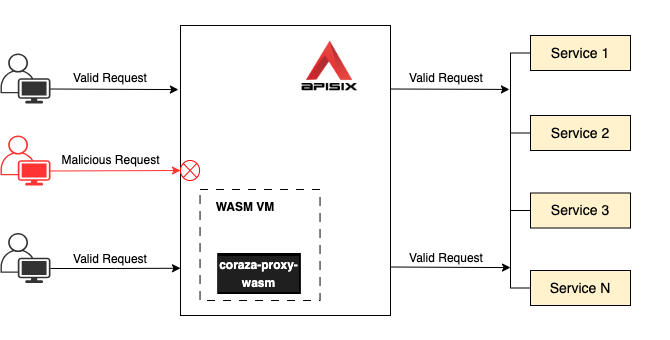
This guide will show you how to enable [coraza-proxy-wasm](https://github.com/corazawaf/coraza-proxy-wasm) to integrate APISIX with Coraza WAF to protect upstream services.
## Prerequisite(s)[](#prerequisites "Direct link to Prerequisite(s)")
* Install [Docker](https://docs.docker.com/get-docker/).
* Install [cURL](https://curl.se/) to send requests to the services for validation.
* Install [ZIP](https://infozip.sourceforge.net/Zip.html) to unzip the `coraza-proxy-wasm` binary from the [release page](https://github.com/corazawaf/coraza-proxy-wasm/releases).
* Follow the [Getting Started tutorial](https://docs.api7.ai/apisix/getting-started.md) to start a new APISIX instance in Docker.
* If you use the Admin API examples and authentication is enabled, export an admin-role key as `ADMIN_API_KEY`. Configure the key under `deployment.admin.admin_key`. The Docker quickstart disables authentication for local evaluation; keep it enabled in production.
## Download `coraza-proxy-wasm`[](#download-coraza-proxy-wasm "Direct link to download-coraza-proxy-wasm")
Download `coraza-proxy-wasm` from the [release page](https://github.com/corazawaf/coraza-proxy-wasm/releases) and unzip it:
```
wget https://github.com/corazawaf/coraza-proxy-wasm/releases/download/0.6.0/coraza-proxy-wasm-0.6.0.zip
unzip coraza-proxy-wasm-0.6.0.zip
```
caution
The upstream 0.6.0 release notes warn that TinyGo runtime limitations can cause memory leaks and performance degradation. Test the module under expected traffic before using it in production.
Copy `coraza-proxy-wasm.wasm` into the `/usr/local/bin` directory:
```
docker cp coraza-proxy-wasm.wasm apisix-quickstart:/usr/local/bin/
```
## Load `coraza-proxy-wasm` in APISIX[](#load-coraza-proxy-wasm-in-apisix "Direct link to load-coraza-proxy-wasm-in-apisix")
Update the `config.yaml` [configuration file](https://docs.api7.ai/apisix/reference/configuration-files.md#configyaml-and-configyamlexample) by adding `coraza-proxy-wasm` configurations:
```
docker exec apisix-quickstart /bin/bash -c "echo '
wasm:
plugins:
- name: coraza-filter
priority: 7999
file: /usr/local/bin/coraza-proxy-wasm.wasm
' >> /usr/local/apisix/conf/config.yaml"
```
❶ `name`: the name of the APISIX plugin corresponding to `coraza-proxy-wasm`.
❷ `priority`: the [execution priority](https://docs.api7.ai/apisix/key-concepts/plugins.md#plugins-execution-order) of the plugin.
❸ `file`: the absolute path to `coraza-proxy-wasm`.
[Reload APISIX](https://docs.api7.ai/apisix/reference/apisix-cli.md#apisix-reload) for configuration changes to take effect:
```
docker exec apisix-quickstart apisix reload
```
## Configure Specific Security Rules[](#configure-specific-security-rules "Direct link to Configure Specific Security Rules")
Create a route and enable `coraza-filter`:
* Admin API
* ADC
```
curl -i "http://127.0.0.1:9180/apisix/admin/routes/" -X PUT \
-H "X-API-KEY: ${ADMIN_API_KEY}" \
-d '{
"id": "getting-started-waf",
"uri": "/anything/*",
"plugins": {
"coraza-filter": {
"conf": {
"directives_map": {
"default": [
"SecDebugLogLevel 9",
"SecRuleEngine On",
"SecRule REQUEST_URI \"@beginsWith /anything/archive\" \"id:101,phase:1,t:lowercase,deny\""
]
},
"default_directives": "default"
}
}
},
"upstream": {
"type": "roundrobin",
"nodes": {
"httpbin.org:80": 1
}
}
}'
```
❶ `SecDebugLogLevel`: configure the debug log level. For details, see [SecDebugLogLevel](https://github.com/SpiderLabs/ModSecurity/wiki/Reference-Manual-\(v2.x\)#secdebugloglevel).
❷ `SecRuleEngine`: configure the rules engine. For details, see [SecRuleEngine](https://github.com/SpiderLabs/ModSecurity/wiki/Reference-Manual-\(v2.x\)#secruleengine).
❸ `SecRule`: check the URI value of your HTTP request to see if the URI value begins with `/anything/archive`. If matched, the request will be rejected. For details, see [SecRule](https://github.com/SpiderLabs/ModSecurity/wiki/Reference-Manual-\(v2.x\)#SecRule).
Give this example its own service name. ADC matches a service by name, so reusing `httpbin Service` updates that existing service even when the label is different. If you previously synchronized this example, delete the older `getting-started-waf` route on `httpbin Service` after synchronizing, and leave every other route on that service in place.
adc.yaml
```
services:
- name: Coraza Service
labels:
docs-example: coraza-waf
routes:
- uris:
- /anything/*
name: getting-started-waf
plugins:
coraza-filter:
conf:
directives_map:
default:
- SecDebugLogLevel 9
- SecRuleEngine On
- SecRule REQUEST_URI "@beginsWith /anything/archive" "id:101,phase:1,t:lowercase,deny"
default_directives: default
upstream:
type: roundrobin
nodes:
- host: httpbin.org
port: 80
weight: 1
```
❶ `SecDebugLogLevel`: configure the debug log level. For details, see [SecDebugLogLevel](https://github.com/SpiderLabs/ModSecurity/wiki/Reference-Manual-\(v2.x\)#secdebugloglevel).
❷ `SecRuleEngine`: configure the rules engine. For details, see [SecRuleEngine](https://github.com/SpiderLabs/ModSecurity/wiki/Reference-Manual-\(v2.x\)#secruleengine).
❸ `SecRule`: check the URI value of your HTTP request to see if the URI value begins with `/anything/archive`. If matched, the request will be rejected. For details, see [SecRule](https://github.com/SpiderLabs/ModSecurity/wiki/Reference-Manual-\(v2.x\)#SecRule).
ADC reconciles services as desired state. The label selector limits both Coraza scenarios to this guide's service. Preview the scoped changes and confirm that they contain no unintended updates or deletions:
```
adc diff -f adc.yaml \
--include-resource-type service \
--label-selector docs-example=coraza-waf
```
Synchronize the reviewed service configuration:
```
adc sync -f adc.yaml \
--include-resource-type service \
--label-selector docs-example=coraza-waf
```
### Verify[](#verify "Direct link to Verify")
Send a request to the route to verify if the HTTP request with a URI beginning with `anything/archive` will be rejected:
```
curl -i "http://localhost:9080/anything/archive/test"
```
You should receive an `HTTP/1.1 403 Forbidden` response.
Send a request to the route to verify if the HTTP request with a URI beginning with `anything` will be allowed:
```
curl -i "http://localhost:9080/anything/public"
```
You should receive an `HTTP/1.1 200 OK` response.
## Configure OWASP Core Rule Set[](#configure-owasp-core-rule-set "Direct link to Configure OWASP Core Rule Set")
You can also configure the entire [OWASP Core Rule Set (CRS)](https://owasp.org/www-project-modsecurity-core-rule-set) on the route as such:
* Admin API
* ADC
```
curl -i "http://127.0.0.1:9180/apisix/admin/routes/" -X PUT \
-H "X-API-KEY: ${ADMIN_API_KEY}" \
-d '{
"id": "getting-started-waf",
"uri": "/anything/*",
"plugins": {
"coraza-filter": {
"conf": {
"directives_map": {
"default": [
"SecDebugLogLevel 9",
"SecRuleEngine On",
"Include @crs-setup-conf",
"Include @owasp_crs/*.conf"
]
},
"default_directives": "default"
}
}
},
"upstream": {
"type": "roundrobin",
"nodes": {
"httpbin.org:80": 1
}
}
}'
```
❶ Include `@crs-setup-conf` to support CRS.
❷ Include all CRS rules. You could also include a specific rule, such as `@owasp_crs/REQUEST-941-APPLICATION-ATTACK-XSS.conf`. See [all available rules](https://github.com/corazawaf/coraza-proxy-wasm/tree/main/wasmplugin/rules/crs).
adc.yaml
```
services:
- name: Coraza Service
labels:
docs-example: coraza-waf
routes:
- uris:
- /anything/*
name: getting-started-waf
plugins:
coraza-filter:
conf:
directives_map:
default:
- SecDebugLogLevel 9
- SecRuleEngine On
- Include @crs-setup-conf
- Include @owasp_crs/*.conf
default_directives: default
upstream:
type: roundrobin
nodes:
- host: httpbin.org
port: 80
weight: 1
```
❶ Include `@crs-setup-conf` to support CRS.
❷ Include all CRS rules. You could also include a specific rule, such as `@owasp_crs/REQUEST-941-APPLICATION-ATTACK-XSS.conf`. See [all available rules](https://github.com/corazawaf/coraza-proxy-wasm/tree/main/wasmplugin/rules/crs).
Preview the changes within the same example-owned service scope:
```
adc diff -f adc.yaml \
--include-resource-type service \
--label-selector docs-example=coraza-waf
```
Synchronize the reviewed service configuration:
```
adc sync -f adc.yaml \
--include-resource-type service \
--label-selector docs-example=coraza-waf
```
### Verify[](#verify-1 "Direct link to Verify")
Send a request with a potential XSS attack to the route:
```
curl -i "http://localhost:9080/anything/public" -H "Cookie: "
```
You should receive an `HTTP/1.1 403 Forbidden` response and observe entries similar to the following in the APISIX error log:
```
Coraza: Warning. NoScript XSS InjectionChecker: HTML Injection [file "@owasp_crs/REQUEST-941-APPLICATION-ATTACK-XSS.conf"] [id "941160"] [ver "OWASP_CRS/4.14.0"] [uri "/anything/public"]
Coraza: Warning. Javascript method detected [file "@owasp_crs/REQUEST-941-APPLICATION-ATTACK-XSS.conf"] [id "941390"] [ver "OWASP_CRS/4.14.0"] [uri "/anything/public"]
Coraza: Access denied (phase 1). Inbound Anomaly Score Exceeded in phase 1 [file "@owasp_crs/REQUEST-949-BLOCKING-EVALUATION.conf"] [id "949111"] [ver "OWASP_CRS/4.14.0"] [uri "/anything/public"]
```
This verifies that the CRS rules are in effect to protect your route.
## Next Steps[](#next-steps "Direct link to Next Steps")
APISIX also supports the integration with [Chaitin WAF](https://docs.api7.ai/hub/chaitin-waf.md). See the plugin documentation for configuration examples and deployment considerations.