# Configure Rate Limiting
Rate limiting is a commonly used technique in API management to set quotas for users and safeguard APIs from excessive requests generated by web crawlers and malicious actors. This helps ensure the fair usage of the upstream services and improves availability of the infrastructure.
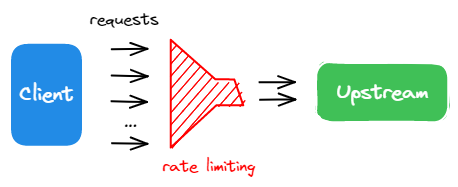
APISIX offers a number of rate limiting plugins that can be easily configured to meet your requirements:
* [`limit-count`](https://docs.api7.ai/hub/limit-count.md) limits requests by the number of requests within a given time interval.
* [`limit-req`](https://docs.api7.ai/hub/limit-req.md) limits requests by the number of requests within a given time interval and a set capacity.
* [`limit-conn`](https://docs.api7.ai/hub/limit-conn.md) limits requests by the number of concurrent connections.
* [`graphql-limit-count`](https://docs.api7.ai/hub/graphql-limit-count.md) limits requests by the depth of GraphQL operations or mutations within a given time interval.
This guide will show you how to implement different rate limiting quotas for consumers in different API pricing plans, as **illustrated** in the [Consumer Groups](https://docs.api7.ai/apisix/key-concepts/consumer-groups.md). You can substitute the `limit-count` plugin used in this guide with other available rate limiting plugins to customize for your needs.
`limit-count` can also share counters through Redis Sentinel, smooth bursts with a sliding window, and delay Redis synchronization on high-throughput routes. Those backends and window options are documented with examples in the [`limit-count` plugin](https://docs.api7.ai/hub/limit-count.md).
## Prerequisite(s)[](#prerequisites "Direct link to Prerequisite(s)")
* Install [Docker](https://docs.docker.com/get-docker).
* Install [cURL](https://curl.se/) to send requests to the services for validation.
* Follow the [Getting Started tutorial](https://docs.api7.ai/apisix/getting-started.md) to start a new APISIX instance in Docker.
* If you use the Admin API examples and authentication is enabled, export an admin-role key as `ADMIN_API_KEY`. Configure the key under `deployment.admin.admin_key`. The Docker quickstart disables authentication for local evaluation; keep it enabled in production.
## Create Consumer Groups[](#create-consumer-groups "Direct link to Create Consumer Groups")
Create a consumer group for the basic plan with a lower API quota:
```
curl "http://127.0.0.1:9180/apisix/admin/consumer_groups" -X PUT \
-H "X-API-KEY: ${ADMIN_API_KEY}" \
-d '{
"id": "basic_plan",
"plugins": {
"limit-count": {
"key": "consumer_name",
"count": 2,
"time_window": 30,
"rejected_code": 429
}
}
}'
```
❶ `count`, `time_window`: allow for 2 requests in a 30-second time interval.
❷ `rejected_code`: returns `HTTP 429 Too Many Requests` response if requests exceed the quota.
Similarly, create a consumer group for the premium plan with a higher API quota:
```
curl "http://127.0.0.1:9180/apisix/admin/consumer_groups" -X PUT \
-H "X-API-KEY: ${ADMIN_API_KEY}" \
-d '{
"id": "premium_plan",
"plugins": {
"limit-count": {
"key": "consumer_name",
"count": 20,
"time_window": 30,
"rejected_code": 429
}
}
}'
```
Setting `key` to `consumer_name` creates a separate counter for each authenticated consumer. If you omit `key`, `limit-count` uses `remote_addr`, so consumers in the same group and connecting from the same client address share a counter.
## Create Consumers[](#create-consumers "Direct link to Create Consumers")
Create a consumer `JohnDoe` within the basic plan:
```
curl "http://127.0.0.1:9180/apisix/admin/consumers" -X PUT \
-H "X-API-KEY: ${ADMIN_API_KEY}" \
-d '{
"username": "JohnDoe",
"group_id": "basic_plan",
"plugins": {
"key-auth": {
"key": "john-key"
}
}
}'
```
Create a second consumer `JaneDoe` within the basic plan:
```
curl "http://127.0.0.1:9180/apisix/admin/consumers" -X PUT \
-H "X-API-KEY: ${ADMIN_API_KEY}" \
-d '{
"username": "JaneDoe",
"group_id": "basic_plan",
"plugins": {
"key-auth": {
"key": "jane-key"
}
}
}'
```
Create a consumer `FetchBot` within the premium plan:
```
curl "http://127.0.0.1:9180/apisix/admin/consumers" -X PUT \
-H "X-API-KEY: ${ADMIN_API_KEY}" \
-d '{
"username": "FetchBot",
"group_id": "premium_plan",
"plugins": {
"key-auth": {
"key": "bot-key"
}
}
}'
```
## Create a Route[](#create-a-route "Direct link to Create a Route")
Create a route with key authentication enabled:
```
curl "http://127.0.0.1:9180/apisix/admin/routes" -X PUT \
-H "X-API-KEY: ${ADMIN_API_KEY}" \
-d '{
"id": "rate-limiting",
"uri": "/internal",
"plugins": {
"key-auth": {}
},
"upstream" : {
"nodes": {
"mock.api7.ai:443": 1
},
"pass_host": "node",
"scheme": "https"
}
}'
```
## Verify Rate Limiting[](#verify-rate-limiting "Direct link to Verify Rate Limiting")
### Verify Quota of Basic Plan[](#verify-quota-of-basic-plan "Direct link to Verify Quota of Basic Plan")
Send 10 concurrent requests to the route as the consumer `JohnDoe`:
```
resp=$(seq 10 | xargs -P 10 -I{} curl "http://127.0.0.1:9080/internal" -H 'apikey: john-key' -o /dev/null -s -w "%{http_code}\n") && \
count_200=$(echo "$resp" | grep "200" | wc -l) && \
count_429=$(echo "$resp" | grep "429" | wc -l) && \
echo "200": $count_200, "429": $count_429
```
You should see the following response:
```
200: 2, 429: 8
```
Send 10 concurrent requests with `JaneDoe`'s key to verify that each consumer has a separate counter:
```
resp=$(seq 10 | xargs -P 10 -I{} curl "http://127.0.0.1:9080/internal" -H 'apikey: jane-key' -o /dev/null -s -w "%{http_code}\n") && \
count_200=$(echo "$resp" | grep "200" | wc -l) && \
count_429=$(echo "$resp" | grep "429" | wc -l) && \
echo "200": $count_200, "429": $count_429
```
You should see the same result for `JaneDoe`:
```
200: 2, 429: 8
```
This verifies that the basic-plan quota is applied separately to each consumer.
### Verify Quota of Premium Plan[](#verify-quota-of-premium-plan "Direct link to Verify Quota of Premium Plan")
Send 30 concurrent requests to the route as the consumer `FetchBot`:
```
resp=$(seq 30 | xargs -P 30 -I{} curl "http://127.0.0.1:9080/internal" -H 'apikey: bot-key' -o /dev/null -s -w "%{http_code}\n") && \
count_200=$(echo "$resp" | grep "200" | wc -l) && \
count_429=$(echo "$resp" | grep "429" | wc -l) && \
echo "200": $count_200, "429": $count_429
```
You should see the following response:
```
200: 20, 429: 10
```
This verifies that the rate limiting quota for the premium plan is in effect.
## Next Steps[](#next-steps "Direct link to Next Steps")
You have now learned about the rate limiting plugins available in APISIX and how to implement different rate limiting quotas for consumers in different consumer groups.
Explore the plugin reference to learn more about how to implement rate limiting for your use cases.