Install API7 Ingress Controller on OpenShift
This guide walks you through how to deploy API7 Ingress Controller on an OpenShift cluster.
Prerequisites
Follow the prerequisites and installation steps in Install API7 Enterprise on OpenShift, except for the Generate and Run Deployment Script (for API7 Gateway) step.
Install API7 Ingress Controller
If you would like to use a different namespace or customize other configuration names, adjust the installation commands and configuration values accordingly.
Generate and Run Deployment Script
Navigate to the Dashboard:
-
Select Gateway Groups from the side navigation bar and then click Add Gateway Group.
-
Select Ingress Controller as Type.
-
Enter
api7-ingressin the Name field. -
Click Add.
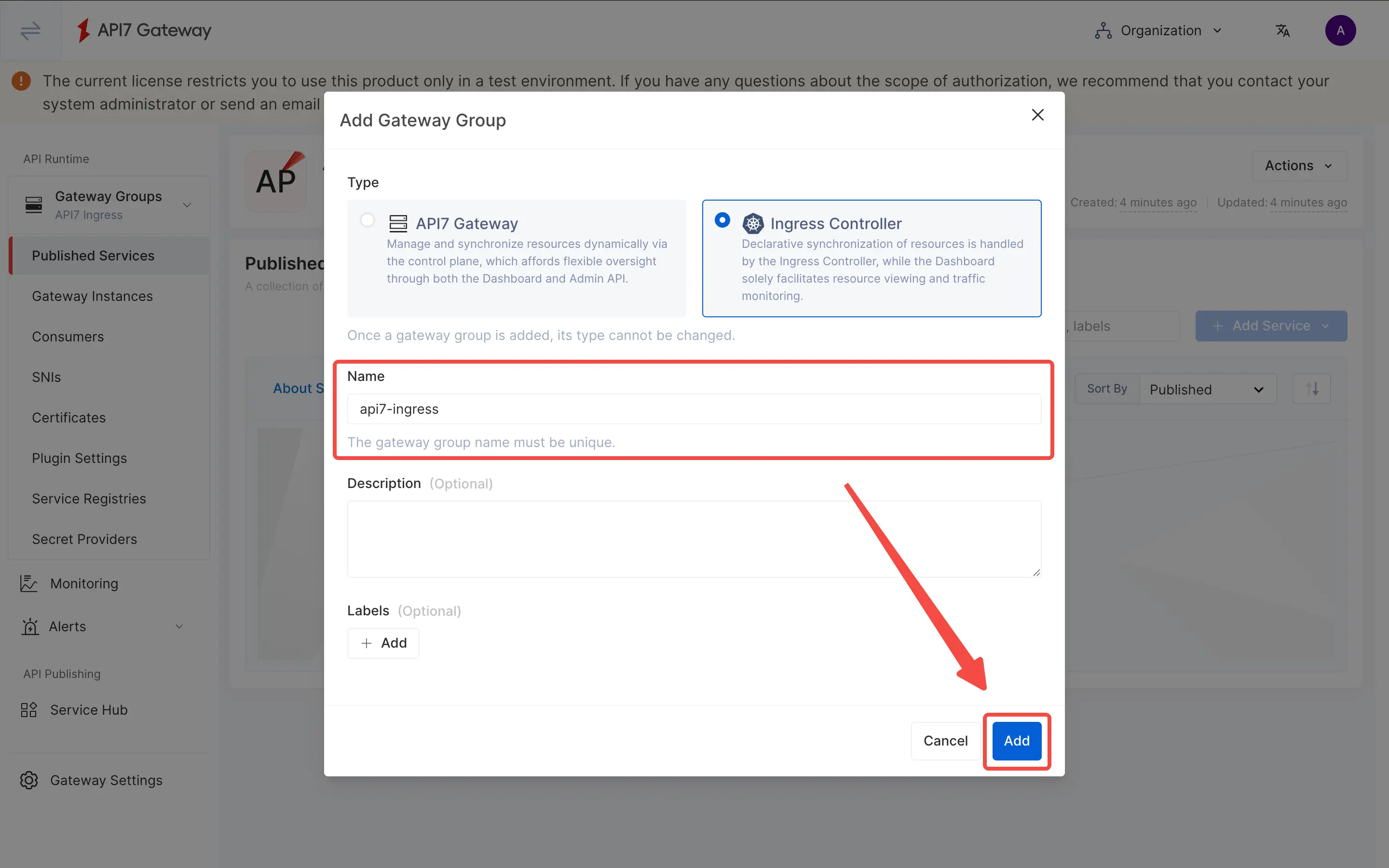
The gateway group should be created, and you will be prompted to install the ingress controller and deploy the GatewayProxy configuration in the Deployment Steps panel.
Enter the namespace and the name of the Ingress Controller.
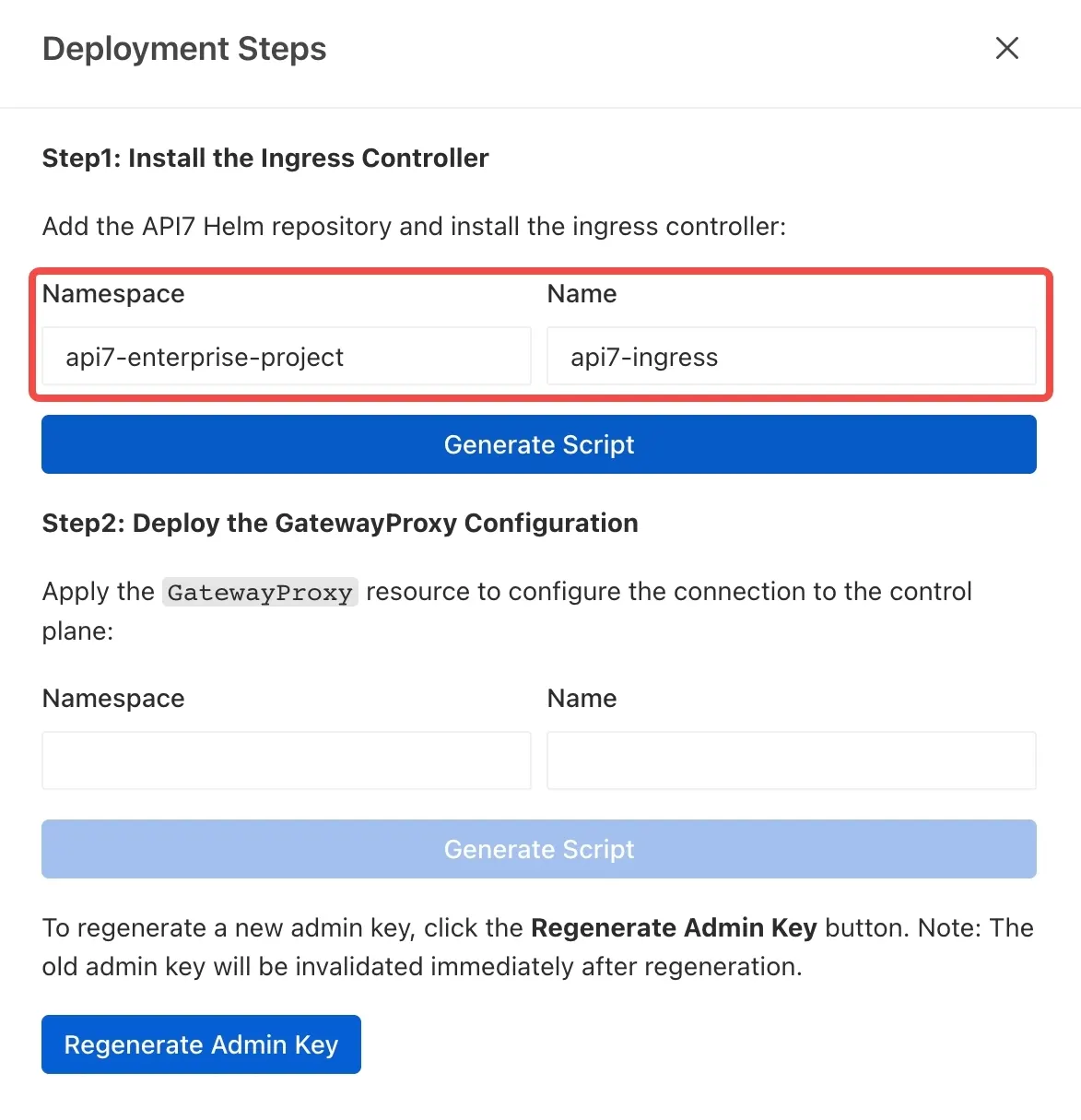
Then click Generate Script.
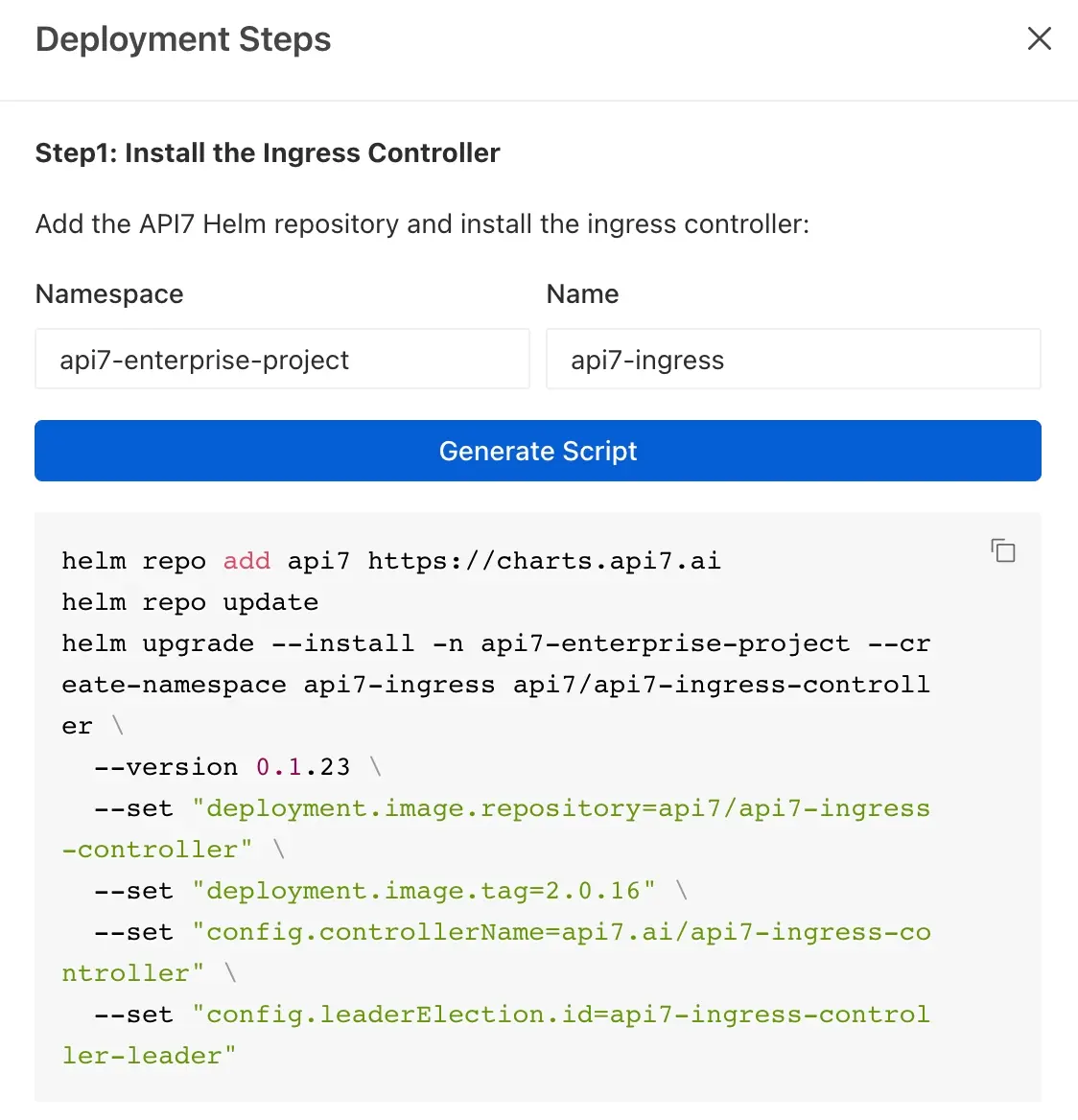
Manually append the highlighted flags at the end of the command. Ensure the previous line ends with a trailing backslash (\). The command should be similar to the following:
helm repo add api7 https://charts.api7.ai
helm repo update
helm upgrade --install -n api7-enterprise-project --create-namespace api7-ingress api7/api7-ingress-controller \
  --version 0.1.23 \
  --set "deployment.image.repository=api7/api7-ingress-controller" \
  --set "deployment.image.tag=2.0.16" \
  --set "config.controllerName=api7.ai/api7-ingress-controller" \
  --set "config.leaderElection.id=api7-ingress-controller-leader" \
  --set "adc.securityContext.runAsUser=65532" \
  --skip-crds
❶ --set "adc.securityContext.runAsUser=65532": Run the API7 Ingress Controller as a non-root user (UID 65532) to comply with OpenShift's security policies.
❷ --skip-crds: Skips installing CRDs through Helm because OpenShift restricts CRD management. Gateway API CRDs are already present, and APISIX CRDs must be installed manually afterward.
If you plan to use Gateway API to create resources, use Helm chart version 0.1.23 or later. Earlier chart versions do not correctly install Gateway API resources in an OpenShift environment.
Run it in the terminal. If deployed successfully, you should see a response similar to the following:
NAME: api7-ingress
LAST DEPLOYED: Mon Feb 2 15:12:59 2026
NAMESPACE: api7-enterprise-project
STATUS: deployed
REVISION: 1
TEST SUITE: None
Configure SCC for API7 Ingress Controller
Create a service account named api7-ingress, which will be referenced in the Helm chart release name. The role must be assigned to the service account used by the Ingress Controller deployment.
oc create serviceaccount api7-ingress -n api7-enterprise-project
Create a role with nonroot-v2 SCC:
oc create role api7-ingress \
  --verb=use \
  --resource=scc \
  --resource-name=nonroot-v2 \
  -n api7-enterprise-project
Bind the role to the service account:
oc create rolebinding api7-ingress \
  --role=api7-ingress \
  --serviceaccount=api7-enterprise-project:api7-ingress \
  -n api7-enterprise-project
Install APISIX CRDs
In OpenShift, Gateway API CRDs are pre-installed and protected by the platform. Helm installations must use --skip-crds to avoid permission errors when attempting to install these protected CRDs. As a result, the APISIX CRDs are also skipped and need to be installed manually.
kubectl apply -f https://raw.githubusercontent.com/api7/api7-helm-chart/refs/heads/main/charts/ingress-controller/crds/apisix-crds.yaml
You should get the following responses.
customresourcedefinition.apiextensions.k8s.io/apisixconsumers.apisix.apache.org created
customresourcedefinition.apiextensions.k8s.io/apisixglobalrules.apisix.apache.org created
customresourcedefinition.apiextensions.k8s.io/apisixpluginconfigs.apisix.apache.org created
customresourcedefinition.apiextensions.k8s.io/apisixroutes.apisix.apache.org created
customresourcedefinition.apiextensions.k8s.io/apisixtlses.apisix.apache.org created
customresourcedefinition.apiextensions.k8s.io/apisixupstreams.apisix.apache.org created
customresourcedefinition.apiextensions.k8s.io/backendtrafficpolicies.apisix.apache.org created
customresourcedefinition.apiextensions.k8s.io/consumers.apisix.apache.org created
customresourcedefinition.apiextensions.k8s.io/gatewayproxies.apisix.apache.org created
customresourcedefinition.apiextensions.k8s.io/httproutepolicies.apisix.apache.org created
customresourcedefinition.apiextensions.k8s.io/pluginconfigs.apisix.apache.org created
Deploy the GatewayProxy Configuration
- Enter
api7-enterprise-projectin the Namespace field. - Enter
api7-ingressin the Name field. - Click Generate Script.
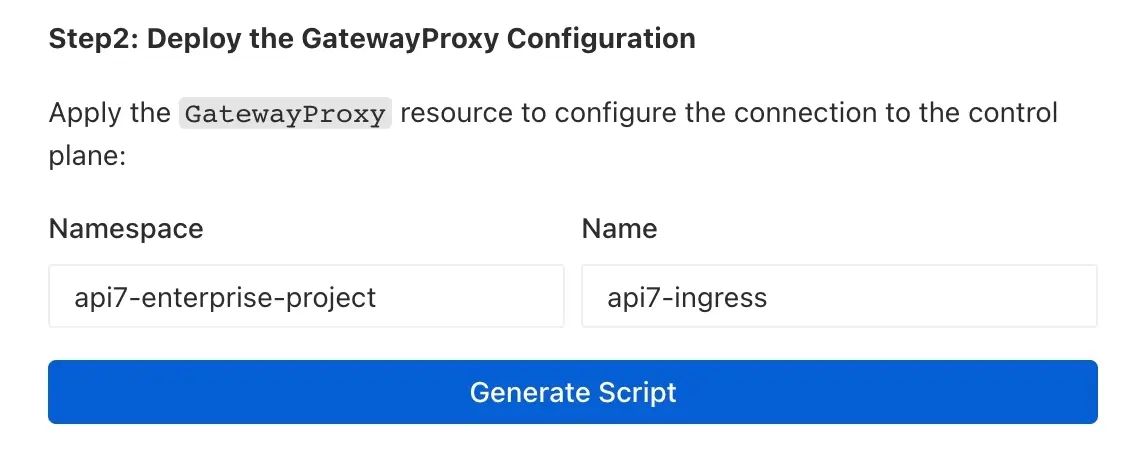
If you have not configured the Admin API Address, you will be prompted to add it first.
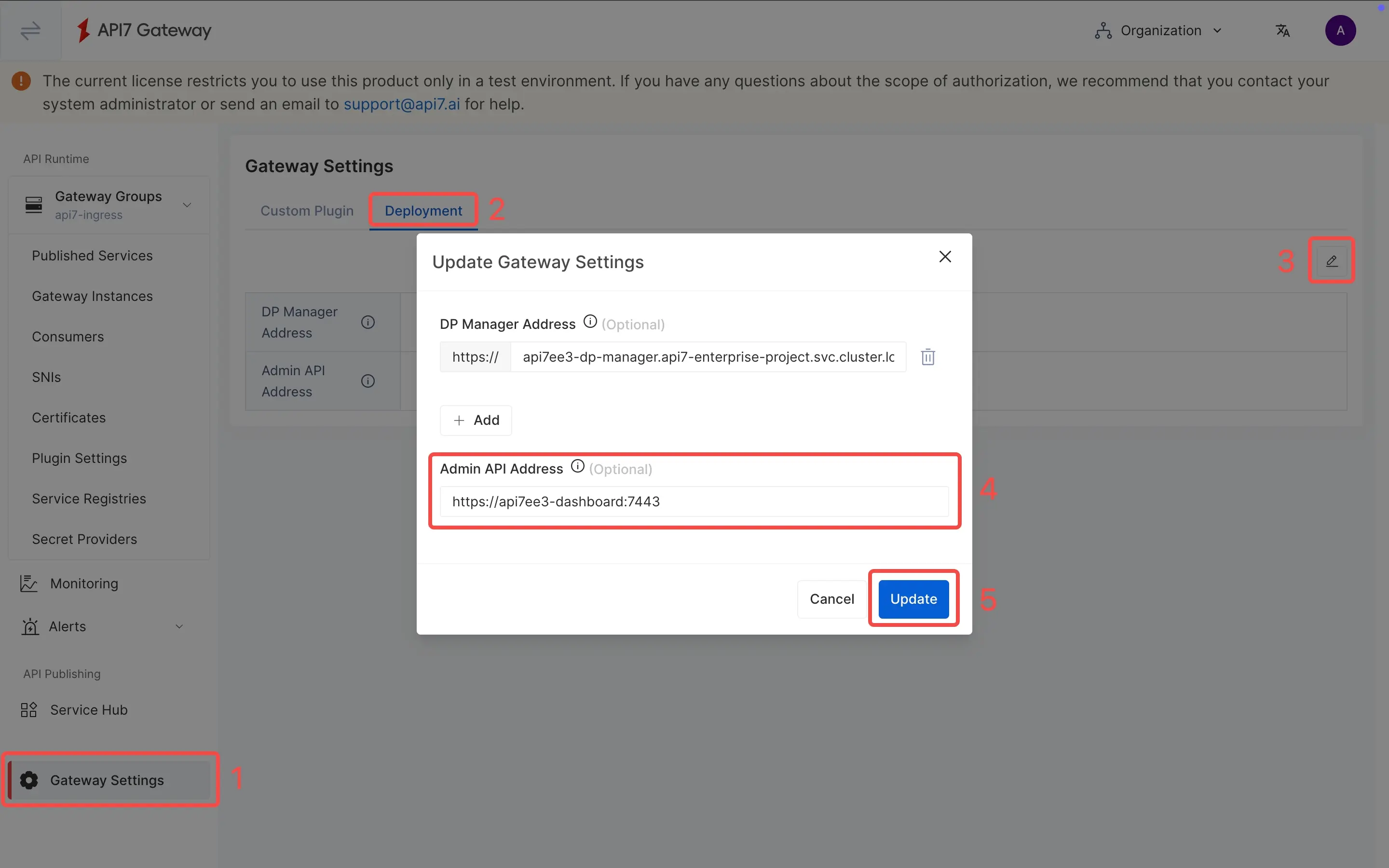
- Select Ingress or Gateway API tab.
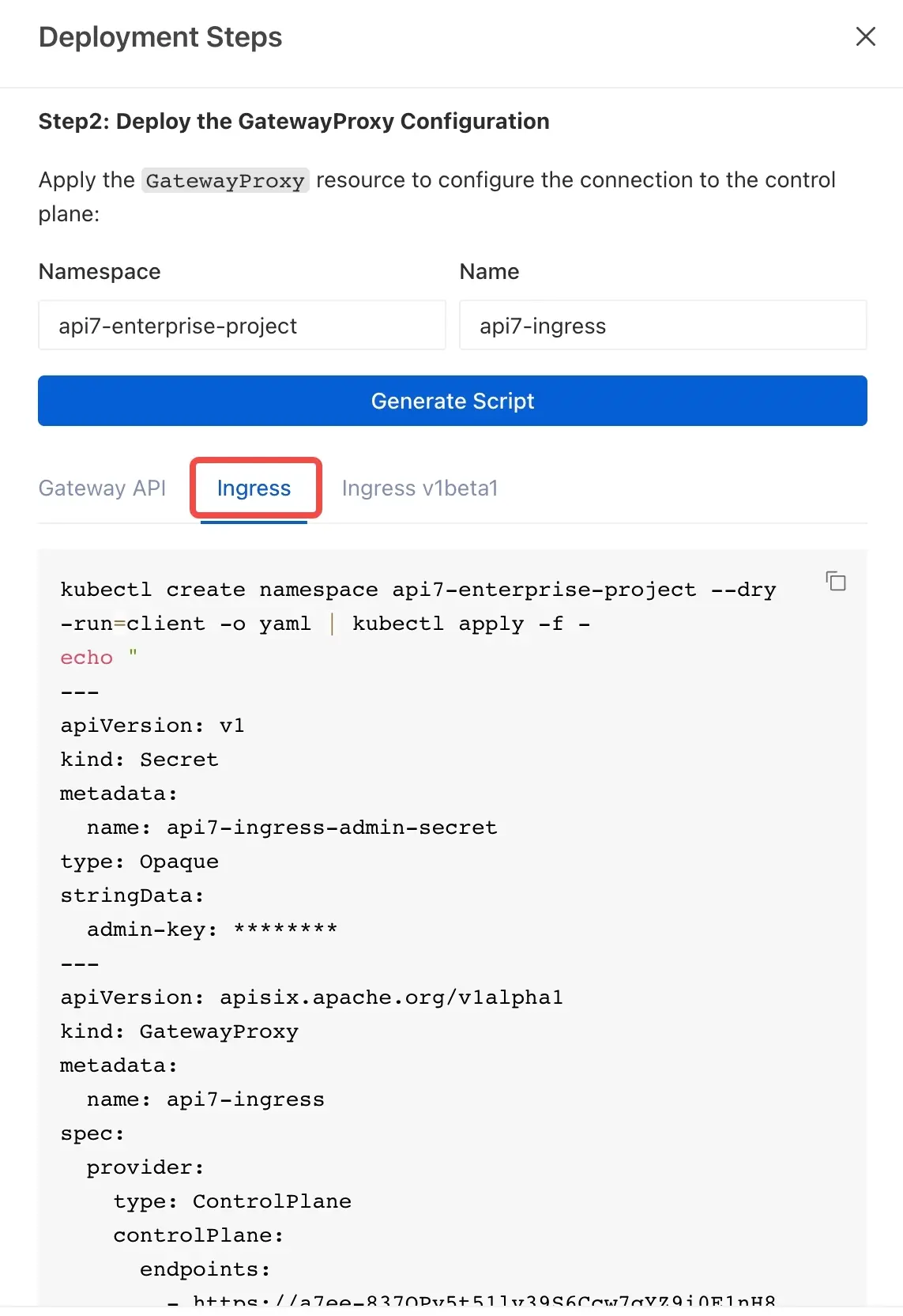
- Copy the generated script and run it in the terminal.
You should get the following responses.
namespace/api7-enterprise-project configured
secret/api7-ingress-admin-secret configured
gatewayclass.gateway.networking.k8s.io/api7-ingress created
gatewayproxy.apisix.apache.org/api7-ingress created
ingressclass.networking.k8s.io/api7-ingress created
Create a Gateway Instance
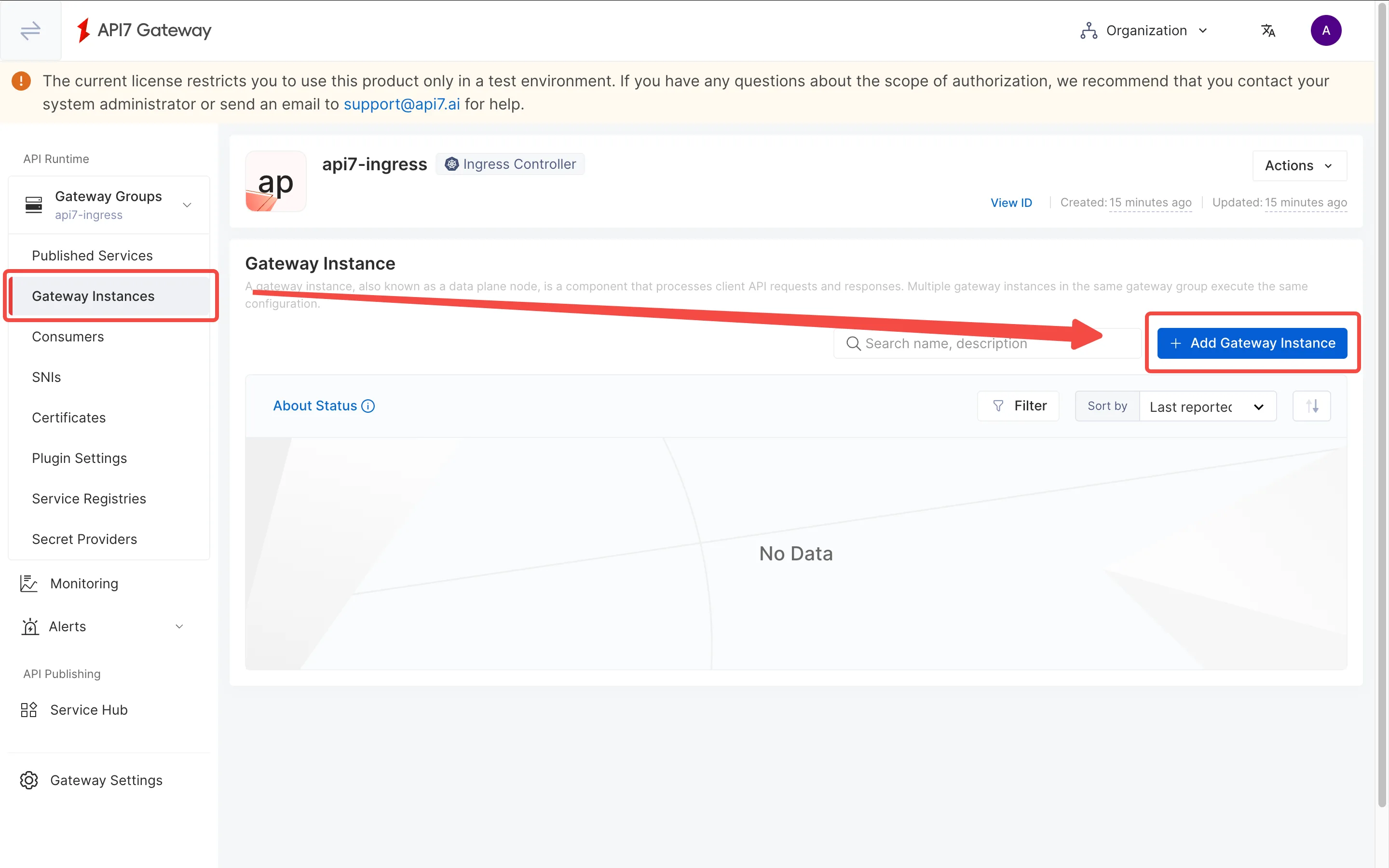
Go to the Gateway Instances page and add a gateway instance.
Switch to the Kubernetes tab and fill out the parameters. Once finished, click Generate to see the deployment script.
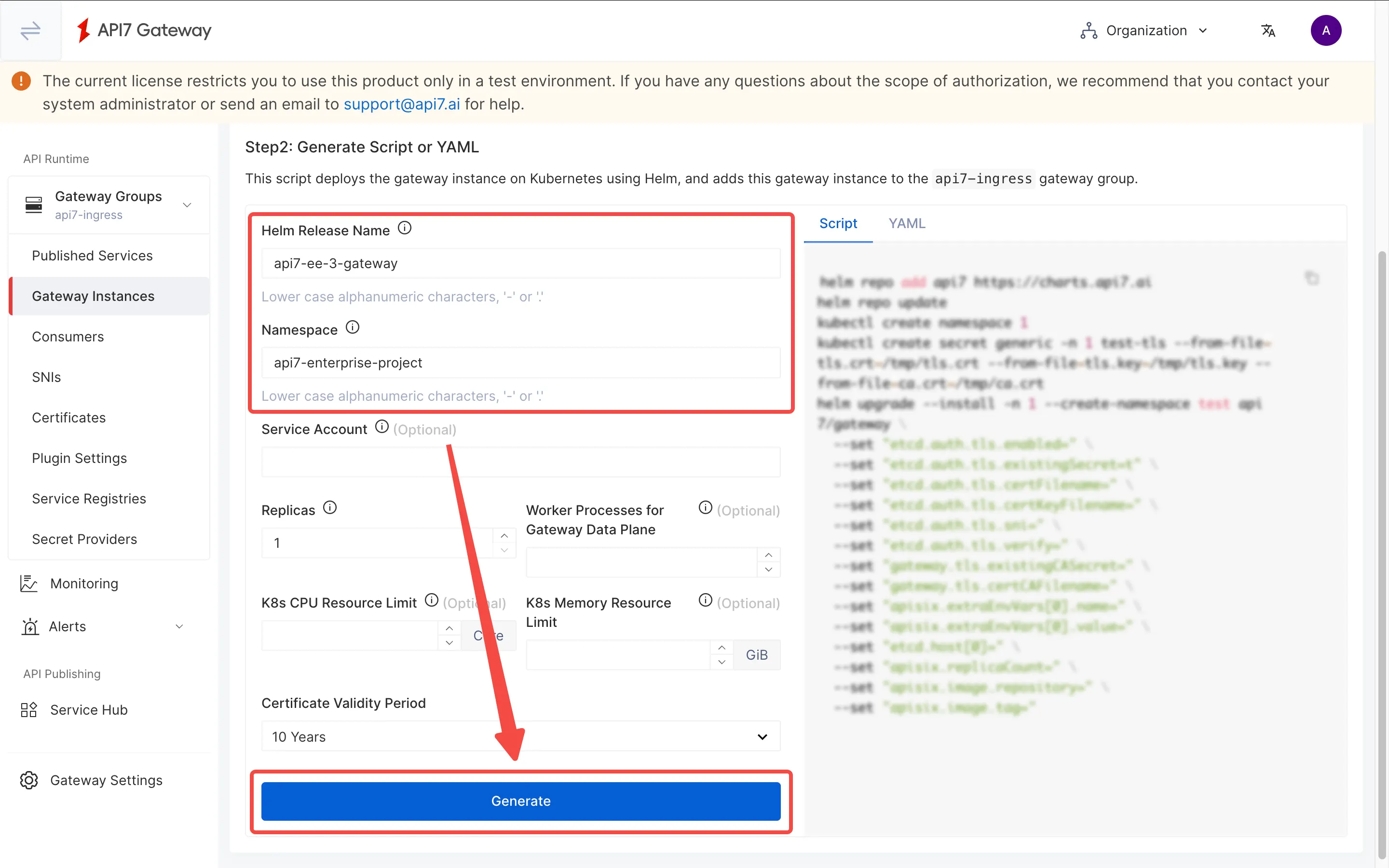
The generated script closes without a backslash (\). Ensure the apisix.image.tag line ends with \ and that the additional securityContext settings are appended to the end of the Helm command as such:
helm repo add api7 https://charts.api7.ai
helm repo update
cat > /tmp/tls.crt <<EOF
-----BEGIN CERTIFICATE-----
MIIBhjCCATigAwIBAgICBAAwBQYDK2VwMEQxCzAJBgNVBAYTAlVTMRMwEQYDVQQI
EwpDYWxpZm9ybmlhMQ0wCwYDVQQKEwRBUEk3MREwDwYDVQQDEwhBUEk3IEluYzAe
Fw0yNTEyMzEwNzQ3MzZaFw0zNjAxMjgwNzQ3MzZaMC4xDTALBgNVBAoTBEFQSTcx
HTAbBgNVBAMTFEdBVEVXQVktQ0EtVkVSU0lPTi0xMCowBQYDK2VwAyEA0WOxi3H/
gxsh/kNEg8L9cLrfZmRqE5lB4fW0DVObre2jZDBiMA4GA1UdDwEB/wQEAwIHgDAT
BgNVHSUEDDAKBggrBgEFBQcDAjAtBgNVHQ4EJgQkYWZjNmQ0ODctMmVmZC00MjZh
LWJiNDktMTA2ZWQ2NDIyOWFkMAwGA1UdIwQFMAOAATEwBQYDK2VwA0EAJJh+f8Sv
4OWo41Um3NOpvB30tjWQEsUXpDKyh9Kh8b7ymcDVQ0Hn1J9jFyI5Y/yFT8ZSz7ek
1GGpngVMsWTiDg==
-----END CERTIFICATE-----
EOF
cat > /tmp/tls.key <<EOF
-----BEGIN PRIVATE KEY-----
MC4CAQAwBQYDK2VwBCIEIFXsXU+dBdP8lkheZH/6SMy7ZnMionHN/xRDHBjOMAvP
-----END PRIVATE KEY-----
EOF
cat > /tmp/ca.crt <<EOF
-----BEGIN CERTIFICATE-----
MIIBeDCCASqgAwIBAgIRAP4AwnUs3br0nZ7V03gyt84wBQYDK2VwMEQxCzAJBgNV
BAYTAlVTMRMwEQYDVQQIEwpDYWxpZm9ybmlhMQ0wCwYDVQQKEwRBUEk3MREwDwYD
VQQDEwhBUEk3IEluYzAgFw0yNTEyMzEwNjU1NDlaGA8yMDg2MDExNTA2NTU0OVow
RDELMAkGA1UEBhMCVVMxEzARBgNVBAgTCkNhbGlmb3JuaWExDTALBgNVBAoTBEFQ
STcxETAPBgNVBAMTCEFQSTcgSW5jMCowBQYDK2VwAyEAHTkeAU7NKliDJFd5UN9b
xYIMgAz4RG3QUwEBXl2NwdCjLzAtMA4GA1UdDwEB/wQEAwIChDAPBgNVHRMBAf8E
BTADAQH/MAoGA1UdDgQDBAExMAUGAytlcANBABrSW1mdva+TFJNiOpyblbz5vSJY
Jk9HSb3vHYfa3dncCz2A5m5sOs1VNFq3QQqPVaI41dx0FvIrp89gVsFVMAk=
-----END CERTIFICATE-----
EOF
kubectl create namespace api7-enterprise-project --dry-run=client -o yaml | kubectl apply -f -
kubectl create secret generic -n api7-enterprise-project api7-ee-3-gateway-tls --from-file=tls.crt=/tmp/tls.crt --from-file=tls.key=/tmp/tls.key --from-file=ca.crt=/tmp/ca.crt
helm upgrade --install -n api7-enterprise-project --create-namespace api7-ee-3-gateway api7/gateway \
  --set "etcd.auth.tls.enabled=true" \
  --set "etcd.auth.tls.existingSecret=api7-ee-3-gateway-tls" \
  --set "etcd.auth.tls.certFilename=tls.crt" \
  --set "etcd.auth.tls.certKeyFilename=tls.key" \
  --set "etcd.auth.tls.verify=true" \
  --set "gateway.tls.existingCASecret=api7-ee-3-gateway-tls" \
  --set "gateway.tls.certCAFilename=ca.crt" \
  --set "apisix.extraEnvVars[0].name=API7_GATEWAY_GROUP_SHORT_ID" \
  --set "apisix.extraEnvVars[0].value=eybqbncmefrqq" \
  --set "etcd.host[0]=https://api7ee3-dp-manager.api7-enterprise-project.svc.cluster.local:7943" \
  --set "apisix.replicaCount=1" \
  --set "apisix.image.repository=api7/api7-ee-3-gateway" \
  --set "apisix.image.tag=3.9.3" \
  --set "apisix.securityContext.runAsNonRoot=true" \
  --set "apisix.securityContext.runAsUser=636"
❶ --set "apisix.securityContext.runAsNonRoot=true": Ensures the APISIX pod runs as a non-root user for OpenShift security compliance.
❷ --set "apisix.securityContext.runAsUser=636": Specifies the UID (636) for the APISIX pod process, matching OpenShift SCC requirements.
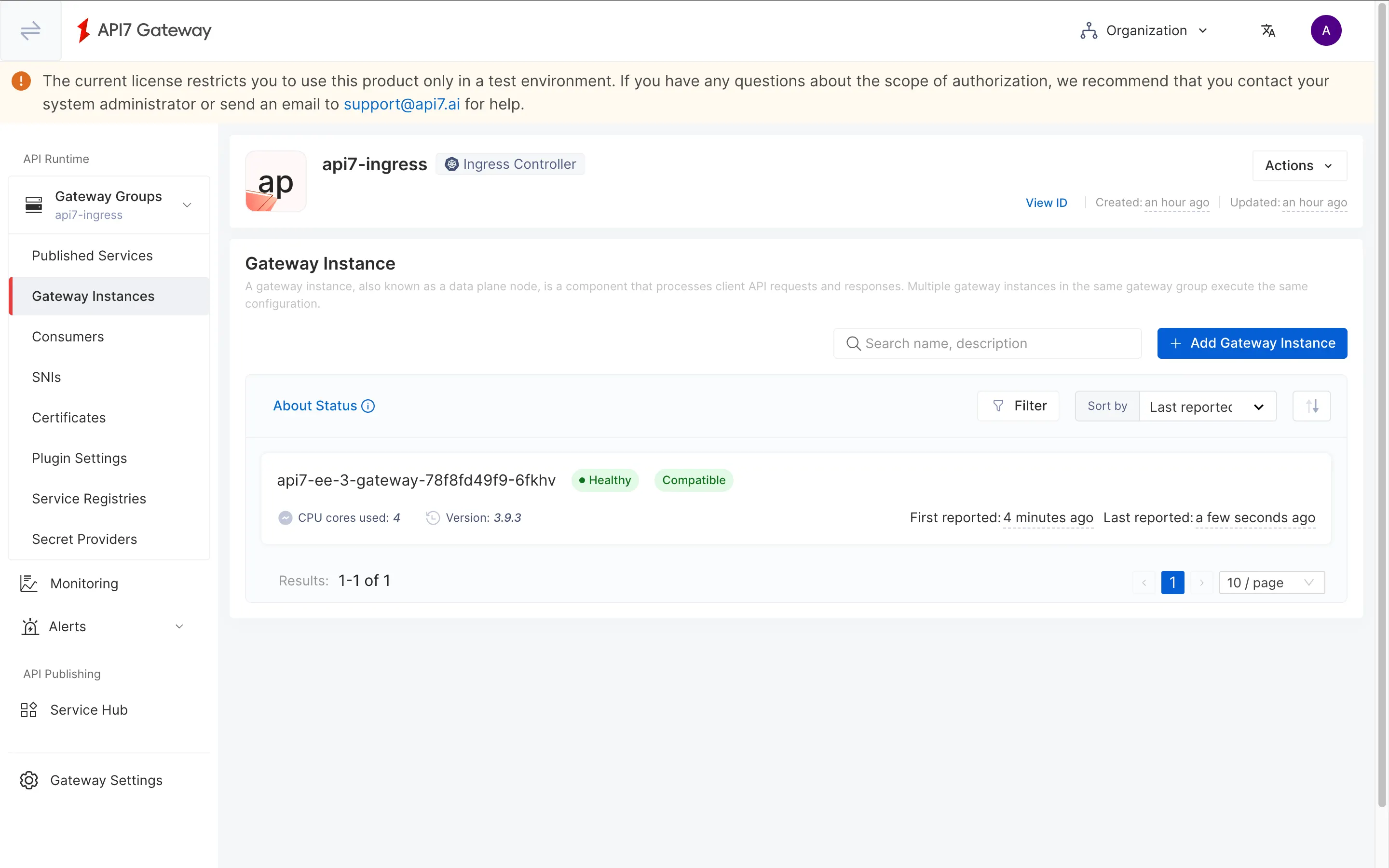
Navigating back to the gateway instance, you should see a healthy gateway instance.
Verify
Check all pod statuses:
kubectl get pods -n api7-enterprise-project
Ensure the Ingress Controller and Gateway pods are in Running status:
NAME                                                    READY   STATUS    RESTARTS         AGE
api7-ee-3-gateway-78f8fd49f9-6fkhv                      1/1     Running   0                4m44s
api7-ingress-api7-ingress-controller-568867b656-v8ftd   2/2     Running   0                65m
api7-postgresql-0                                       1/1     Running   0                91m
api7-prometheus-server-5c9b5c98ff-mf2gl                 1/1     Running   0                91m
api7ee3-dashboard-df48f5f59-x5zkt                       1/1     Running   0                91m
api7ee3-developer-portal-7fbd8fdc54-jvnvc               1/1     Running   0                91m
api7ee3-dp-manager-7b449767dc-dxfrr                     1/1     Running   0                91m
List all Services:
kubectl get svc -n api7-enterprise-project
You should see a gateway service available:
NAME                                               TYPE        CLUSTER-IP       EXTERNAL-IP   PORT(S)                      AGE
api7-ee-3-gateway-gateway                          NodePort    172.30.128.146   <none>        80:31474/TCP,443:30130/TCP   32m
api7-ingress-api7-ingress-controller-webhook-svc   ClusterIP   172.30.63.42     <none>        443/TCP                      67m
api7-ingress-metrics-service                       ClusterIP   172.30.133.232   <none>        8443/TCP                     67m
api7-postgresql                                    ClusterIP   172.30.123.46    <none>        5432/TCP                     92m
api7-postgresql-hl                                 ClusterIP   None             <none>        5432/TCP                     92m
api7-prometheus-server                             ClusterIP   172.30.10.79     <none>        9090/TCP                     92m
api7ee3-dashboard                                  ClusterIP   172.30.84.136    <none>        7080/TCP,7443/TCP            92m
api7ee3-developer-portal                           ClusterIP   172.30.42.148    <none>        4321/TCP                     92m
api7ee3-dp-manager                                 ClusterIP   172.30.153.144   <none>        7900/TCP,7943/TCP            92m
What's Next
Learn how to route traffic to your services by reading Proxy Requests to a Service.