
Provider Keys
A provider key stores the credential and connection settings AISIX uses to call a provider. Multiple model aliases can share one provider key. Applications authenticate to AISIX with caller API keys, which keeps upstream credentials out of application code.
Prerequisites
- Obtain a credential from your upstream provider.
- In AISIX Enterprise or AISIX Cloud, obtain permission to create organization provider keys and access to the environment where the model will run. For an Enterprise installation, follow Get Started with AISIX Enterprise. To request AISIX Cloud access, contact API7.
- In AISIX OSS, prepare a gateway that loads
resources.yaml. The AISIX OSS quickstart covers validation and reload.
Create a Provider Key
Create an OpenAI provider key named openai-prod, confirm that AISIX saved it, then use it in a model request.
- AISIX Enterprise or Cloud
- AISIX OSS
- Dashboard
- Admin API
The provider key belongs to the organization. Grant access to the environments whose models will use it.
-
Under Organization, open Provider keys, then select New provider key.
-
Enter
openai-prodin Display name and select OpenAI in Provider. Enter the provider credential in Upstream API key. -
Under Allowed environments, select each environment where models will use the key. This example selects
prod.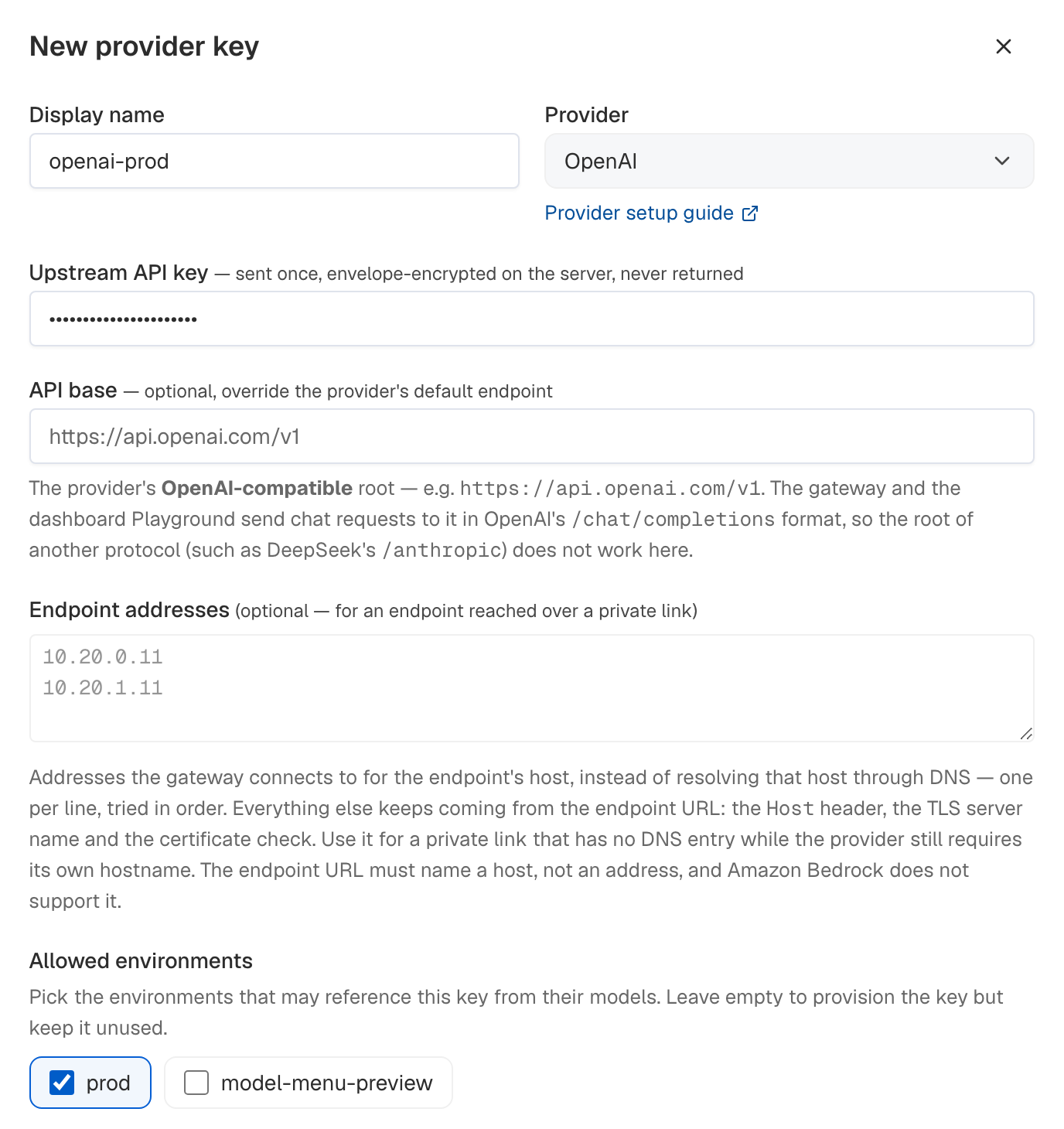
-
Select Create provider key. Verify the display name, provider, and allowed environments in the list.

The provider key belongs to the organization. Grant access to the environments whose models will use it.
Export the control-plane URL, an admin token with write scope, and the target environment ID:
# AISIX_CP is the Admin API base URL; include /api and omit a trailing slash.
# The local AISIX Enterprise quickstart uses http://localhost:8080/api.
export AISIX_CP="YOUR_AISIX_CONTROL_PLANE_API_URL"
export AISIX_TOKEN="YOUR_ADMIN_TOKEN"
export ENV_ID="YOUR_ENVIRONMENT_ID"
Create the OpenAI provider key:
# Replace with your value
export OPENAI_API_KEY="YOUR_OPENAI_API_KEY"

curl -sS -X POST "$AISIX_CP/provider_keys" \
  -H "Authorization: Bearer $AISIX_TOKEN" \
  -H "Content-Type: application/json" \
  -d '{
    "display_name": "openai-prod",
    "provider": "openai",
    "api_key": "'"${OPENAI_API_KEY}"'",
    "api_base": "https://api.openai.com/v1",
    "allowed_environments": ["'"${ENV_ID}"'"]
  }'
❶ Allow models in the selected environment to use this key.
Save provider_key.id from the response. Use it as provider_key_id when you configure a direct model.
export PROVIDER_KEY_ID="YOUR_PROVIDER_KEY_ID"
The creation response omits the base URL. Retrieve the provider key to inspect its saved URL:
curl -sS "$AISIX_CP/provider_keys/$PROVIDER_KEY_ID" \
  -H "Authorization: Bearer $AISIX_TOKEN"
Use an environment variable for the credential and reference it in the provider_keys collection.
export OPENAI_API_KEY="YOUR_OPENAI_API_KEY"
Add the OpenAI key to the complete resources file:
provider_keys:
  - id: 83eba07c-0ad3-4b81-b760-247f2d978e95
    display_name: openai-prod
    provider: openai
    adapter: openai
    api_key: ${OPENAI_API_KEY}
    api_base: https://api.openai.com/v1
Use the key entry's id, 83eba07c-0ad3-4b81-b760-247f2d978e95, as provider_key_id in your model configuration.
Validate the complete resources file. Then apply the configuration based on whether the credential is already available to the gateway process:
- If
OPENAI_API_KEYis already in the gateway process environment, reload the resources file. - If you added the variable after startup, recreate the gateway with
-e OPENAI_API_KEYto pass it to the process. See the AISIX OSS startup command.
Verify the Provider Key
-
Create a model that uses the provider key.
-
Create a caller API key with access to that model alias.
-
Export the plaintext caller key as
AISIX_API_KEY.export AISIX_API_KEY="YOUR_CALLER_API_KEY" -
Send a request with the caller key and confirm that the upstream returns a successful response.
The successful upstream response verifies that the provider credential, endpoint, model reference, and caller access work together. Repeat this request after changing the endpoint or configuring an override. To verify a reasoning override, send a streaming Chat Completions request and confirm that the response contains delta.reasoning_content.
Credential Handling
Assign an owner to each upstream credential, especially when several models share one key. An in-place rotation affects every model that uses the key.
- AISIX Enterprise and AISIX Cloud. AISIX encrypts the upstream credential before storing it. Read endpoints return the key's settings but omit the credential. They leave default request-header and body-field names visible and mask their values as
***. See Change the Configuration Later to edit masked values. Supply a non-empty credential when you replace it. - Bedrock and Vertex AI catalog keys. In AISIX Enterprise and AISIX Cloud, supply the credential fields in
configand omitapi_key. A Bedrock configuration can also select a Bedrock API key or the gateway's AWS credentials. See Choose a Credential Mode. - AISIX OSS. Store the credential in an environment variable and reference it in the resources file. For a structured credential, store the JSON string in the environment variable referenced by
api_key.
Set Provider and Adapter
The provider identifies the upstream. The adapter determines the API format AISIX uses to call it, such as OpenAI, Anthropic, or Bedrock.
- AISIX Enterprise or Cloud
- AISIX OSS
- Dashboard
- Admin API
For a known upstream, select its catalog provider. The catalog includes native integrations and community entries from models.dev. AISIX selects the adapter, including for providers with an OpenAI-compatible API such as DeepSeek.
For a private or custom upstream, select Bring your own upstream (private endpoint), choose the Protocol adapter that matches the upstream API, and enter its API base. To change the adapter later, create a replacement key and update the models and passthrough routes that reference the old key.
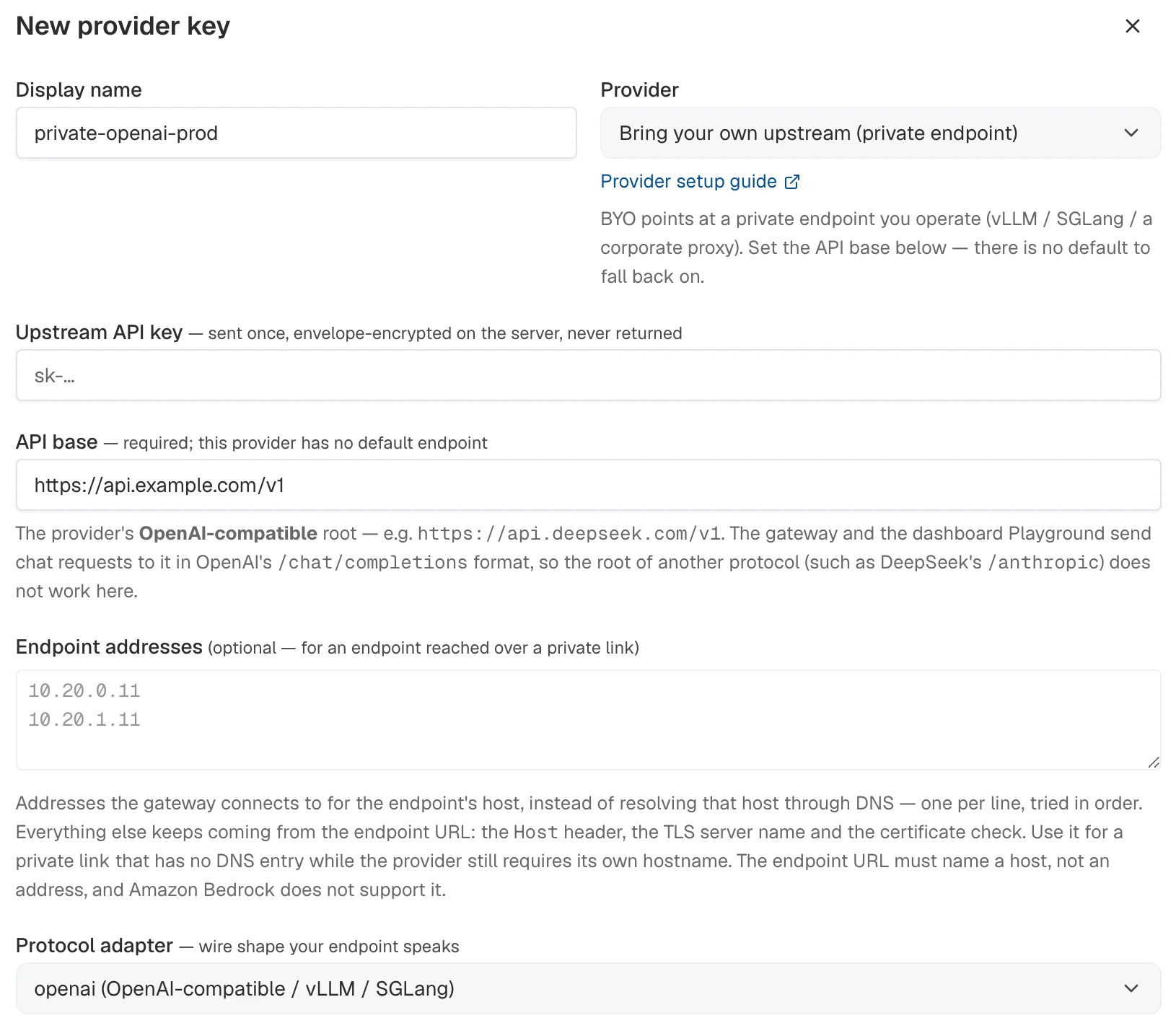
For a catalog key, set provider to the catalog ID and omit adapter. The API derives the adapter and returns HTTP 400 if you supply one. This example selects DeepSeek and keeps its base URL explicit:
{
  "provider": "deepseek",
  "api_base": "https://api.deepseek.com"
}
For a private or custom upstream, set provider to byo and supply both the adapter and base URL. This example uses an OpenAI-compatible endpoint:
{
  "provider": "byo",
  "adapter": "openai",
  "api_base": "https://api.example.com/v1"
}
To change the adapter later, create a replacement key and update the models and passthrough routes that reference the old key.
In the resources file, provider accepts any label. AISIX uses provider-specific behavior for a recognized vendor and otherwise uses the adapter you select. The adapter reference lists the supported protocol families.
To change the adapter, update the provider key entry, validate the complete resources file, and reload the configuration.
Configure the Base URL
The base URL is the default address for upstream requests. Use the URL shape the adapter expects. If the provider serves a second protocol at a separate path, configure a separate URL for that API surface.
When to Set a Base URL
AISIX Enterprise and AISIX Cloud use the catalog base URL when one is available. For AISIX OSS, check the provider setup guide for the URL the gateway can derive.
Set an explicit base URL in either of these cases.
- The catalog entry supplies a URL template. Examples include Databricks, Neon, Snowflake Cortex, Cloudflare Workers AI, and
infomaniak. - The key points to a private endpoint or an upstream proxy.
For a catalog entry with a URL template, the dashboard marks API base as required. The Admin API returns HTTP 400 if the create request omits the URL or an update clears it.
Use the upstream root. AISIX normalizes trailing slashes and common full endpoint paths.
- AISIX Enterprise or Cloud
- AISIX OSS
- Dashboard
- Admin API
In Provider keys, create or edit the key. Enter the upstream root in API base, then save.
Use the control-plane URL, write-scoped token, and provider key ID from Create a Provider Key:
curl -sS -X PATCH "$AISIX_CP/provider_keys/$PROVIDER_KEY_ID" \
  -H "Authorization: Bearer $AISIX_TOKEN" \
  -H "Content-Type: application/json" \
  -d '{
    "api_base": "https://openai-proxy.example.com/v1"
  }'
Set api_base on the existing provider key entry. Preserve its credential, provider, adapter, and any other settings. Validate the complete resources file, then reload it.
Common Base URLs
Use the base URL format for the selected adapter.
| Upstream API | Adapter | Base URL |
|---|---|---|
| OpenAI | openai | https://api.openai.com/v1 |
| DeepSeek | openai | https://api.deepseek.com |
| Gemini OpenAI-compatible API | openai | https://generativelanguage.googleapis.com/v1beta/openai |
| Anthropic | anthropic | https://api.anthropic.com |
| Azure OpenAI | azure-openai | https://<resource>.openai.azure.com |
| AWS Bedrock | bedrock | https://bedrock-runtime.<region>.amazonaws.com |
| Google Vertex AI | vertex | Regional: https://<region>-aiplatform.googleapis.com; global: https://aiplatform.googleapis.com; multi-region: https://aiplatform.us.rep.googleapis.com or https://aiplatform.eu.rep.googleapis.com |
For Bedrock, the control plane can derive the endpoint from the credential's region when you leave the base URL empty. In AISIX OSS, the AWS SDK derives the same endpoint. See AWS Bedrock.
Allow for DNS Refresh
Most upstream HTTP clients share a DNS cache. A successful lookup is cached for 30 seconds regardless of the record's TTL. A failed lookup is cached for one second.
These cache settings do not cover every transport:
- Bedrock and Realtime use separate clients.
- With a forward proxy, the proxy resolves the upstream hostname itself.
Pin the Endpoint Addresses
Use private DNS when you can publish a record for the provider's hostname. Otherwise, retain that hostname in the base URL and pin the private link's addresses on the provider key. See Protected Header Names for how AISIX handles the Host header.
- Enter IPv4 or IPv6 address literals without brackets or ports.
- List addresses in order of preference. If a connection attempt fails, AISIX can try another address. With both IPv4 and IPv6 entries, the client can try the alternate address family in parallel.
- Keep the scheme, hostname, and any custom port in the base URL. The hostname still identifies the upstream for TLS and certificate verification. The HTTP host or authority also retains any custom port.
- AISIX Enterprise or Cloud
- AISIX OSS
- Dashboard
- Admin API
In Provider keys, edit the key. Under Endpoint addresses, enter one address per line in order of preference, then save. To return to DNS resolution, clear the field and save again.
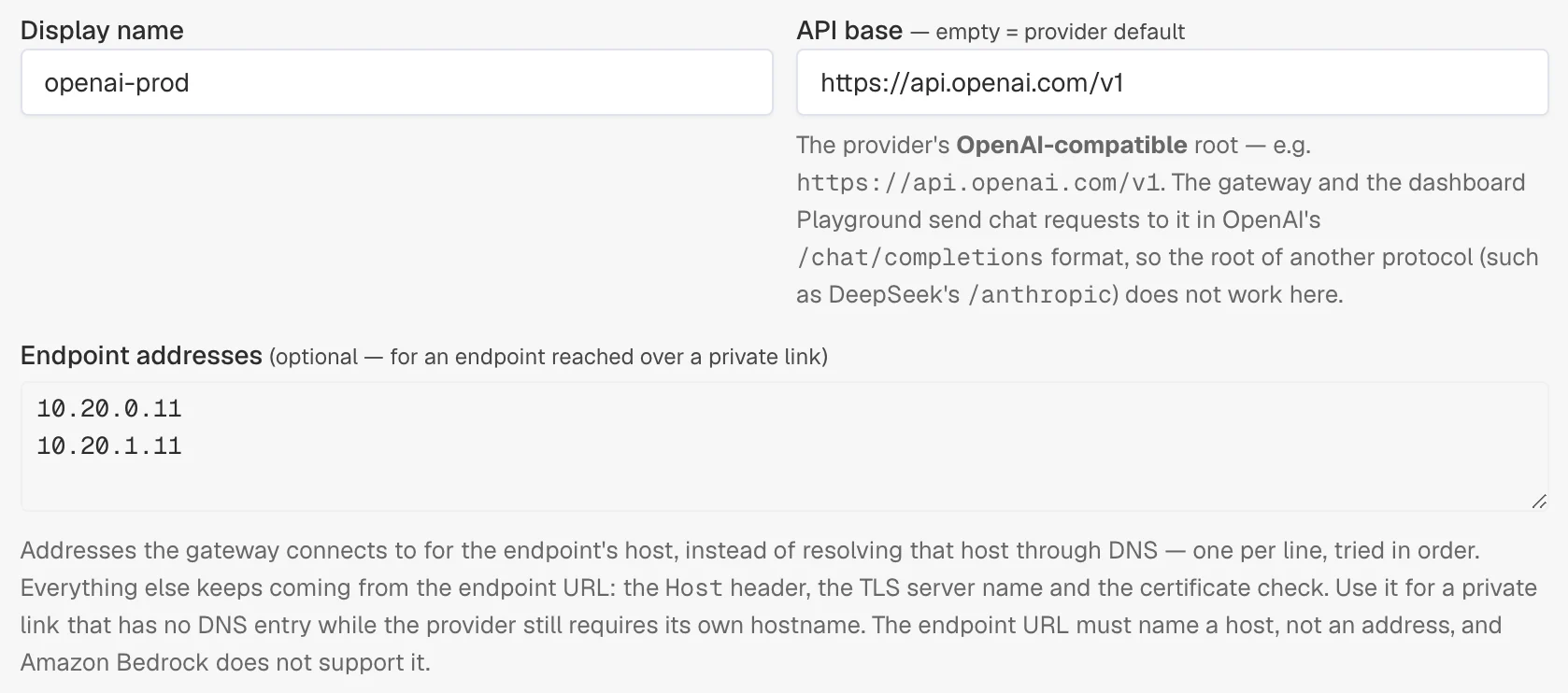
Use the control-plane URL, write-scoped token, and provider key ID from Create a Provider Key. Send the addresses as a list:
curl -sS -X PATCH "$AISIX_CP/provider_keys/$PROVIDER_KEY_ID" \
  -H "Authorization: Bearer $AISIX_TOKEN" \
  -H "Content-Type: application/json" \
  -d '{
    "api_base": "https://api.example-llm.com/v1",
    "resolve_addresses": ["10.20.0.11", "10.20.1.11"]
  }'
Send null to remove the override. The Admin API rejects an empty list.
Set resolve_addresses on the provider key in the resources file. The Resources File Reference lists the complete field catalog.
provider_keys:
  - id: ac2f104c-e1b6-4d0b-bb0b-05f3af97ce7c
    display_name: private-llm
    provider: byo
    adapter: openai
    api_key: ${PRIVATE_LLM_API_KEY}
    api_base: https://api.example-llm.com/v1
    resolve_addresses: ["10.20.0.11", "10.20.1.11"]
Validate and reload the complete resources file. To return to DNS resolution, remove resolve_addresses and reload again.
Understand the Scope
The pinned addresses apply to the hostname in the base URL. Other API surfaces on that hostname share the pinned addresses. An API surface on a different host uses normal DNS resolution.
| Case | Behavior |
|---|---|
| Base URL already contains an IP address | AISIX Enterprise and AISIX Cloud reject the combination because pinning requires a hostname. In AISIX OSS, the configuration loads, but the addresses have no hostname to replace and do not affect connections. |
| Bedrock provider key | AISIX Enterprise and AISIX Cloud reject the field. In AISIX OSS, the field has no effect because Bedrock uses the AWS transport, which also bypasses per-key TLS settings. |
| Realtime | A separate transport resolves the endpoint and uses deployment-wide TLS settings. |
| Forward proxy | The proxy resolves the upstream hostname. See Forward Proxy for IDE AI Traffic. |
Declare the API Surfaces
A provider can serve several APIs under one credential. A surface declaration tells AISIX which APIs the endpoint serves natively and which URLs to use. For example, forwarding to a native Anthropic Messages endpoint preserves features such as cache breakpoints and signed thinking.
Set the Surface URLs
Each surface uses the key's default base URL unless you supply a separate URL. The following example configures a DeepSeek key to serve Responses at its default URL and Messages at its Anthropic-compatible path.
- AISIX Enterprise or Cloud
- AISIX OSS
- Dashboard
- Admin API
-
In Provider keys, open the
deepseek-prodkey. If it does not exist, select New provider key, then enterdeepseek-prodas the Display name, select DeepSeek as the Provider, enter the upstream credential, set API base tohttps://api.deepseek.com, and select the allowed environments. -
Expand API surfaces. If Declare this endpoint's API surfaces is not already selected, select it.
-
Ensure Responses API (/v1/responses) is selected and leave its Base URL empty.
-
Ensure Anthropic Messages API (/v1/messages) is selected and set its Base URL to
https://api.deepseek.com/anthropic.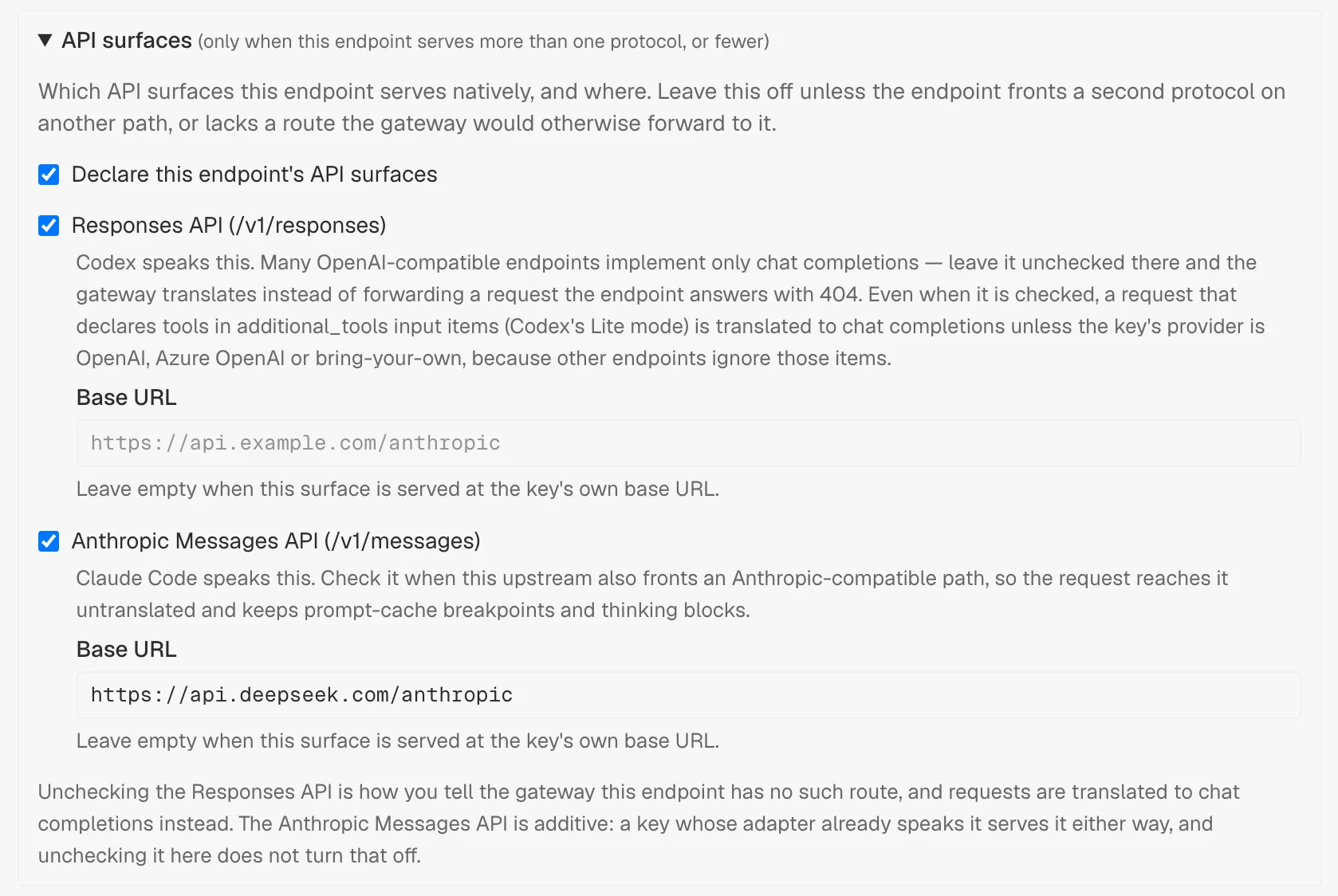
-
Save the key.
Follow the DeepSeek provider-key procedure to create deepseek-prod and export its ID as PROVIDER_KEY_ID. Then update its base URL and surface declaration:
curl -sS -X PATCH "$AISIX_CP/provider_keys/$PROVIDER_KEY_ID" \
  -H "Authorization: Bearer $AISIX_TOKEN" \
  -H "Content-Type: application/json" \
  -d '{
    "api_base": "https://api.deepseek.com",
    "apis": {
      "responses": {},
      "messages": {
        "base": "https://api.deepseek.com/anthropic"
      }
    }
  }'
Export the DeepSeek credential and add the complete key entry to the resources file, preserving its other collections and entries:
export DEEPSEEK_API_KEY="YOUR_PROVIDER_API_KEY"
Add the key and its native surface declaration to the complete resources file:
provider_keys:
  - id: c81e0bdb-eb61-4a25-896e-6dd739aa4608
    display_name: deepseek-prod
    provider: deepseek
    adapter: openai
    api_key: ${DEEPSEEK_API_KEY}
    api_base: https://api.deepseek.com
    apis:
      responses: {}
      messages:
        base: https://api.deepseek.com/anthropic
Validate and reload the complete resources file. If the variable was not already available to the gateway process, recreate the gateway and pass DEEPSEEK_API_KEY to it.
All three request types use the same upstream model name.
| Caller route | Upstream URL |
|---|---|
/v1/chat/completions | https://api.deepseek.com/chat/completions |
/v1/messages | https://api.deepseek.com/anthropic/v1/messages |
/v1/responses | https://api.deepseek.com/v1/responses |
Decide Which APIs to Forward Natively
Some upstreams expose Responses or Messages on routes that AISIX cannot infer from the provider and adapter alone. Declare only the routes AISIX should forward natively.
Responses
First confirm whether the upstream exposes /v1/responses. If it does, include responses in the declaration so AISIX forwards calls there natively. If it does not, create the declaration without responses; AISIX then translates the calls to Chat Completions. Declaring a route that does not exist can return an upstream HTTP 404. Codex Lite-mode tool requests are an exception with separate forwarding rules.
- AISIX Enterprise or Cloud
- AISIX OSS
- Dashboard
- Admin API
For an OpenAI-compatible endpoint that serves only Chat Completions, enable Declare this endpoint's API surfaces, leave both surfaces unselected, then save.
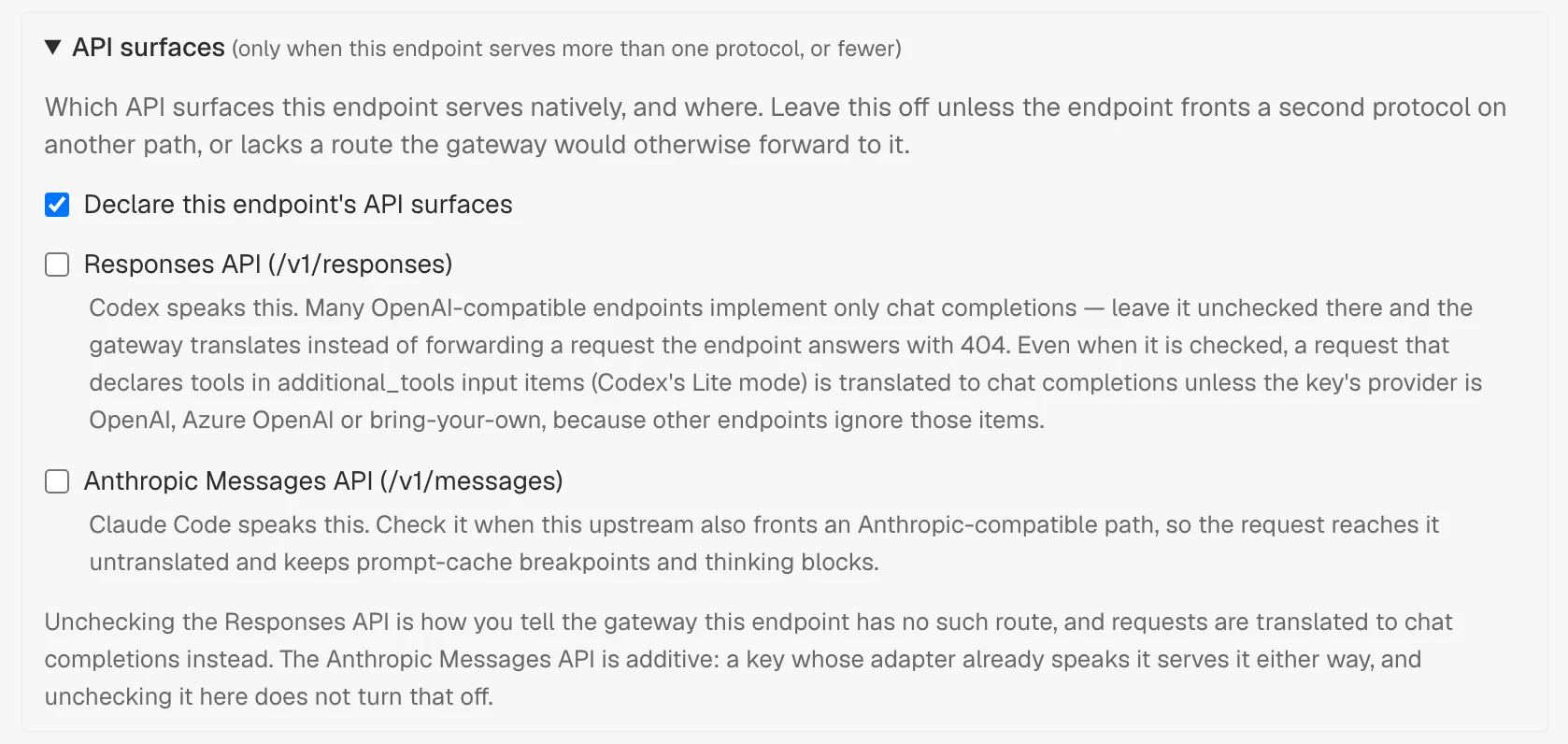
For an OpenAI-compatible endpoint that serves only Chat Completions, send an empty surface declaration:
{
  "apis": {}
}
For an OpenAI-compatible endpoint that serves only Chat Completions, set apis to an empty object in the provider key entry:
apis: {}
Messages
Anthropic providers and adapters already send Messages and Count Tokens natively, so they need no declaration. With another adapter that supports surface declarations, add messages only when the upstream implements both routes and accepts Anthropic-compatible authentication. AISIX then passes the provider credential in x-api-key and sends the anthropic-version header by default.
For a Messages endpoint that requires bearer authentication or serves only one of the two routes, use an authenticated passthrough route.
APIs Outside Surface Declarations
Leave other APIs out of surface declarations. Chat Completions, embeddings, audio, images, video, files, batches, fine-tuning, and rerank continue to use the default base URL. Bedrock, Vertex AI, and Azure OpenAI translate requests to their platform APIs automatically, so the Admin API rejects surface declarations for those adapters. Claude Messages and Count Tokens on Bedrock or Vertex AI still use the platform's Anthropic Messages API.
Keep or Override Catalog Defaults
If you do not declare surfaces yourself, AISIX uses the catalog when one applies, then falls back to the provider and adapter defaults. See Provider Behavior for the Responses defaults.
- AISIX Enterprise or Cloud
- AISIX OSS
- Dashboard
- Admin API
For AISIX Enterprise and AISIX Cloud, a DeepSeek key at the vendor's catalog URL uses the catalog's curated declaration. The dashboard identifies a declaration supplied by AISIX. Editing it makes the declaration operator-managed. Clearing it returns the key to the curated declaration when the endpoint still qualifies for one.
Changing API base to a custom endpoint stops the curated declaration from applying. An operator-managed declaration remains in effect.
For AISIX Enterprise and AISIX Cloud, a DeepSeek key at the vendor's catalog URL uses the catalog's curated declaration. The key detail returns apis and apis_source.
| Configuration | Result |
|---|---|
| Use a provider's curated declaration at its catalog URL | The key reports apis_source: catalog. |
| Set an explicit declaration | It replaces the catalog declaration, and the key reports apis_source: operator. |
Clear the declaration with null | The key returns to the curated declaration if the endpoint qualifies for one. |
Point api_base at a custom endpoint | The catalog declaration ceases to apply. An operator declaration stays in effect. |
AISIX OSS has no control-plane catalog declaration. Omit apis to let the gateway resolve surfaces from provider and adapter. Add an explicit block to override the derived Responses choice or declare additional native surfaces. Remove the block and reload the complete file to return to provider and adapter resolution.
Configure Provider-Specific Overrides
Configure provider-key overrides when the upstream request or response differs from the adapter's format. Every model that references the key inherits its overrides.
The following example adapts requests and streaming responses for a custom OpenAI-compatible upstream. Start with an existing BYO key from Bring Your Own Endpoint, then update it through the same management workflow.
- AISIX Enterprise or Cloud
- AISIX OSS
- Dashboard
- Admin API
-
In Provider keys, create or edit the Bring your own upstream (private endpoint) key. For a new key, enter its display name, credential, API base, and allowed environments, then choose the
openaioption under Protocol adapter. -
Expand Advanced wire-shape overrides.
-
In Request override JSON, rename
max_completion_tokensto the upstream'smax_tokens. If a caller sends both fields, AISIX keepsmax_completion_tokens:{"param_renames": {"max_completion_tokens": "max_tokens"}}For reasoning models on the OpenAI provider or Azure OpenAI adapter, AISIX applies the built-in token cap conversion before this custom rename.
-
In Response override JSON, map upstream streaming reasoning from
delta.thinkingtodelta.reasoning_contentin the AISIX response:{"reasoning_field": "delta.thinking"}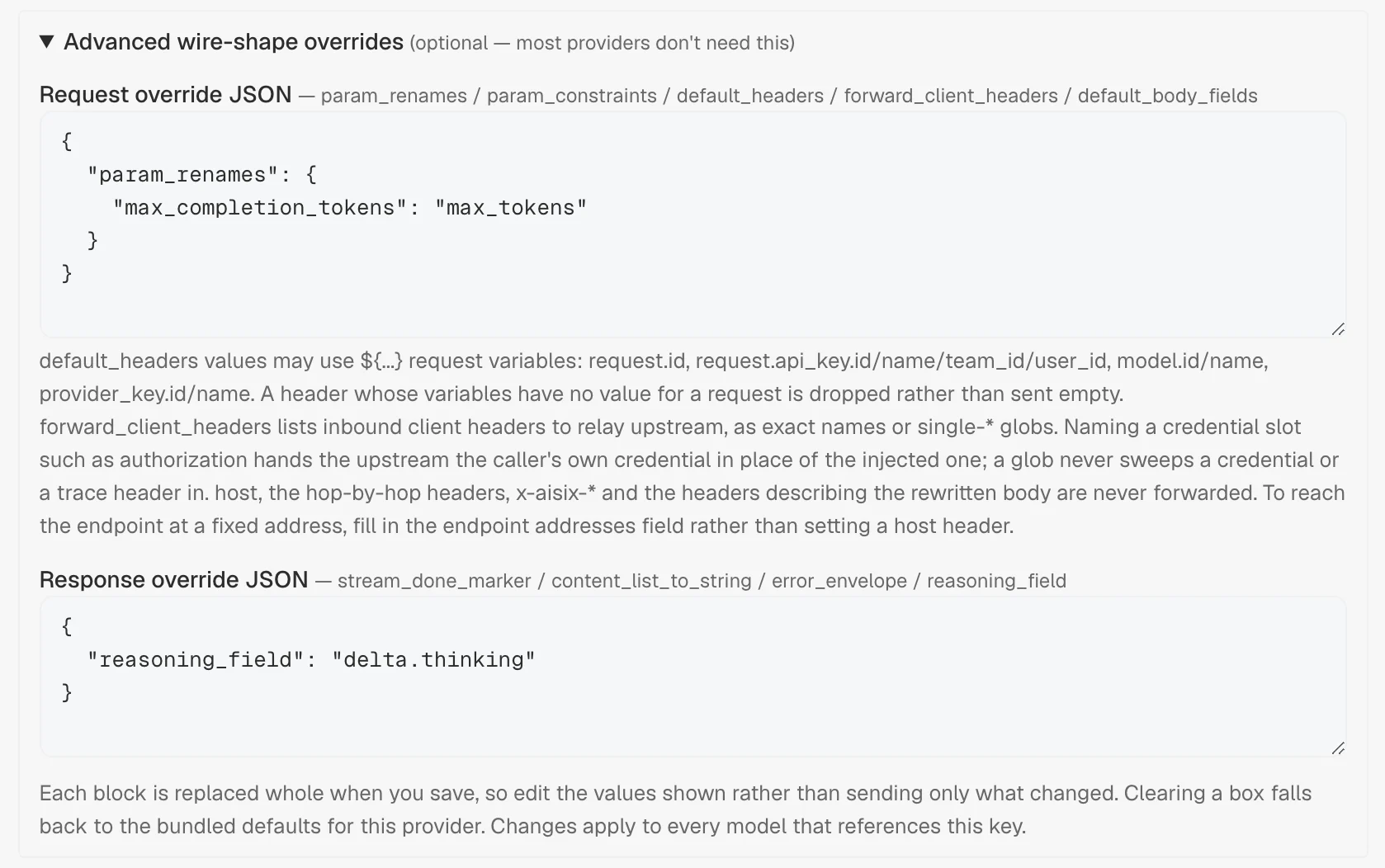
-
Save the key.
Export the ID of the existing BYO provider key, then update both override blocks. A patch replaces each block in full, so include every setting that the block should retain.
export CUSTOM_PROVIDER_KEY_ID="YOUR_CUSTOM_PROVIDER_KEY_ID"

curl -sS -X PATCH "$AISIX_CP/provider_keys/$CUSTOM_PROVIDER_KEY_ID" \
  -H "Authorization: Bearer $AISIX_TOKEN" \
  -H "Content-Type: application/json" \
  -d '{
    "request": {
      "param_renames": {
        "max_completion_tokens": "max_tokens"
      }
    },
    "response": {
      "reasoning_field": "delta.thinking"
    }
  }'
❶ Rename the caller-facing field to the name the upstream expects. If a caller sends both fields, AISIX keeps max_completion_tokens.
❷ Map upstream streaming reasoning from delta.thinking to delta.reasoning_content in the AISIX response.
For reasoning models on the OpenAI provider or Azure OpenAI adapter, AISIX applies the built-in token cap conversion before the custom request rename.
Add the overrides to the complete BYO provider key entry. Preserve the file's other resources and pass COMPAT_API_KEY to the gateway process.
export COMPAT_API_KEY="YOUR_UPSTREAM_API_KEY"
Add the key and both override blocks to the complete resources file:
provider_keys:
  - id: 790082ae-eb58-4663-8ca8-9fcc0c4980f1
    display_name: custom-openai-prod
    provider: byo
    adapter: openai
    api_key: ${COMPAT_API_KEY}
    api_base: https://api.example.com/v1
    request:
      param_renames:
        max_completion_tokens: max_tokens
    response:
      reasoning_field: delta.thinking
❶ Rename the caller-facing field to the name the upstream expects. If a caller sends both fields, AISIX keeps max_completion_tokens.
❷ Map upstream streaming reasoning from delta.thinking to delta.reasoning_content in the AISIX response.
For reasoning models on the OpenAI provider or Azure OpenAI adapter, AISIX applies the built-in token cap conversion before the custom request rename.
Validate and reload the complete resources file. If COMPAT_API_KEY was not already available to the gateway process, recreate the gateway and pass the variable to it.
Available fields vary by adapter, request path, and management path. For the complete field set, use the Admin API reference for managed keys or the Resources File Reference for AISIX OSS. Header generation and forwarding are covered in Configure Upstream Request Headers.
After saving, verify the provider key with a representative request through a non-production alias before sharing it across models.
Next Steps
- To connect another upstream, choose its guide in Provider Setup for credential and endpoint requirements.
- Use Provider Key Rotation to update a credential in place or move models and passthrough routes to a replacement key in stages.
- In AISIX Enterprise and AISIX Cloud, create a budget with Provider key scope to track upstream spend or block calls through the key once it reaches its limit.