
Model Aliases
Model aliases give callers stable names while AISIX controls how their requests reach upstream models.
A direct model connects an alias to one upstream model through a provider key. Routing, semantic, and ensemble models resolve an alias to one or more direct models when a request arrives.
Create a direct model for each upstream model AISIX should call. Add a virtual model only when the caller-facing alias needs target selection or response synthesis.
Choose a Model Shape
AISIX supports the following dispatch shapes. Select a shape to open its configuration instructions. An embedding model dispatches like a direct model and adds vector metadata; it is not a virtual dispatch shape.
| Model shape | How AISIX handles a request | Use when |
|---|---|---|
| Direct | Calls one upstream model through one provider key. | The alias has one upstream destination. |
| Embedding | Calls an embedding-capable upstream and records vector metadata for semantic comparisons. | A semantic router needs an embedding model. |
| Routing | Selects one direct target by failover, round robin, weights, cost, latency, or load. | One stable alias should distribute traffic or survive target failure. |
| Semantic | Embeds the latest user message and selects one direct target by meaning. | Different topics should reach different models without caller-side routing. |
| Ensemble | Calls several direct panel models and asks a direct judge model to synthesize one response. | One answer should incorporate multiple model responses. |
Each model has one dispatch shape. AISIX rejects a resource that combines direct upstream fields with routing, semantic, or ensemble configuration.
In AISIX Enterprise and AISIX Cloud, models reference provider keys and other models by resource ID. In an AISIX OSS resources file, direct models and semantic classifier blocks reference provider-key entries by id. Caller keys use allowed_models for model display names or glob patterns and allowed_model_ids for model IDs. In routing, semantic, and ensemble models, the name-based fields model, target, default, and embedding_model take model display names, while their *_id counterparts take model IDs.
A direct model can serve Embeddings without additional vector metadata. Add embedding metadata when the model supports Semantic Routing.
Prerequisites
Before starting, prepare the following:
- A provider key for each upstream credential the models will use.
- A connected gateway and a valid upstream credential for live request verification. Install
curlandjqfor request verification. - For AISIX Enterprise or AISIX Cloud, prepare access to the target environment and permission to manage models and caller API keys. The provider key must allow that environment. Get Started with AISIX Enterprise provides a local setup; to request AISIX Cloud access, contact API7.
- If you use the Dashboard to configure AISIX Enterprise or AISIX Cloud, sign in and confirm that you can enter the target environment.
- If you use the Admin API to configure AISIX Enterprise or AISIX Cloud, prepare a write-scoped admin token, the environment ID, and the provider key ID.
- For AISIX OSS, prepare a gateway that loads a complete resources file containing the provider key.
Create a Direct Model
A direct model maps one caller-facing alias to one upstream model.
- AISIX Enterprise or Cloud
- AISIX OSS
- Dashboard
- Admin API
Create the model in the environment where applications will use it.
-
In Environments, select Enter for your target environment. Open Models.
-
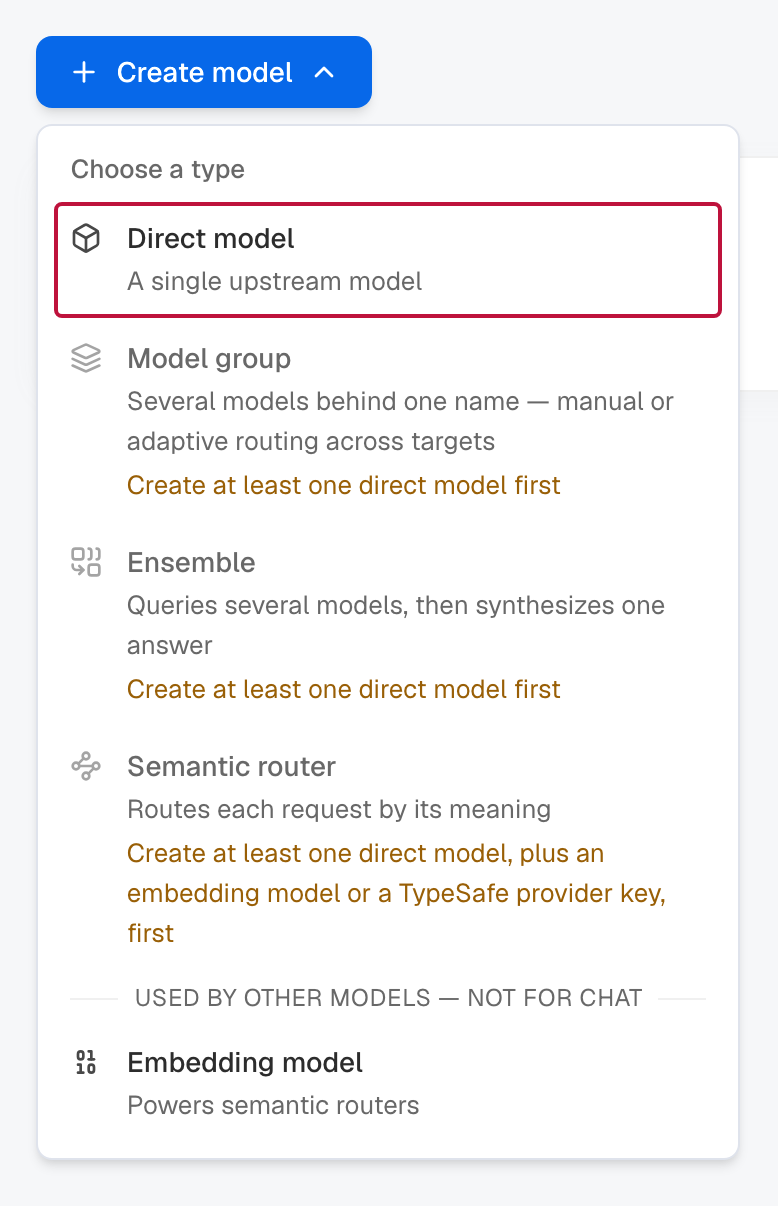
Select Create model, then Direct model.
-
Enter the alias the caller sends, such as
gpt-4o-prod, in Display name. -
Select the Provider key, then enter the provider's model ID, such as
gpt-4o, in Upstream model id.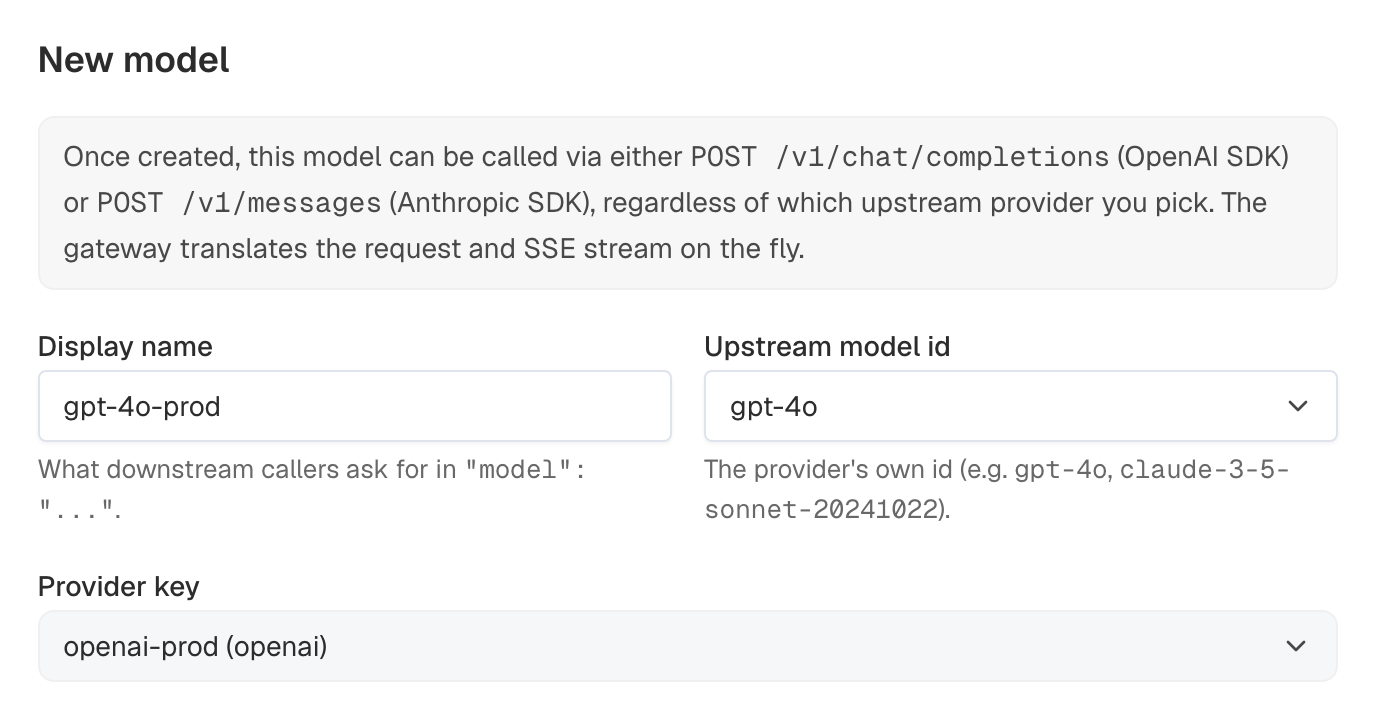
-
Select Create model. Verify that the list shows the alias as a Direct model with the expected upstream model and provider key.

The Upstream model id field offers suggestions from the selected provider's catalog. Enter an exact ID for an unlisted model or private deployment. For a Bring Your Own Endpoint key, enter the ID in the text field.
If the form reports missing pricing, you can still save the model. Requests record no cost until pricing is configured. Select the link in the hint to open Add model pricing in a new tab with the provider and model prefilled. Save the price and return to the model form to clear the hint.
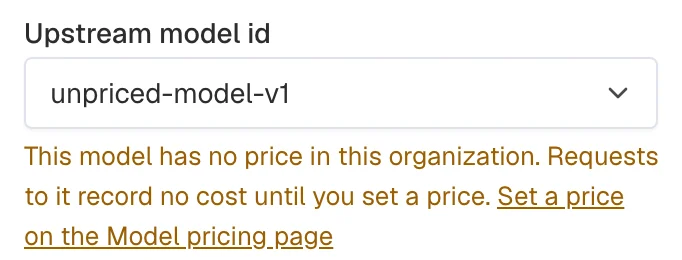
This check applies to direct and embedding models with an exact upstream model ID. See Identify a Missing Price for pricing coverage.
Export the control-plane connection details and provider key ID:
# AISIX_CP is the Admin API base URL; include /api and omit a trailing slash.
# The local AISIX Enterprise quickstart uses http://localhost:8080/api.
export AISIX_CP="YOUR_AISIX_CONTROL_PLANE_API_URL"
export AISIX_TOKEN="YOUR_ADMIN_TOKEN"
export ENV_ID="YOUR_ENVIRONMENT_ID"
export PROVIDER_KEY_ID="YOUR_PROVIDER_KEY_ID"
Create a direct model with the provider key ID you prepared:
curl -sS -X POST "$AISIX_CP/environments/$ENV_ID/models" \
  -H "Authorization: Bearer $AISIX_TOKEN" \
  -H "Content-Type: application/json" \
  -d '{
    "display_name": "gpt-4o-prod",
    "model_name": "gpt-4o",
    "provider_key_id": "'"$PROVIDER_KEY_ID"'"
  }'
Find the new model's resource ID in the response:
{
  "model": {
    "id": "677c847f-d92d-4f0e-b445-8b449764f06a",
    "env_id": "YOUR_ENVIRONMENT_ID",
    "kind": "direct",
    "display_name": "gpt-4o-prod",
    "model_name": "gpt-4o",
    "provider_key_id": "YOUR_PROVIDER_KEY_ID",
    "created_at": "2026-06-24T12:18:39Z",
    "updated_at": "2026-06-24T12:18:39Z"
  }
}
Use the ID to inspect, update, or delete the model, and to reference it from routing, semantic, or ensemble models. Other model shapes return their ID in the same response field.
Callers send the display name. AISIX sends the upstream model ID or deployment name to the provider selected by the key. Use the same name for both when a separate alias is unnecessary.
Add the model to the models collection and set provider_key_id to the provider-key entry's id:
models:
  - id: b5d1e9b6-a895-4cc4-8812-95db86b857b0
    display_name: gpt-4o-prod
    provider: openai
    model_name: gpt-4o
    provider_key_id: 83eba07c-0ad3-4b81-b760-247f2d978e95
Use the model's display name in caller requests. In the file, set the provider explicitly and reference the provider key by ID. Validate and reload the complete file to apply the model.
Verify the Direct Model
-
Create a caller API key and grant it access to
gpt-4o-prod. -
Set
AISIX_API_KEYto the plaintext caller credential.export AISIX_API_KEY="YOUR_CALLER_API_KEY" -
Verify access using that key and the gateway URL. The request must use the alias,
gpt-4o-prod. -
Confirm that the upstream returns an assistant message. The successful request verifies the provider key, upstream model, and caller access together; saved configuration alone does not.
Match Model Names with a Wildcard
Use a wildcard alias to expose several upstream models through one resource. The alias contains one asterisk, which can appear anywhere in the name. The text before and after it must match the beginning and end of the requested name. For example, gpt-*-mini matches names with that prefix and suffix.
A wildcard alias is a direct model. Its upstream model template determines how the matching name is forwarded.
| Alias | Requested model | Upstream model template | Upstream model |
|---|---|---|---|
openai/* | openai/gpt-4o | * | gpt-4o |
acme/* | acme/llama-v3 | accounts/acme/models/* | accounts/acme/models/llama-v3 |
openai/* | Any matching name | gpt-4o | gpt-4o |
An exact alias takes precedence over a wildcard. If several wildcards match, AISIX uses the most specific pattern.
- AISIX Enterprise or Cloud
- AISIX OSS
Create the wildcard model with the provider key prepared earlier. Use one asterisk in the alias and no more than one in the upstream model template. The control plane rejects a new value with multiple asterisks, but it lets you resend an unchanged value that was stored before this validation was added.
Wildcard aliases do not appear in GET /v1/models, because they are patterns rather than concrete model names.
- Dashboard
- Admin API
-
Open the environment and select Models.
-
Select Create model, then choose Direct model.
-
Enter
openai/*in Display name. -
Select the provider key and enter
*in Upstream model id.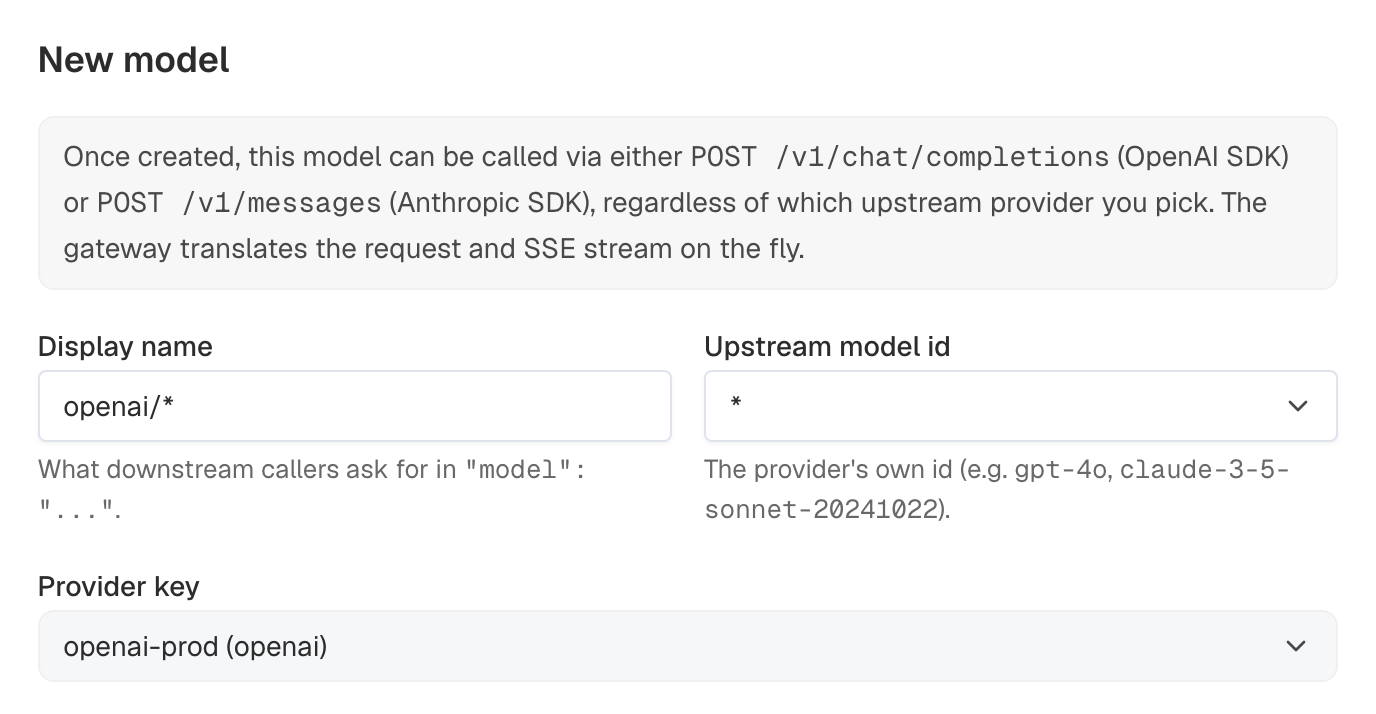
-
Select Create model and confirm that
openai/*appears under Direct models.
Create a caller key for the wildcard:
-
Open API keys, select New API key, and enter
wildcard-callerin Display name. -
Keep Selected models. Under Allowed models, open the model picker and select
openai/*.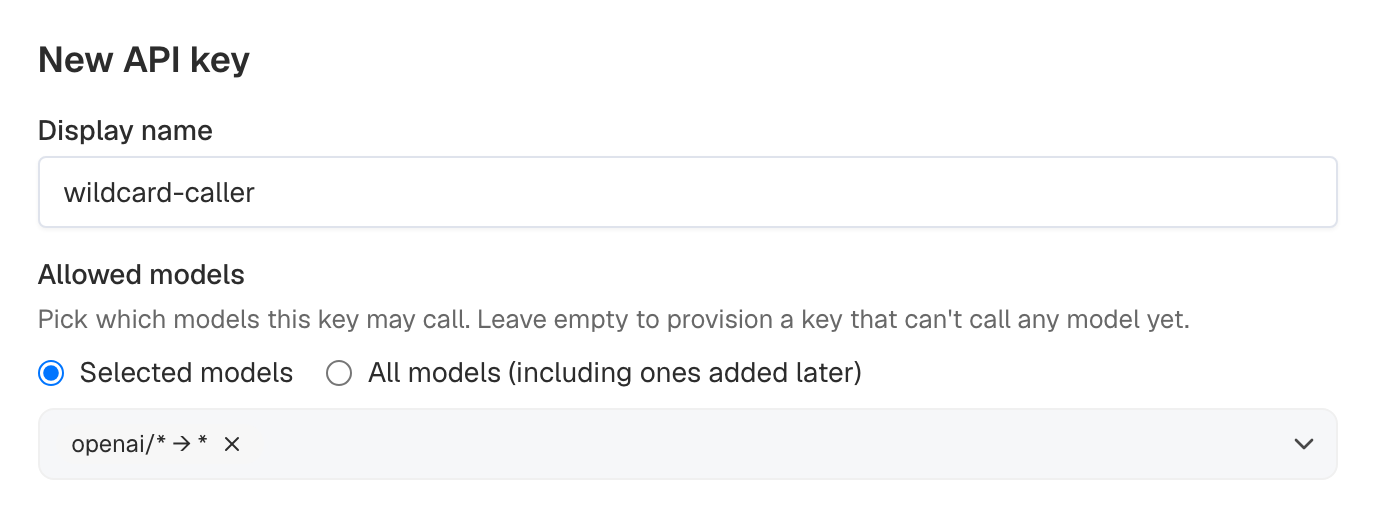
-
Select Create API key and copy the plaintext from the one-time view before dismissing it.
An existing key with All models already allows the wildcard. For an existing key in Selected models mode:
- Select Edit.
- Add
openai/*while preserving the existing grants. - Select Save changes.
Continue using the plaintext credential already held by the application.
Create the wildcard model and capture its ID:
WILDCARD_MODEL_RESPONSE=$(curl -sS -X POST "$AISIX_CP/environments/$ENV_ID/models" \
  -H "Authorization: Bearer $AISIX_TOKEN" \
  -H "Content-Type: application/json" \
  -d '{
    "display_name": "openai/*",
    "provider_key_id": "'"$PROVIDER_KEY_ID"'",
    "model_name": "*"
  }')

export WILDCARD_MODEL_ID=$(printf '%s' "$WILDCARD_MODEL_RESPONSE" | jq -er '.model.id')
printf '%s' "$WILDCARD_MODEL_RESPONSE" | jq
Create the caller key with access to the wildcard model. Save its ID for cleanup and its plaintext value for request verification:
KEY_RESPONSE=$(curl -sS -X POST "$AISIX_CP/environments/$ENV_ID/api_keys" \
  -H "Authorization: Bearer $AISIX_TOKEN" \
  -H "Content-Type: application/json" \
  -d '{
    "display_name": "wildcard-caller",
    "allowed_models": ["'"$WILDCARD_MODEL_ID"'"]
  }')

export WILDCARD_CALLER_KEY_ID=$(printf '%s' "$KEY_RESPONSE" | jq -er '.api_key.id')
export AISIX_API_KEY=$(printf '%s' "$KEY_RESPONSE" | jq -er '.plaintext')
printf '%s' "$KEY_RESPONSE" | jq 'del(.plaintext)'
To extend an existing key instead, use the following update. If an existing caller key uses all-model access, it already grants the wildcard. Otherwise, export that existing key's resource ID and preserve its current selected models while adding the wildcard:
export EXISTING_API_KEY_ID="YOUR_EXISTING_CALLER_API_KEY_RESOURCE_ID"

curl -sS "$AISIX_CP/environments/$ENV_ID/api_keys" \
  -H "Authorization: Bearer $AISIX_TOKEN" \
  | jq -ec --arg key_id "$EXISTING_API_KEY_ID" --arg id "$WILDCARD_MODEL_ID" '
      .data[] | select(.id == $key_id)
      | {allowed_models: ((.allowed_models // []) + [$id] | unique)}' \
  | curl -sS -X PATCH "$AISIX_CP/environments/$ENV_ID/api_keys/$EXISTING_API_KEY_ID" \
      -H "Authorization: Bearer $AISIX_TOKEN" \
      -H "Content-Type: application/json" \
      --data-binary @- | jq
Use one asterisk in the alias and no more than one in the upstream model template. An alias with multiple asterisks never matches as a pattern. If the upstream template contains more than one, AISIX replaces the first and sends the rest literally.
Export a separate credential for the wildcard caller:
export WILDCARD_CALLER_KEY="YOUR_CALLER_API_KEY"
export WILDCARD_CALLER_KEY_SHA256="$(printf '%s' "$WILDCARD_CALLER_KEY" | sha256sum | cut -d ' ' -f 1)"
Add openai/* to the existing models collection and add wildcard-caller to api_keys. Preserve unrelated entries and collections:
models:
  - id: 5eba0595-2d70-4fd9-8e51-b3cb8b9afe81
    display_name: openai/*
    provider: openai
    provider_key_id: 83eba07c-0ad3-4b81-b760-247f2d978e95
    model_name: "*"

api_keys:
  - id: 7f30d06d-f9a5-49e3-bf9a-ce0472614170
    display_name: wildcard-caller
    key_hash: ${WILDCARD_CALLER_KEY_SHA256}
    allowed_models:
      - openai/*
Validate the assembled complete file before loading it. If WILDCARD_CALLER_KEY_SHA256 is not already available to the running gateway process, restart or recreate the gateway with the new variable instead of reloading it in place.
Wildcard aliases do not appear in GET /v1/models, because they are patterns rather than concrete model names.
Verify the Wildcard
Export the gateway origin:
export AISIX_PROXY="YOUR_AISIX_GATEWAY_URL"
Set the caller credential for the workflow you used:
- AISIX Enterprise or Cloud
- AISIX OSS
- Dashboard
- Admin API
Export the plaintext value copied when the key was created:
export AISIX_API_KEY="YOUR_CALLER_API_KEY"
The creation example already exports the new credential as AISIX_API_KEY. If you used an existing caller key instead, export the plaintext value held by the application:
export AISIX_API_KEY="YOUR_CALLER_API_KEY"
Reuse the value supplied to the gateway:
export AISIX_API_KEY="$WILDCARD_CALLER_KEY"
Choose a concrete matching model name for which no exact alias exists, then send the request:
curl -sS -X POST "$AISIX_PROXY/v1/chat/completions" \
  -H "Authorization: Bearer $AISIX_API_KEY" \
  -H "Content-Type: application/json" \
  -d '{
    "model": "openai/gpt-4o-mini",
    "messages": [{"role": "user", "content": "Hello from a wildcard alias."}]
  }' | jq
Confirm that choices[0].message contains an assistant response. This verifies that the wildcard matched and AISIX called the upstream model with the substituted name. Because the model-list endpoint omits wildcard patterns, use a concrete request like this one to verify them.
Clean Up Test Resources
Remove the wildcard and caller key if you created them only for this test.
- AISIX Enterprise or Cloud
- AISIX OSS
- Dashboard
- Admin API
Delete the wildcard model as described in Rename or Delete a Model. The control plane removes it from caller-key allowlists automatically. Then open API keys, select Revoke on wildcard-caller, and confirm.
Delete the wildcard model as described in Rename or Delete a Model. The control plane removes it from caller-key allowlists automatically. Then delete only the dedicated caller key captured in WILDCARD_CALLER_KEY_ID:
curl -sS -X DELETE "$AISIX_CP/environments/$ENV_ID/api_keys/$WILDCARD_CALLER_KEY_ID" \
  -H "Authorization: Bearer $AISIX_TOKEN" | jq
Remove both test entries from models and api_keys, preserving unrelated entries and collections. Validate the complete resources file, then reload it. Recreate the gateway only if you also want to remove WILDCARD_CALLER_KEY_SHA256 from the process environment.
Configure Optional Model Behavior
Most direct models only need a caller-facing alias, upstream model name, and provider key reference. Add optional fields only when the model needs one of these behaviors:
| Goal | Setting |
|---|---|
| Limit how long an upstream request can take | timeout, in milliseconds |
| Limit the wait between streaming chunks | stream_timeout, in milliseconds |
| Retry an upstream failure | retries; see Retry Budget |
| Restrict callers by client IP | allowed_cidrs |
| Probe model health outside the request path | background_model_check |
| Temporarily exclude a failing target | cooldown |
| Translate reasoning-effort values | Reasoning Effort Mapping |
| Limit traffic to one alias | API Key and Model Rate Limits |
- AISIX Enterprise or Cloud
- AISIX OSS
Background health checks send Chat Completions requests. The control plane rejects enabling them for a TypeSafe provider key. Leave them disabled for other decision models that do not serve Chat Completions.
- Dashboard
- Admin API
Configure optional settings when creating a direct model or select Edit for an existing model. Expand Upstream call behaviour (optional) for timeouts and retries or Client IP allowlist (optional) for network restrictions. Health probes, cooldown, reasoning effort mapping, and rate limits have their own sections. Select Create model or Save.
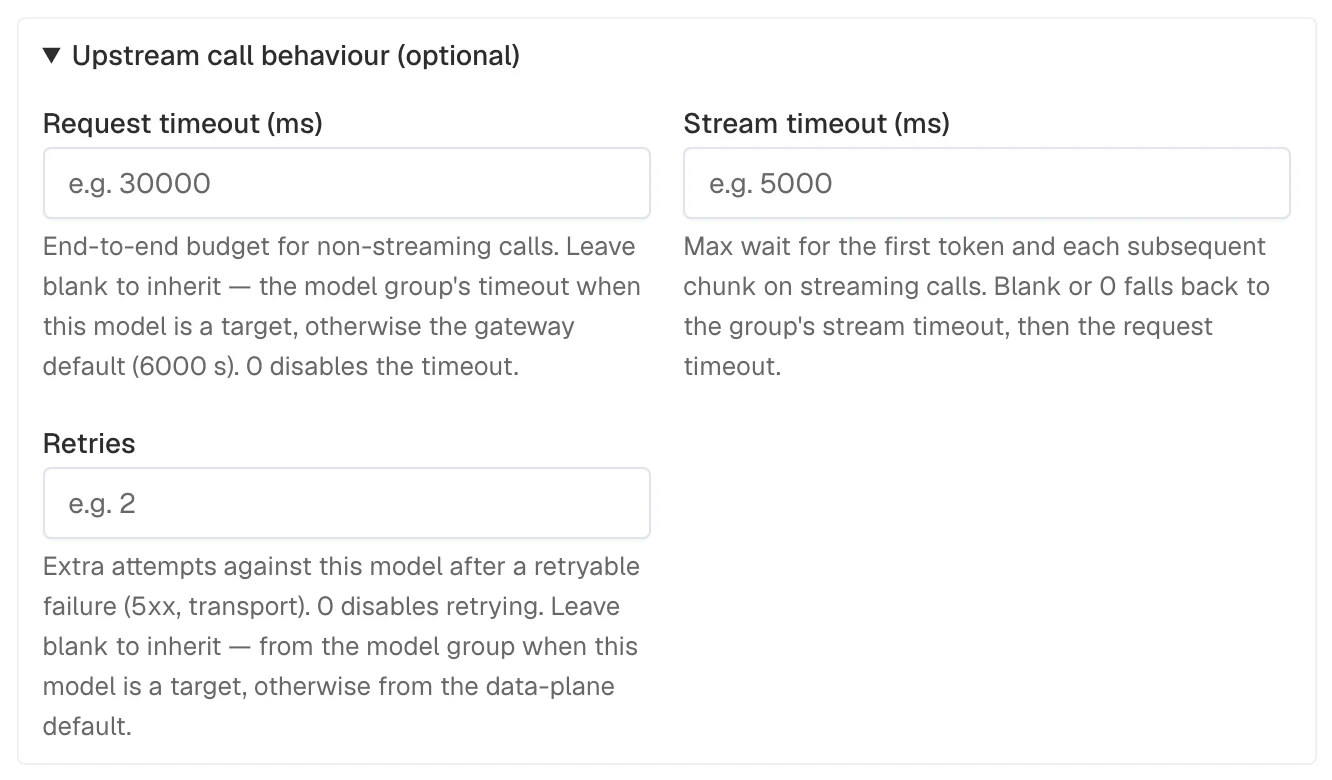
For Automatic prompt caching, follow Anthropic Prompt Caching for provider and model requirements.
Export the model resource ID, then patch only the optional fields you want to change:
export MODEL_ID="YOUR_MODEL_ID"

curl -sS -X PATCH "$AISIX_CP/environments/$ENV_ID/models/$MODEL_ID" \
  -H "Authorization: Bearer $AISIX_TOKEN" \
  -H "Content-Type: application/json" \
  -d '{
    "timeout": 30000,
    "stream_timeout": 15000,
    "allowed_cidrs": ["10.0.0.0/8"]
  }' | jq
Merge optional fields into the existing model entry. Preserve its other settings, unrelated entries and collections, and the file's single models key. Validate the assembled complete file before reloading it.
For example, add an IPv4 allowlist to the existing model:
models:
  - id: b5d1e9b6-a895-4cc4-8812-95db86b857b0
    display_name: gpt-4o-prod
    provider: openai
    model_name: gpt-4o
    provider_key_id: 83eba07c-0ad3-4b81-b760-247f2d978e95
    allowed_cidrs:
      - 10.0.0.0/8
How Settings Flow Through Virtual Models
Configure provider settings, health checks, and cooldown on the direct models behind each virtual alias.
- Routing models use the selected target's provider settings, timeout, health, and cooldown.
- Semantic routers use the settings of the selected target and the embedding model. If a route target excludes the caller's IP, AISIX uses the default target and records no route. If both exclude the caller, AISIX returns
403. An unhealthy target or a target in cooldown also gives way to an available default. - Ensemble models use the settings on their panel and judge models.
For semantic routing, AISIX chooses the embedding deadline in this order:
- The router's
embedding_timeout_ms. - The embedding model's timeout.
- The deployment default.
A semantic router can set a default retry budget for targets that have no budget of their own.
Match Client IPs Correctly
Client IP restrictions apply when callers address the model directly and when a routing model selects it as a target. AISIX uses the immediate peer's IP unless a trusted proxy supplies the address. Configure trusted proxies as described in Client IP Resolution before applying restrictions behind a load balancer or ingress.
Use IPv4 notation for IPv4 ranges, including on a dual-stack listener. An IPv4 caller matches 10.0.0.0/8; a mapped IPv6 range such as ::ffff:10.0.0.0/104 does not match that caller. Trusted proxies can supply the client address through a forwarded header or PROXY protocol.
Retry Budget
The retry budget controls how many additional attempts AISIX makes after a retryable failure, such as an upstream server error or connection failure.
- AISIX Enterprise or Cloud
- AISIX OSS
- Dashboard
- Admin API
Edit the model and expand Upstream call behaviour (optional). Set Retries to 1, then select Save.
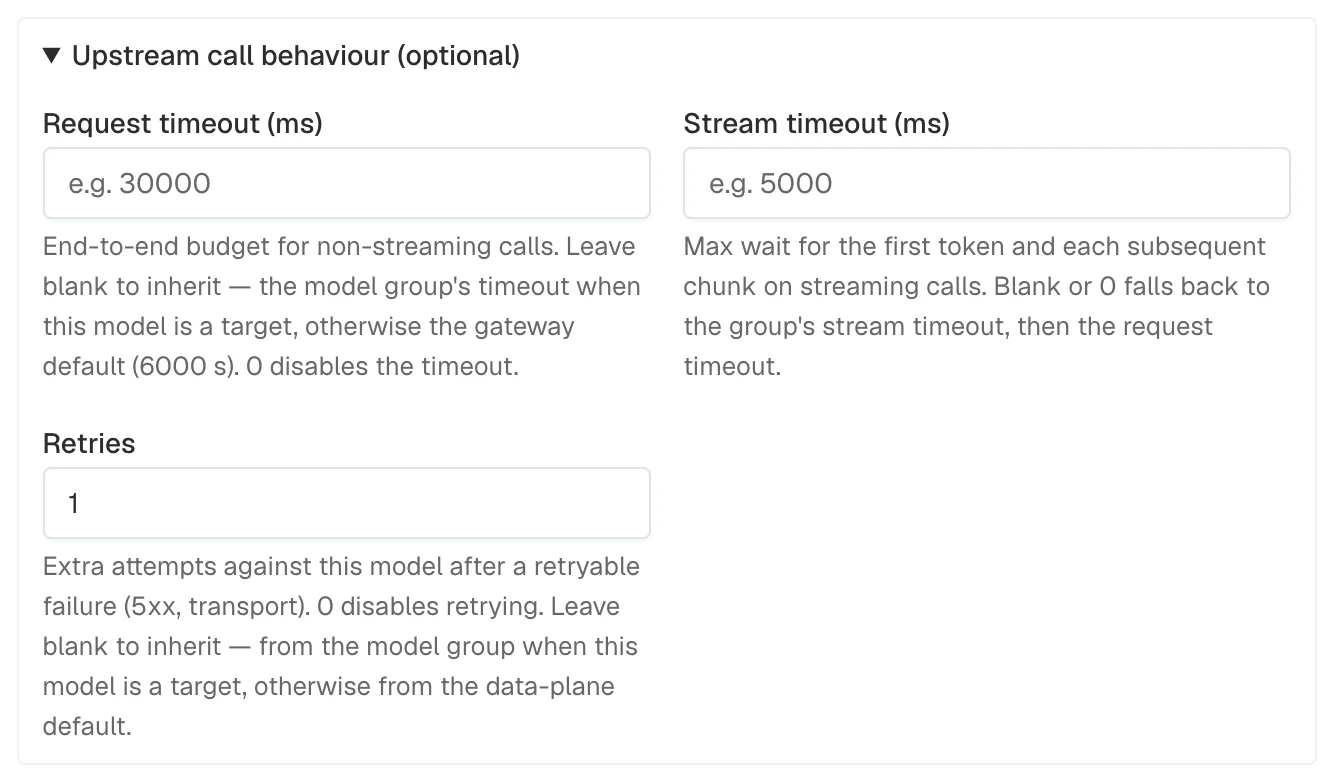
Export the model resource ID, then set one additional attempt with a focused patch:
export MODEL_ID="YOUR_MODEL_ID"

curl -sS -X PATCH "$AISIX_CP/environments/$ENV_ID/models/$MODEL_ID" \
  -H "Authorization: Bearer $AISIX_TOKEN" \
  -H "Content-Type: application/json" \
  -d '{"retries":1}' | jq
In AISIX OSS, merge retries into the existing model entry. Preserve its other settings, every unrelated model and collection, and the file's single models key. The following partial example permits one additional attempt:
models:
  - id: b5d1e9b6-a895-4cc4-8812-95db86b857b0
    display_name: gpt-4o-prod
    provider: openai
    model_name: gpt-4o
    provider_key_id: 83eba07c-0ad3-4b81-b760-247f2d978e95
    retries: 1
Validate the assembled complete resources file before reloading it.
Where Retries Apply
The budget applies to direct requests and to a model selected as a routing target.
| Requests | Retry behavior |
|---|---|
| Chat Completions, Text Completions, Messages, Count Tokens, Responses | Use the model retry budget. |
| Embeddings, Rerank, Audio, Image Generation, Image Editing, video submission and status polling | Use the model retry budget. |
| Direct calls made by an ensemble | Use the model retry budget. |
| Realtime, Files, Batches, Fine-tuning | This model setting does not apply. |
| Passthrough routes | Relay a single upstream attempt. Failure does not trigger model retries or cooldown. |
How AISIX Chooses a Budget
AISIX resolves the budget for each attempt in this order:
| Source | Applies When |
|---|---|
retries on the model | The model sets it. This wins even when the model is a target of a routing model that sets its own retries. |
routing.retries on the routing model | The target does not set retries. Acts as the group-wide default for every target. |
retries on the semantic router | The dispatched route target does not set retries and the request came through a semantic router. The router's top-level value fills the same group slot as routing.retries does on a model group. |
upstream.retries in the gateway configuration file | None of the above is set. Defaults to 2. See the Startup Configuration Reference. |
Set retries: 0 to turn retrying off for a model. A 0 is an explicit setting at every level, never shorthand for leaving the field unset.
When the Deployment Default Behaves Differently
AISIX uses an explicit model or routing budget as configured. Two exceptions apply when the budget comes from the deployment default.
- Another target is available. AISIX moves to the next target after a retryable failure. The default budget applies to the last target.
- The request times out. AISIX skips retries on the timed-out target. Set an explicit model budget to retry timeouts. With either budget, a timeout can trigger failover to another target.
Account for Every Upstream Attempt
Each retry re-sends the full request body, and AISIX retries in addition to any retry the provider's own edge performs. Account for the combined number of upstream attempts before raising the budget on a high-volume model.
On the video submit call, a non-idempotent request is never retried once the provider has already returned its response status. A lost or invalid response body at that point means the operation committed upstream, so replaying it would duplicate the write. Failures during connection or send remain retryable everywhere.
Cost Metadata
- AISIX Enterprise or Cloud
- AISIX OSS
The control plane uses its pricing catalog and organization-level overrides for cost-based routing, usage totals, and budgets. To set a price for a model the catalog does not cover, see Model Pricing.
The cost field affects least_cost routing only. It does not affect provider routing, access control, or usage accounting. Usage events carry token counts without a cost.
Merge cost into the existing model entry in resources.yaml, preserving its other settings and the rest of the complete file. The field records input and output prices per 1,000 tokens:
models:
  - id: b5d1e9b6-a895-4cc4-8812-95db86b857b0
    display_name: gpt-4o-prod
    provider: openai
    model_name: gpt-4o
    provider_key_id: 83eba07c-0ad3-4b81-b760-247f2d978e95
    cost:
      input_per_1k: 0.0025
      output_per_1k: 0.01
Validate the assembled complete file before reloading it. For the full workflow, see Get Started with AISIX OSS.
Rename or Delete a Model
- AISIX Enterprise or Cloud
- AISIX OSS
Renaming a model updates its dependent resource references. Deletion requires resolving the dependencies that would become invalid.
- Dashboard
- Admin API
To rename a model:
- Open the environment and select Models.
- Select Edit on the model.
- Change Display name or Upstream model id, then select Save.
- Confirm that the row shows the new value.
To delete a model:
- Select Delete on its row.
- Review any cascaded resources named in the confirmation.
- Confirm Delete.
If a protected dependency still references the model, the Dashboard reports the conflict and keeps the model. Repoint or remove that dependency, then retry.
Export the model resource ID:
export MODEL_ID="YOUR_MODEL_ID"
Rename the model with a partial update:
curl -sS -X PATCH "$AISIX_CP/environments/$ENV_ID/models/$MODEL_ID" \
  -H "Authorization: Bearer $AISIX_TOKEN" \
  -H "Content-Type: application/json" \
  -d '{"display_name":"gpt-4o-production"}' | jq
After removing any blocking dependencies, delete it:
curl -sS -X DELETE "$AISIX_CP/environments/$ENV_ID/models/$MODEL_ID" \
  -H "Authorization: Bearer $AISIX_TOKEN" | jq
Rename
Renaming the model updates these references:
- Targets in routing models.
- Panel members and judges in ensemble models.
- Route targets, the embedding model, and default or on-failure targets in semantic models.
- The embedding model used by semantic guardrails and semantic cache policies.
- A cache policy's
applies_toselector. - Model allowlists on caller API keys.
Retrieve the dependent resources after renaming to verify the updated references.
Update any rate limit condition that matches the old model name. Name-based conditions match the caller's request and retain their configured value after a model rename.
AISIX returns 400 when changing a model to a wildcard alias would break an exact-name dependency or widen a caller API key's model grant. The response identifies the blocking dependency. Update or remove that dependency first, or create a separate wildcard alias. The check applies only to the field used by that dependency. For example, caller API key allowlists and cache policy applies_to selectors use display_name, not model_name.
Resending a field's current value is not a rename. A model that already uses a wildcard value remains editable while referenced.
Delete
Deleting a model is refused with 409 and error code MODEL_IN_USE while any of these still reference it:
- Another model: a routing target, an ensemble panel member or judge, or a
kind: semanticmodel's route target, embedding model, default, or on-failure target. - A semantic cache policy that uses it as the embedding model.
- A
kind: semanticguardrail that uses it as itsembedding_model. A guardrail defaults tofail_open: false, so one that cannot resolve its embedding model would answer422to every request in its scope.
Rebind or delete these dependent resources first. AISIX automatically removes three other reference types instead of blocking the deletion:
- A classic rate limit policy whose
scopeismodeland whosescope_refis this model is deleted. The dashboard's delete confirmation lists these policies by name. - The model is removed from every caller API key that allows it.
- Guardrails attached to the model lose that attachment.
Two inactive references remain in place:
- A cache policy whose
applies_toselects the model stops covering traffic. It does not start covering a later model of the same name. See Tune Policy Scope. - A conditional rate limit policy's
modelcondition that names the model remains, because it is one clause of the policy rather than the policy's subject. It evaluates from then on as it would for any ID that matches no model. Amodel_namecondition compares names and is not changed by the delete.
Rename or remove the model entry in the complete resources file. When renaming, update every reference that uses its display name, including routing, semantic, ensemble, and caller-key entries. Preserve unrelated entries and collections, keep a single models key, and validate the assembled file before reloading it. AISIX OSS does not perform the managed control plane's rename cascades or delete cleanup.
Next Steps
- Create a caller API key to grant an application access to the alias and verify a request.
- Use Routing and Failover to distribute requests or provide a fallback upstream.
- Configure Model Pricing in AISIX Enterprise or AISIX Cloud to record costs for models outside the pricing catalog.