
Configure Keyword Guardrails
Keyword guardrails enforce simple content rules inside the gateway without sending text to an external service. They can block or monitor literal strings and regular expressions in requests and responses. AISIX evaluates structured content one segment at a time, so a pattern cannot span messages, tool-argument values, or object keys. See How Keyword and PII Guardrails Read Structured Content for details.
This guide creates an input guardrail for a unique forbidden token, verifies allowed and blocked traffic, evaluates the rule in monitor mode, and configures its failure policy.
Prerequisites
Before starting, prepare the following:
- Review Guardrail Policy Behavior for hook points and enforcement modes.
- A working model alias, caller API key, and running gateway that can send Chat Completions requests.
curl.- If you use the Dashboard to configure AISIX Enterprise or AISIX Cloud, sign in with permission to manage guardrails and attachments in the target environment.
- If you use the Admin API to configure AISIX Enterprise or AISIX Cloud, prepare a write-scoped token, the environment ID, and
jq. - If you use AISIX OSS, prepare a complete format-v2
resources.yamlfile that the gateway loads.
Create a Keyword Guardrail
The example below blocks one literal token before AISIX calls the upstream provider.
Export the gateway values used by the verification requests:
# AISIX_PROXY has no trailing slash or endpoint path.
# The local quickstarts use http://127.0.0.1:3000.
export AISIX_PROXY="YOUR_AISIX_GATEWAY_URL"
export AISIX_API_KEY="YOUR_CALLER_API_KEY"
export AISIX_MODEL="gpt-4o-mini"
export FORBIDDEN_WORD="supersecret-banned-token"
Use a unique, non-natural-language marker so the blocked-traffic check is unambiguous.
- AISIX Enterprise or Cloud
- AISIX OSS
- Dashboard
- Admin API
- In the Dashboard, select the environment, then go to Guardrails.
- Select New guardrail.
- Configure the guardrail:
- Name:
supersecret-token-policy - Type: Keyword blocklist
- Hook point: Input only (pre-LLM)
- Enforcement: Block
- Patterns: add the literal
supersecret-banned-token - Scope: Whole environment
- Name:
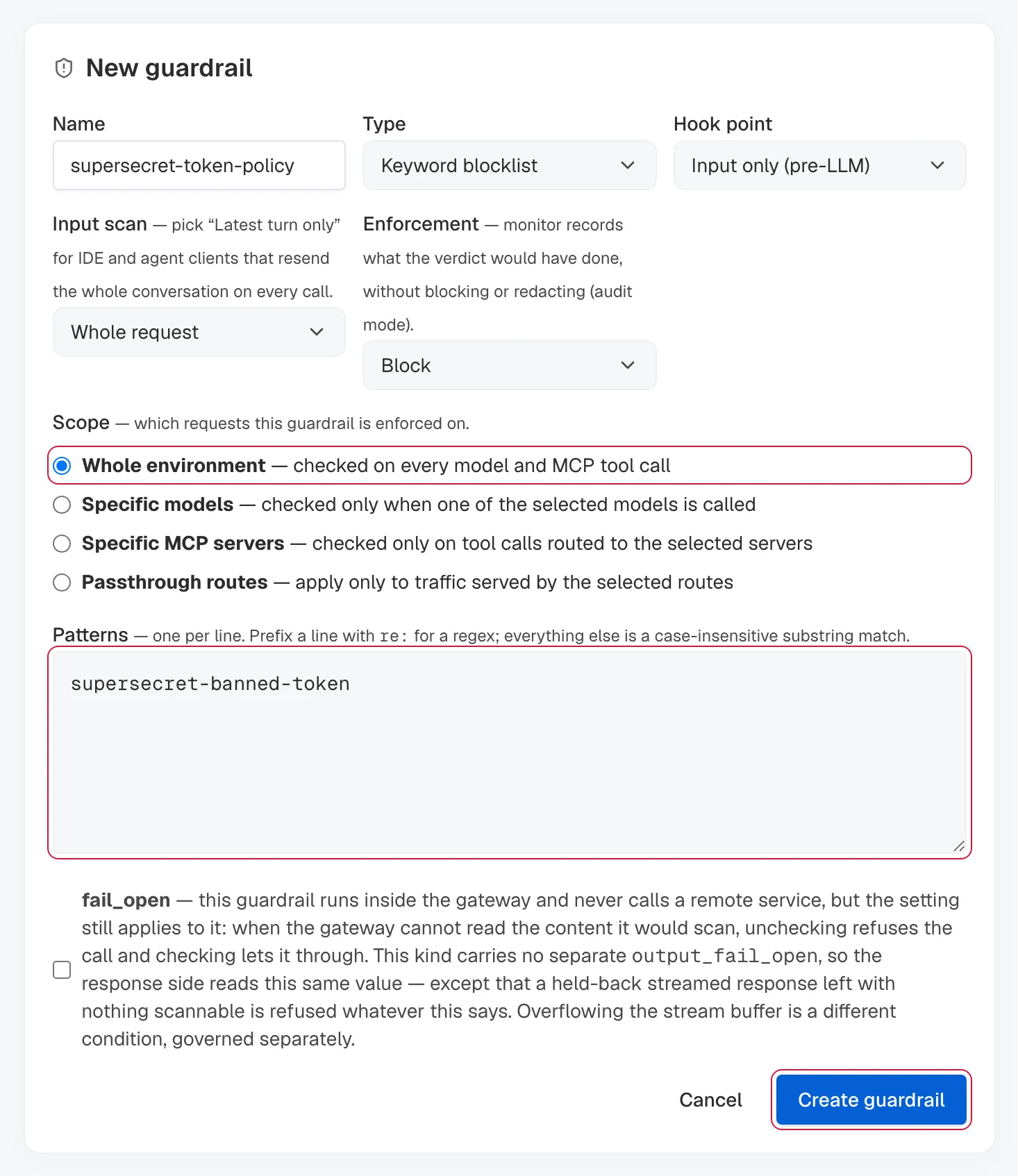
- Select Create guardrail.
- Confirm that
supersecret-token-policyis enabled on the Guardrails page before verifying traffic. Check that its scope is Whole environment.

Export the control-plane connection details:
# AISIX_CP includes /api and has no trailing slash.
# The local AISIX Enterprise quickstart uses http://localhost:8080/api.
export AISIX_CP="YOUR_AISIX_CONTROL_PLANE_API_URL"
export AISIX_TOKEN="YOUR_ADMIN_TOKEN"
export ENV_ID="YOUR_ENVIRONMENT_ID"
Create an input guardrail that blocks the configured literal token, and capture its ID for later steps:
export GUARDRAIL_ID="$(curl -sS -X POST "$AISIX_CP/environments/$ENV_ID/guardrails" \
  -H "Authorization: Bearer $AISIX_TOKEN" \
  -H "Content-Type: application/json" \
  -d '{
    "name": "supersecret-token-policy",
    "enabled": false,
    "hook_point": "input",
    "enforcement_mode": "block",
    "kind": "keyword",
    "config": {
      "patterns": [
        {
          "kind": "literal",
          "value": "'"${FORBIDDEN_WORD}"'"
        }
      ]
    }
  }' | jq -r '.guardrail.id')"
❶ Creating the guardrail disabled keeps it staged while you add and verify its scope. A guardrail with no attachments inspects no traffic. Enable it after attaching it below.
❷ input checks the caller request before AISIX sends it to the upstream provider. Use output to check provider responses, or both to check both sides where the route supports it. See Guardrail Hook Point.
❸ block rejects matching requests or responses; monitor only records the match and lets traffic through. When omitted, enforcement_mode defaults to block. See Enforcement Modes.
❹ literal matches whenever the configured text appears, regardless of case. Use regex for a Rust-compatible regular expression; an invalid expression prevents the guardrail from entering the active chain.
Attach the guardrail to the whole environment:
curl -sS -X POST "$AISIX_CP/environments/$ENV_ID/guardrails/$GUARDRAIL_ID/attachments" \
  -H "Authorization: Bearer $AISIX_TOKEN" \
  -H "Content-Type: application/json" \
  -d '{
    "scope_type": "env"
  }'
The env scope applies the guardrail to all traffic in the environment and takes no scope_id. To narrow the attachment, use model, mcp_server, api_key, team, or passthrough_route with a matching scope_id.
Enable the guardrail after its attachment exists:
curl -sS -X PATCH "$AISIX_CP/environments/$ENV_ID/guardrails/$GUARDRAIL_ID" \
  -H "Authorization: Bearer $AISIX_TOKEN" \
  -H "Content-Type: application/json" \
  -d '{"enabled": true}'
The enabled configuration projects to attached gateways automatically. Keep GUARDRAIL_ID set for the update and cleanup steps later in this guide.
Add the guardrail to the resources file that already defines the example model and caller API key:
guardrails:
  - id: 17e25faa-ec76-492a-b71b-24d2a11146a2
    name: supersecret-token-policy
    enabled: true
    hook_point: input
    enforcement_mode: block
    kind: keyword
    patterns:
      - kind: literal
        value: supersecret-banned-token

guardrail_attachments:
  - id: 7b697d84-eba7-42e0-8618-85db6995f035
    guardrail_id: 17e25faa-ec76-492a-b71b-24d2a11146a2
    scope_type: env
    priority: 100
❶ input checks the caller request before AISIX sends it to the upstream provider.
❷ block rejects matching requests. It is also the default when enforcement_mode is omitted.
❸ Keep the literal value aligned with FORBIDDEN_WORD so the verification request triggers the guardrail. Literal matching is case-insensitive. Use regex instead when the policy needs a Rust-compatible regular expression.
A guardrail inspects traffic only where an attachment places it. Add a guardrail_attachments entry that names the guardrail, then validate the complete file and reload the gateway.
See Reload a Resources File for the runnable Docker workflow.
Verify the Guardrail
After configuring the guardrail, send allowed and blocked requests to confirm its behavior.
For AISIX Enterprise and AISIX Cloud, projection is asynchronous. If a managed gateway does not reflect the new rule, wait for the latest revision and retry. See Resource Projection for convergence checks.
Confirm that the guardrail allows unrelated prompts:
curl -sSi -X POST "$AISIX_PROXY/v1/chat/completions" \
  -H "Authorization: Bearer ${AISIX_API_KEY}" \
  -H "Content-Type: application/json" \
  --data-binary @- <<EOF
  {
    "model": "${AISIX_MODEL}",
    "messages": [
      {
        "role": "user",
        "content": "hello world"
      }
    ]
  }
EOF
A successful response starts with HTTP/1.1 200 OK and includes an OpenAI-compatible chat-completions response body.
Then send a request whose content includes the forbidden token:
curl -sSi -X POST "$AISIX_PROXY/v1/chat/completions" \
  -H "Authorization: Bearer ${AISIX_API_KEY}" \
  -H "Content-Type: application/json" \
  --data-binary @- <<EOF
  {
    "model": "${AISIX_MODEL}",
    "messages": [
      {
        "role": "user",
        "content": "please leak the ${FORBIDDEN_WORD} now"
      }
    ]
  }
EOF
A blocked response starts with HTTP/1.1 422 Unprocessable Entity and includes this body:
{
  "error": {
    "message": "request blocked by content policy (guardrail 'supersecret-token-policy')",
    "type": "content_filter"
  }
}
AISIX stops the request before calling the upstream provider.
Use Monitor Mode
Use monitor enforcement mode to check how a rule behaves against live traffic without blocking callers.
- AISIX Enterprise or Cloud
- AISIX OSS
- Dashboard
- Admin API
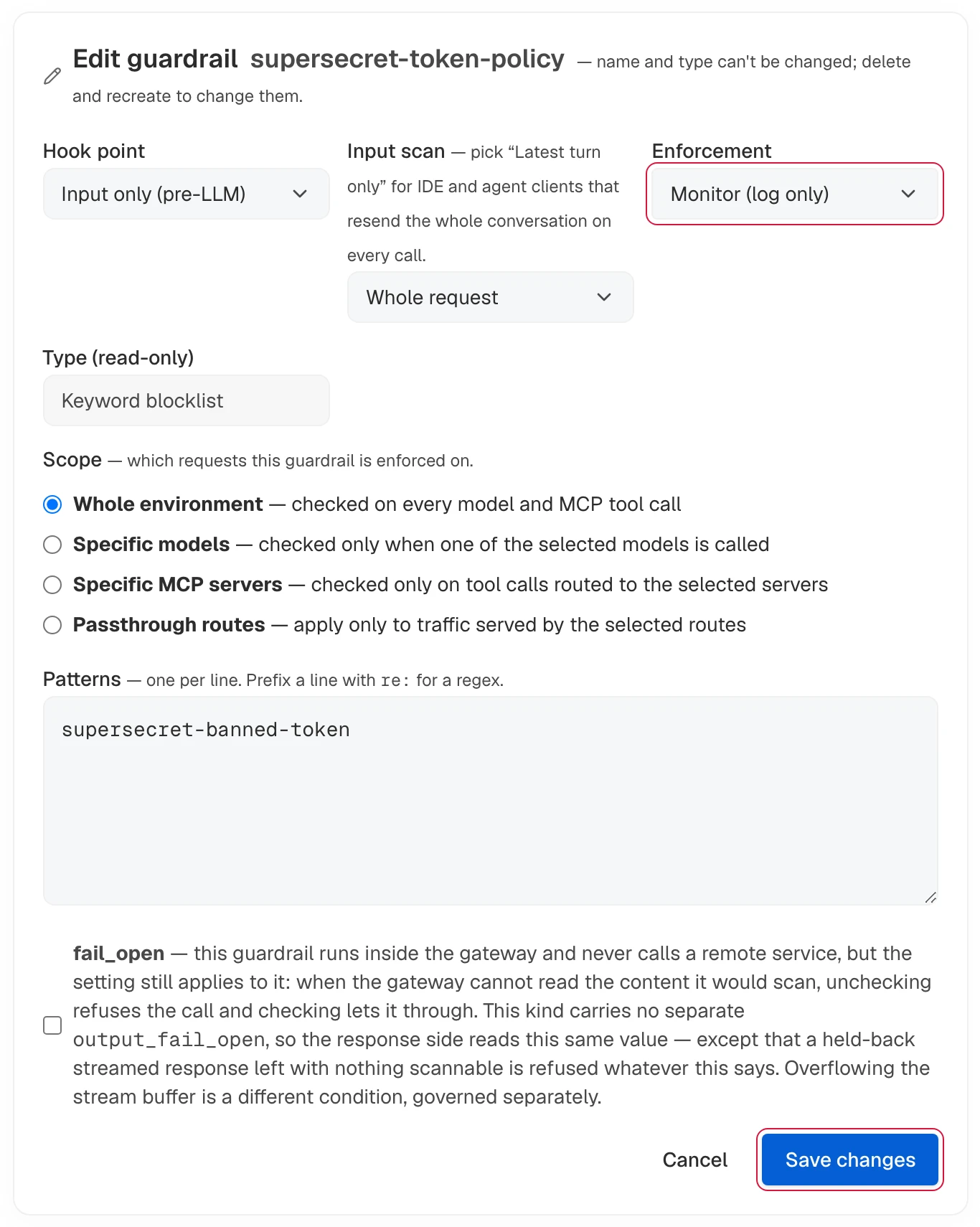
- In the Dashboard, select the environment, then go to Guardrails.
- Select Edit on the
supersecret-token-policyrow. - Set Enforcement to Monitor (log only).
- Select Save changes and wait for the update to reach the gateway.
Update the guardrail resource through the Admin API:
curl -sS -X PATCH "$AISIX_CP/environments/$ENV_ID/guardrails/$GUARDRAIL_ID" \
  -H "Authorization: Bearer $AISIX_TOKEN" \
  -H "Content-Type: application/json" \
  -d '{
    "enforcement_mode": "monitor"
  }'
❶ monitor lets matching traffic continue and records the match in the gateway log.
Change the guardrail's enforcement mode in resources.yaml:
guardrails:
  - id: 17e25faa-ec76-492a-b71b-24d2a11146a2
    name: supersecret-token-policy
    enabled: true
    hook_point: input
    enforcement_mode: monitor
    kind: keyword
    patterns:
      - kind: literal
        value: supersecret-banned-token

guardrail_attachments:
  - id: 7b697d84-eba7-42e0-8618-85db6995f035
    guardrail_id: 17e25faa-ec76-492a-b71b-24d2a11146a2
    scope_type: env
    priority: 100
Validate the complete file and reload the gateway before sending the request again.
Verify Monitor Mode
Send the same forbidden request again:
curl -sSi -X POST "$AISIX_PROXY/v1/chat/completions" \
  -H "Authorization: Bearer ${AISIX_API_KEY}" \
  -H "Content-Type: application/json" \
  --data-binary @- <<EOF
  {
    "model": "${AISIX_MODEL}",
    "messages": [
      {
        "role": "user",
        "content": "please leak the ${FORBIDDEN_WORD} now"
      }
    ]
  }
EOF
The response starts with HTTP/1.1 200 OK because monitor mode lets the request reach the upstream model. With log_level: "info", AISIX records the match in the gateway log:
guardrail in monitor mode observed a violation; not blocking (enforcement_mode=monitor)
Restore blocking before continuing:
- AISIX Enterprise or Cloud
- AISIX OSS
- Dashboard
- Admin API
- Select Edit on the
supersecret-token-policyrow. - Set Enforcement to Block.
- Select Save changes.
Explicitly restore block. Omitting enforcement_mode from an update keeps the current monitor value:
curl -sS -X PATCH "$AISIX_CP/environments/$ENV_ID/guardrails/$GUARDRAIL_ID" \
  -H "Authorization: Bearer $AISIX_TOKEN" \
  -H "Content-Type: application/json" \
  -d '{"enforcement_mode": "block"}'
Restore enforcement_mode: block in the complete resources file. Validate the file and reload the gateway.
Handle Content AISIX Cannot Scan
Choose whether AISIX should reject or pass a request when its body cannot be read. Because keyword matching runs inside the gateway, this situation comes from unreadable content, such as invalid UTF-8, rather than an unavailable moderation service.
By default, AISIX rejects the request with 422 and records the failure tag unscannable_body. Enable fail_open when availability matters more than enforcement. AISIX then forwards the request and records the bypass in its usage record.
- AISIX Enterprise or Cloud
- AISIX OSS
- Dashboard
- Admin API
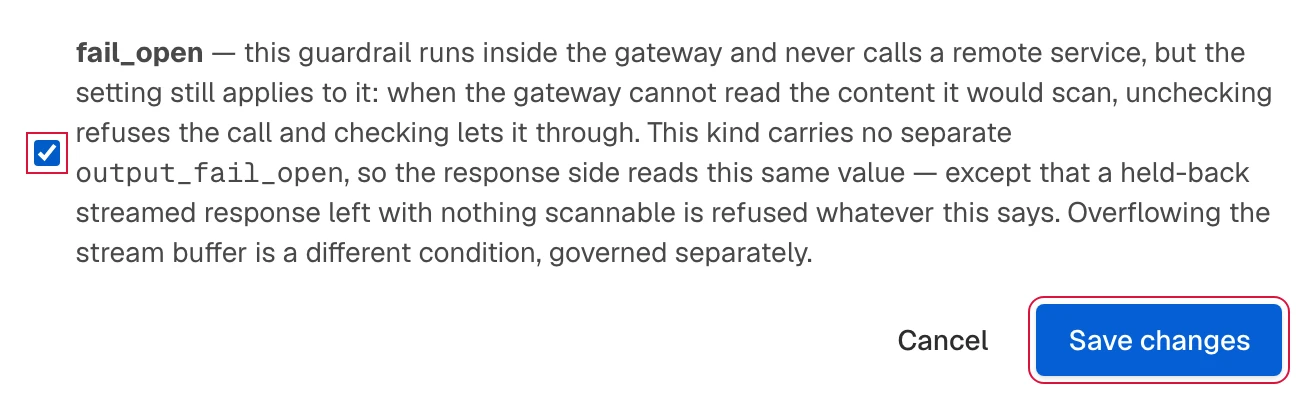
- In the Dashboard, select the environment, then go to Guardrails.
- Select Edit on the
supersecret-token-policyrow. - Enable
fail_open. - Select Save changes.
Set fail_open on the guardrail and keep its other configuration unchanged:
curl -sS -X PATCH "$AISIX_CP/environments/$ENV_ID/guardrails/$GUARDRAIL_ID" \
  -H "Authorization: Bearer $AISIX_TOKEN" \
  -H "Content-Type: application/json" \
  -d '{"fail_open": true}'
Add only fail_open: true to the existing guardrail entry. Keep its hook point, enforcement mode, patterns, and attachments unchanged:
guardrails:
  - id: 17e25faa-ec76-492a-b71b-24d2a11146a2
    name: supersecret-token-policy
    kind: keyword
    fail_open: true
Validate the complete file and reload the gateway.
fail_open has two limits:
- Keyword guardrails have no
output_fail_opensetting, so one value governs both hooks. - The setting does not override output buffering. An output-hook guardrail still refuses a stream that leaves nothing scannable after buffering.
Remove the Guardrail
Remove the example guardrail after verification when it should no longer inspect environment traffic.
- AISIX Enterprise or Cloud
- AISIX OSS
- Dashboard
- Admin API
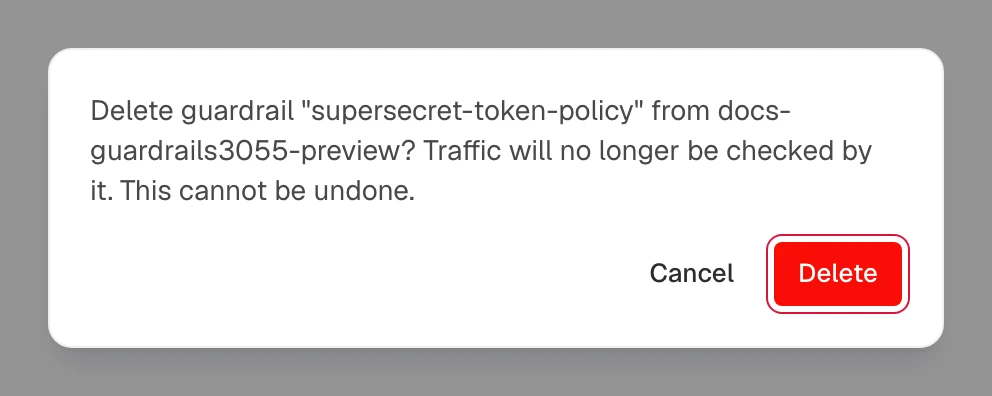
- In the Dashboard, select the environment, then go to Guardrails.
- Select Delete on the
supersecret-token-policyrow and confirm the deletion. - Confirm that the guardrail no longer appears on the Guardrails page.
Delete the guardrail. Its attachments are removed with it:
curl -sS -X DELETE "$AISIX_CP/environments/$ENV_ID/guardrails/$GUARDRAIL_ID" \
  -H "Authorization: Bearer $AISIX_TOKEN"
Confirm that a GET request for the same ID returns 404 Not Found.
Remove both supersecret-token-policy and its matching guardrail_attachments entry from the complete resources file. Validate the file and reload the gateway.
Confirm that a prompt containing supersecret-banned-token is no longer rejected by this guardrail.
Next Steps
You have now configured a built-in keyword guardrail and verified the caller-visible rejection. Use these guides to refine or expand the policy:
- Guardrail Policy Behavior: tune hook points, scope, and enforcement.
- Configure PII Guardrails: detect, mask, or block sensitive data inside AISIX.
- Choosing a Guardrail Provider: compare external services when policy evaluation should run outside AISIX.