
Set Up MCP Gateway
AISIX MCP Gateway places registered MCP servers behind one /mcp endpoint and enforces which tools each caller can use. This lets applications reach approved tools through AISIX without connecting to each upstream server directly.
Start the local Everything test server, register it with AISIX, grant its echo tool to one caller key, then verify both allowed and denied calls.
Prerequisites
Before starting, prepare the following:
- For AISIX Enterprise, complete the AISIX Enterprise getting-started guide, then keep its shell and
aisix-dpgateway running. For AISIX Cloud, obtain an environment, attached gateway, caller API key, and gateway URL from your organization. - For Dashboard workflows, sign in with permission to create or submit MCP servers and update caller API keys. For Admin API workflows, obtain a write-scoped token from an identity allowed to manage MCP servers and API keys.
- For the open-source AISIX gateway, complete the AISIX OSS getting-started guide, then remain in its shell and working directory with the
aisix-quickstartgateway running. - Docker, cURL, and jq.
Start an MCP Test Server
The example runs the official MCP Everything test server in Docker. The server and your existing gateway join a temporary Docker network, so the gateway can reach the server without a restart. Use the Everything server only for local testing: it has no authentication and includes a diagnostic tool that can return its process environment. The container used here receives no secrets. Stop and remove it after finishing the guide.
Set the gateway container name for your configuration path.
For AISIX Enterprise or AISIX Cloud:
export AISIX_GATEWAY_CONTAINER="aisix-dp"
For the open-source AISIX gateway:
export AISIX_GATEWAY_CONTAINER="aisix-quickstart"
Create a temporary network and connect the running gateway to it:
docker network create aisix-mcp
docker network connect aisix-mcp "$AISIX_GATEWAY_CONTAINER"
Start the Everything server on the same network:
docker run -d --name aisix-mcp-everything \
  --network aisix-mcp \
  node:22-alpine \
  sh -c 'npx -y @modelcontextprotocol/server-everything@2026.7.4 streamableHttp'
Wait until the server is ready:
for attempt in $(seq 1 120); do
  docker logs aisix-mcp-everything 2>&1 | grep -q "listening on port 3001" && break
  sleep 1
done

docker logs aisix-mcp-everything 2>&1 | grep "listening on port 3001"
The final command prints a log line confirming that port 3001 is ready. From the gateway container, the MCP endpoint is available at http://aisix-mcp-everything:3001/mcp.
Register the Server and Grant a Tool
Register the server using the management path for your deployment. Both paths name the server everything and grant only its echo tool to the existing quickstart caller.
- AISIX Enterprise or Cloud
- AISIX OSS
- Dashboard
- Admin API
- Open MCP servers and select New MCP server. If your role allows only submissions, select Submit MCP server.
- Keep MCP server selected. Enter
everythingas the name andhttp://aisix-mcp-everything:3001/mcpas the URL. - Keep Authentication set to None and Enabled selected. Under Available in environments, select the environment served by the test gateway.
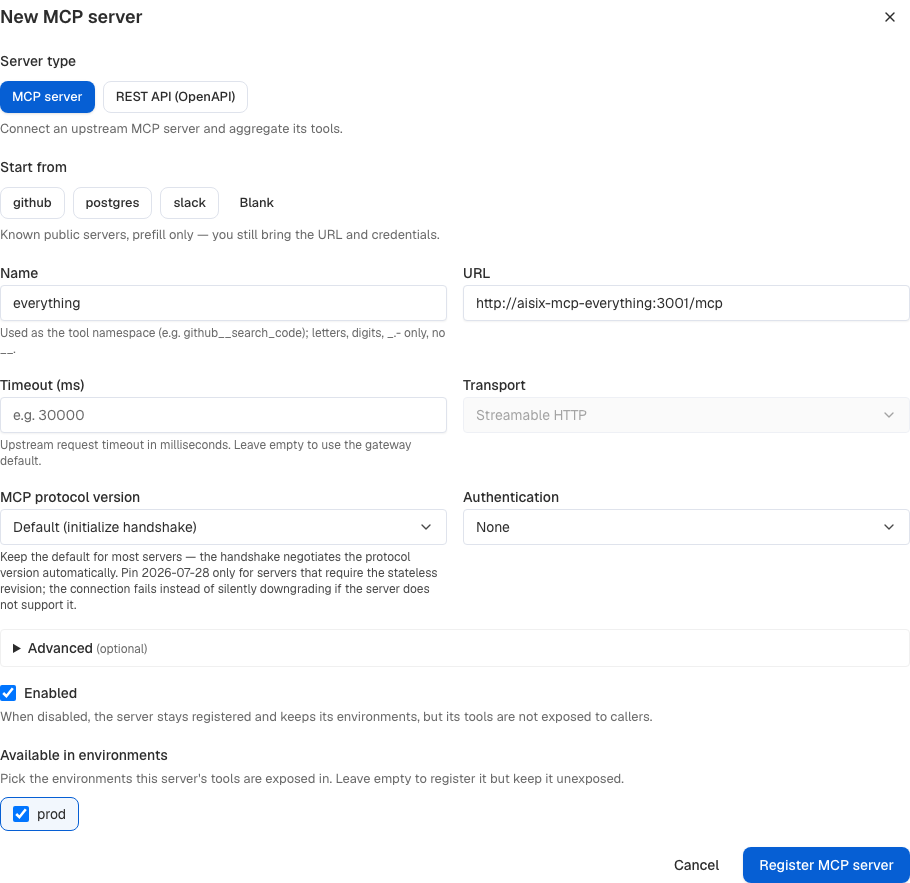
- Select Register MCP server, or Submit MCP server for a submission-only role. If you submitted it, wait for an authorized operator to approve it. Confirm that the row shows Approved, Enabled, and the selected environment.

- Follow Control Tool Access to grant
everything__echoto the caller key.
Export the plaintext caller key before verifying access:
export AISIX_MCP_KEY="YOUR_CALLER_API_KEY"
Register the test server and allow it in the quickstart environment:
MCP_SERVER_RESPONSE=$(curl -fsS -X POST "$AISIX_CP/mcp_servers" \
  -H "Authorization: Bearer $AISIX_TOKEN" \
  -H "Content-Type: application/json" \
  --data-binary @- <<EOF
{
  "name": "everything",
  "type": "mcp",
  "url": "http://aisix-mcp-everything:3001/mcp",
  "auth_type": "none",
  "allowed_environments": ["${ENV_ID}"]
}
EOF
)

export MCP_SERVER_ID=$(echo "$MCP_SERVER_RESPONSE" | jq -er '.mcp_server.id')
echo "$MCP_SERVER_RESPONSE" | jq
❶ name becomes the tool namespace.
❷ allowed_environments controls which environments receive this organization-level resource.
A write-scoped token from an identity allowed to manage MCP servers and API keys approves the server immediately. The control plane then projects it to the attached gateway.
Grant the everything__echo tool to the caller API key created by the quickstart:
curl -fsS -X PATCH \
  "$AISIX_CP/environments/$ENV_ID/api_keys/$API_KEY_ID" \
  -H "Authorization: Bearer $AISIX_TOKEN" \
  -H "Content-Type: application/json" \
  -d '{"mcp_access":{"allow":["everything__echo"]}}' | jq

export AISIX_MCP_KEY="$AISIX_API_KEY"
The partial update retains the key's existing model access. AISIX_MCP_KEY uses the plaintext caller key returned by the quickstart.
In the existing resources.yaml, add mcp_access to the quickstart caller and add the mcp_servers collection. Keep the existing provider key and model entries unchanged:
api_keys:
  - id: 85b60b85-09dc-40fc-a403-5c7c8beb4e8d
    display_name: quickstart-caller
    key_hash: ${CALLER_API_KEY_SHA256}
    allowed_models:
      - gpt-4o-mini
    mcp_access:
      allow:
        - everything__echo

mcp_servers:
  - id: a3db3dd9-e6b0-42f9-a921-fd33f048175f
    name: everything
    type: mcp
    url: http://aisix-mcp-everything:3001/mcp
    auth_type: none
❶ mcp_access.allow grants the quickstart caller only the namespaced echo tool.
❷ The server name becomes the tool namespace, so the upstream echo tool is exposed as everything__echo.
Validate the complete file inside the running gateway container, then reload it without restarting the container:
docker exec aisix-quickstart \
  aisix validate --resources /etc/aisix/resources.yaml

docker kill --signal HUP aisix-quickstart

export AISIX_MCP_KEY="$CALLER_API_KEY"
If the updated file is invalid, the gateway keeps serving the last valid configuration. Check docker logs aisix-quickstart for the rejected load.
Verify MCP Tool Access with HTTP
Before introducing an editor, run a protocol-level check that isolates the gateway configuration, caller grant, and upstream server. The verification commands are the same for the control-plane and resources-file paths. They use the existing AISIX_PROXY value and the caller credential saved in AISIX_MCP_KEY.
An MCP client performs the initialization exchange automatically. Send an initialization request directly to verify the endpoint:
curl -fsS -X POST "$AISIX_PROXY/mcp" \
  -H "Authorization: Bearer $AISIX_MCP_KEY" \
  -H "Content-Type: application/json" \
  -H "Accept: application/json, text/event-stream" \
  -d '{
    "jsonrpc": "2.0",
    "id": 1,
    "method": "initialize",
    "params": {
      "protocolVersion": "2025-11-25",
      "capabilities": {},
      "clientInfo": {"name": "aisix-setup", "version": "1.0"}
    }
  }' | jq -e '.result.capabilities.tools'
A successful response includes the server's tools capability. Complete the initialization exchange:
curl -fsS -o /dev/null -w "%{http_code}\n" \
  -X POST "$AISIX_PROXY/mcp" \
  -H "Authorization: Bearer $AISIX_MCP_KEY" \
  -H "MCP-Protocol-Version: 2025-11-25" \
  -H "Content-Type: application/json" \
  -H "Accept: application/json, text/event-stream" \
  -d '{
    "jsonrpc": "2.0",
    "method": "notifications/initialized"
  }'
The notification returns HTTP 202 with no response body.
The control plane can take a few seconds to project configuration to a gateway. Poll the tool list for up to 90 seconds, then verify that only the allowed tool is visible:
for attempt in $(seq 1 45); do
  TOOLS_RESPONSE=$(curl -fsS -X POST "$AISIX_PROXY/mcp" \
    -H "Authorization: Bearer $AISIX_MCP_KEY" \
    -H "MCP-Protocol-Version: 2025-11-25" \
    -H "Content-Type: application/json" \
    -H "Accept: application/json, text/event-stream" \
    -d '{
      "jsonrpc": "2.0",
      "id": 2,
      "method": "tools/list",
      "params": {}
    }') || true

  if echo "$TOOLS_RESPONSE" | jq -e \
    '.result.tools | map(.name) == ["everything__echo"]' >/dev/null 2>&1; then
    break
  fi
  sleep 2
done

echo "$TOOLS_RESPONSE" | jq -e \
  '.result.tools | map(.name) == ["everything__echo"]'
The final command prints true. Call the permitted tool:
curl -fsS -X POST "$AISIX_PROXY/mcp" \
  -H "Authorization: Bearer $AISIX_MCP_KEY" \
  -H "MCP-Protocol-Version: 2025-11-25" \
  -H "Content-Type: application/json" \
  -H "Accept: application/json, text/event-stream" \
  -d '{
    "jsonrpc": "2.0",
    "id": 3,
    "method": "tools/call",
    "params": {
      "name": "everything__echo",
      "arguments": {"message": "hello through AISIX"}
    }
  }' | jq -e \
  '.result.content[] | select(.text == "Echo: hello through AISIX")'
The command prints the matching tool-result content block. To verify that the allowlist is enforced, attempt to call another tool from the same upstream server:
curl -fsS -X POST "$AISIX_PROXY/mcp" \
  -H "Authorization: Bearer $AISIX_MCP_KEY" \
  -H "MCP-Protocol-Version: 2025-11-25" \
  -H "Content-Type: application/json" \
  -H "Accept: application/json, text/event-stream" \
  -d '{
    "jsonrpc": "2.0",
    "id": 4,
    "method": "tools/call",
    "params": {
      "name": "everything__get-sum",
      "arguments": {"a": 1, "b": 2}
    }
  }' | jq -e \
  '.error.message == "tool '\''everything__get-sum'\'' is not available"'
The command prints true. AISIX rejects the call without sending it upstream.
Adapt the Setup for Your MCP Server
Replace the test server URL with a Streamable HTTP endpoint reachable from the gateway. Keep type: mcp, and configure the upstream credential with auth_type and its related fields. See Upstream Authentication.
For an open-source AISIX gateway, validate the complete resources file and send SIGHUP when the running gateway already has every referenced environment variable. If you add or change an environment variable, recreate the container with the new value. See Reload a Resources File.
The control plane stores upstream credentials and projects the approved configuration to attached gateways. To let members submit servers without publishing them directly, use Review and Approve MCP Servers.
Pin the MCP Protocol Revision
The gateway opens the upstream session with the MCP initialize handshake, which negotiates the protocol revision with the server. Keep that default for most servers, including servers that implement the stateless 2026-07-28 revision while remaining backward compatible.
Set protocol_version to 2026-07-28 only for a server that requires that revision, which replaces the handshake with an on-demand server/discover call. A pinned server never falls back: if the upstream does not support the pinned revision, the connection fails instead of quietly negotiating an older one. The setting applies to type: mcp servers only, since an openapi server has no upstream MCP session.
- AISIX Enterprise or Cloud
- AISIX OSS
- Dashboard
- Admin API
- Open MCP servers and select Edit on the server.
- Set MCP protocol version to 2026-07-28 (stateless).
- Select Save.
To return to negotiation, select the default handshake option and save again.
Pin the registered server by resource ID:
curl -fsS -X PATCH "$AISIX_CP/mcp_servers/$MCP_SERVER_ID" \
  -H "Authorization: Bearer $AISIX_TOKEN" \
  -H "Content-Type: application/json" \
  -d '{"protocol_version":"2026-07-28"}' | jq
Send "protocol_version": null to remove the pin and return the server to the handshake.
Add the field to the existing server entry, then validate and reload the complete resources file:
mcp_servers:
  - id: a3db3dd9-e6b0-42f9-a921-fd33f048175f
    name: everything
    type: mcp
    url: http://aisix-mcp-everything:3001/mcp
    auth_type: none
    protocol_version: "2026-07-28"
Upstream Message Size Limit
A single message from an upstream MCP server can be at most 64 MiB. This limit applies to an application/json response body and to each SSE event, including one tools/call result or one tools/list page.
The gateway rejects a larger message instead of buffering it. A tools/call returns the JSON-RPC error upstream MCP server '<name>' failed to call tool; a failed tools/list omits that server's tools from the list. In both cases, the gateway log names the exceeded size limit.
The limit is fixed and applies only to type: mcp servers.
Clean Up
Keep the server and caller grant if you plan to continue with the other MCP Gateway guides. Otherwise, remove the resources added through your management path.
- AISIX Enterprise or Cloud
- AISIX OSS
- Dashboard
- Admin API
- Open API keys, edit the caller key, and clear its MCP tool grant.
- Select Save changes.
- Open MCP servers, select Delete on
everything, and confirm.
Clear the caller's tool grant and delete the server:
curl -fsS -X PATCH \
  "$AISIX_CP/environments/$ENV_ID/api_keys/$API_KEY_ID" \
  -H "Authorization: Bearer $AISIX_TOKEN" \
  -H "Content-Type: application/json" \
  -d '{"mcp_access":{"allow":[]}}' | jq

curl -fsS -X DELETE "$AISIX_CP/mcp_servers/$MCP_SERVER_ID" \
  -H "Authorization: Bearer $AISIX_TOKEN"
Remove the mcp_access and mcp_servers additions from resources.yaml, validate the file, and send SIGHUP again.
Remove the test server and temporary network:
docker rm -f aisix-mcp-everything
docker network disconnect aisix-mcp "$AISIX_GATEWAY_CONTAINER"
docker network rm aisix-mcp
Next Steps
You have now registered an MCP server, granted one tool, and verified both allowed and denied tool calls. Use these guides to extend the setup:
- Connect Cursor to MCP Gateway: configure Cursor and verify a complete tool call.
- Connect VS Code to MCP Gateway: configure VS Code and verify a complete tool call.
- Expose a REST API as MCP tools: generate tools from an OpenAPI document.
- Configure upstream authentication: use a bearer token, API key, or OAuth client credentials.
- Control tool access: grant exact tool names, one server's tools, or every registered tool.
- Apply rate limits and budgets: govern MCP tool calls with caller and server limits.
- Configure guardrails: inspect tool arguments and results.