JWT Authentication
AISIX can authenticate callers with short-lived JSON Web Tokens (JWTs) instead of long-lived caller API keys. A trust provider verifies each token against a JSON Web Key Set (JWKS) or a shared secret.
Each verified identity maps to a caller API key and inherits its model access, rate limits, and usage attribution. In AISIX Enterprise and AISIX Cloud, matching budgets also apply.
JWKS-based providers include Keycloak, Entra ID, Okta, Auth0, and other OIDC-compliant identity providers. AISIX can also verify HMAC-signed tokens from an issuer that shares a secret with the gateway. In both cases, AISIX verifies the token's signature and claims on every request. The agent does not need the caller API key's plaintext value.
Dashboard single sign-on for human operators and gateway JWT authentication for agent requests are independent. Configuring one does not affect the other.
How It Works
When an environment has at least one enabled trust provider, AISIX inspects each request's bearer token:
- The JWT's issuer claim selects an enabled trust provider. An issuer match must be exact. Provider Selection describes the fallback rules for shared-secret providers that do not pin an issuer.
- AISIX verifies the token's signature against the provider's JSON Web Key Set (JWKS), or against its shared secret when the provider has one, and validates the registered claims:
exp(expiration, always required),aud(audience, when the provider configures accepted audiences), andnbf(not-before) when present. - The provider's
required_scopesandbound_claimsrequirements are enforced. - The provider's identity claim,
subby default, selects a caller key with the same subject and provider binding. The request then runs as that key. Binding both values prevents another trusted provider from asserting the same identity. - If no key binds the identity directly, claim mappings can select an existing policy key from the verified claims. A token matching neither a binding nor a mapping is rejected.
AISIX rejects tokens that fail verification or do not map to a caller API key before the request reaches a provider, MCP server, or vector store. For a JWKS provider, signing-key rotation at the identity provider is picked up automatically, with no gateway restart.
Prerequisites
Before starting, prepare the following:
- One of these configuration paths:
- AISIX Enterprise or AISIX Cloud with an environment and an attached gateway. Dashboard users need permission to manage OIDC providers and caller API keys. Admin API users need a write-scoped token from an identity with the same provider and API-key permissions. For AISIX Enterprise, follow the AISIX Enterprise getting-started guide. To request AISIX Cloud access, contact API7.
- An open-source AISIX gateway that loads a declarative
resources.yamlfile.
- A system that issues JWT tokens to your agents, with the verification material for the method it uses:
- For JWKS verification, prepare the expected issuer and either its JWKS endpoint URL or its OIDC discovery document (
<issuer>/.well-known/openid-configuration). - Ensure that a JWKS provider signs tokens with an asymmetric algorithm supported by AISIX: RSA (
RS256,RS384,RS512,PS256,PS384, orPS512), ECDSA (ES256orES384), or EdDSA. AISIX rejects HMAC-signed tokens from a JWKS provider. - For HMAC signing, prepare the shared secret. It must contain at least 32 UTF-8 bytes. The expected issuer and audiences are optional. Configure this method as described in Shared-Secret (HMAC) Providers.
- For JWKS verification, prepare the expected issuer and either its JWKS endpoint URL or its OIDC discovery document (
- A model alias the caller should be allowed to use and, for the Admin API workflow, its model ID. If you have not created one yet, configure Provider Keys and Model Aliases first.
curlandjq. The open-source AISIX gateway also requires OpenSSL for the credential-generation command shown below.
Configure JWT Authentication
Configure the trust provider and identity-bound caller API key using the management path for your deployment. Replace the example issuer, audience, subject, and model values with those from your issuing system and gateway.
- AISIX Enterprise or Cloud
- AISIX OSS
Register the provider and bind the caller key in the same environment.
- Dashboard
- Admin API
Open the environment and select OIDC providers, then New OIDC provider.
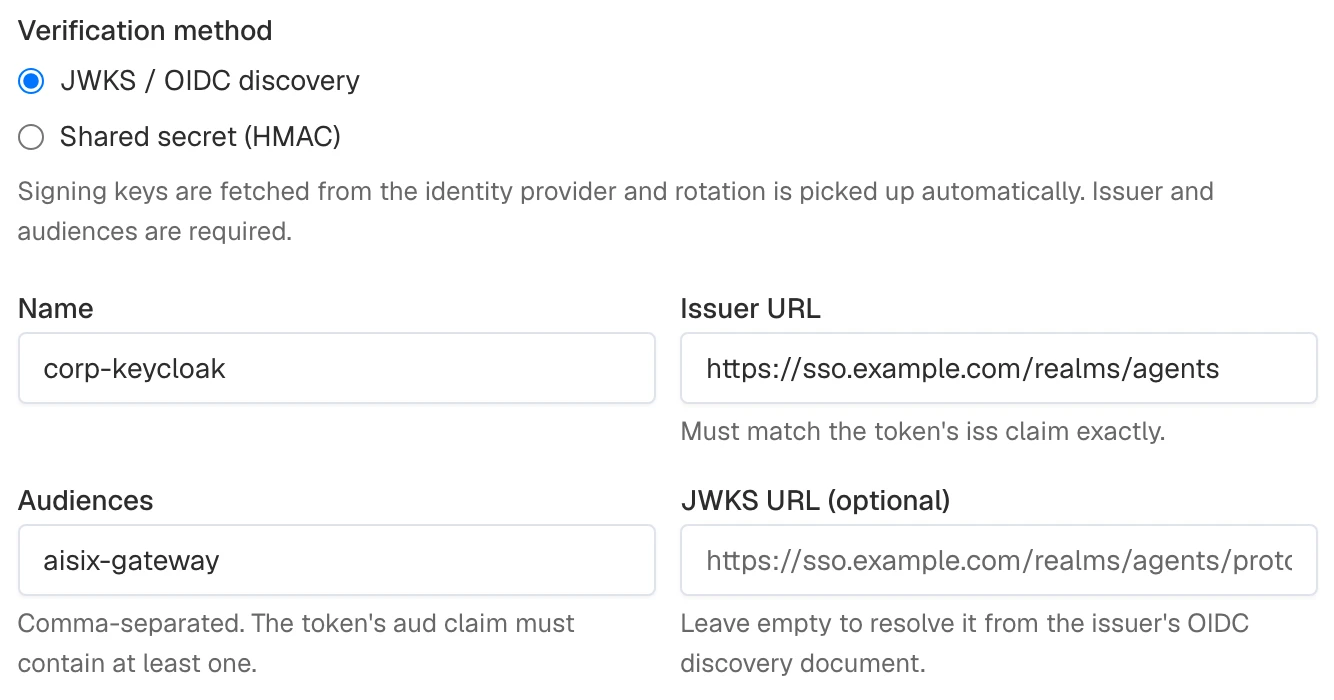
- Keep JWKS / OIDC discovery under Verification method.
- Set Name to
corp-keycloakand Issuer URL tohttps://sso.example.com/realms/agents. - Enter
aisix-gatewayin Audiences. Leave JWKS URL empty to use the issuer's discovery document.
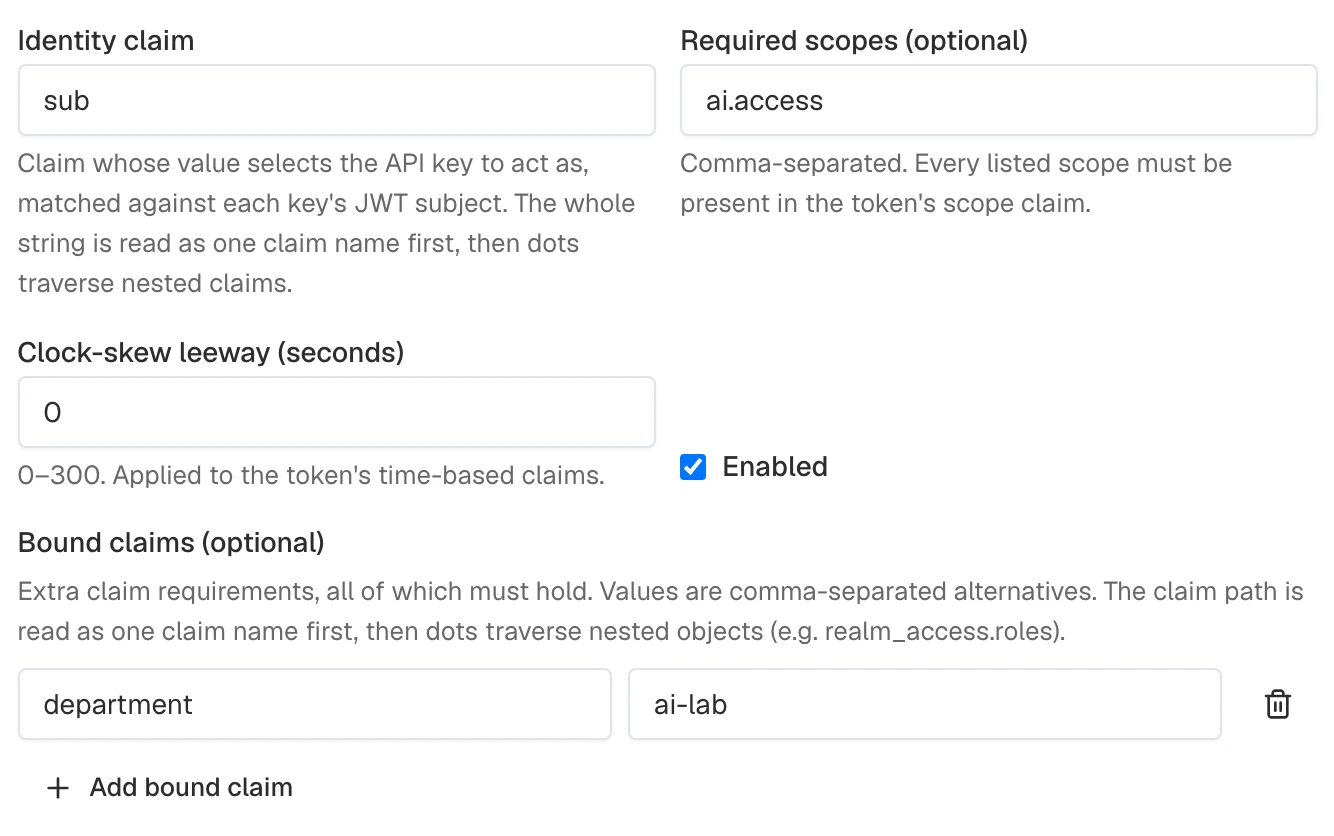
- Keep the default Identity claim of
sub. Enterai.accessin Required scopes (optional). - Under Bound claims (optional), select Add bound claim. Enter
departmentas the claim andai-labas the accepted value.
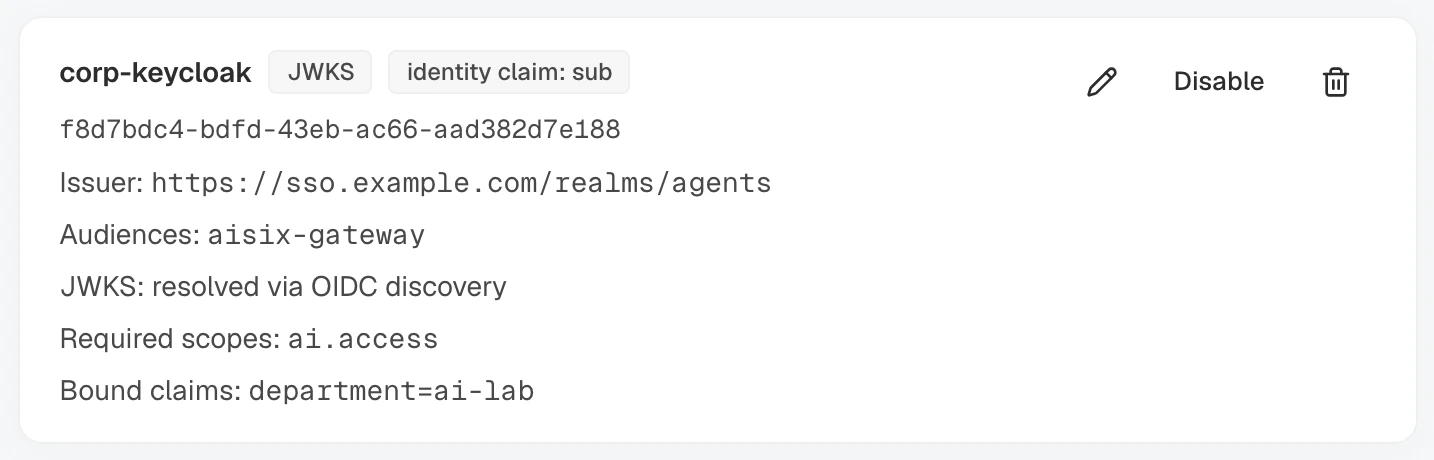
- Select Create provider. Confirm that the saved provider is enabled and shows the intended issuer and requirements.
Bind the caller identity:
- Open API keys. Select New API key to create
billing-agent, or Edit on an existing key. - For a new key or an existing selected-model key, select the model under Allowed models, retaining any other required access. An existing all-model key already grants it; keep that mode unchanged.
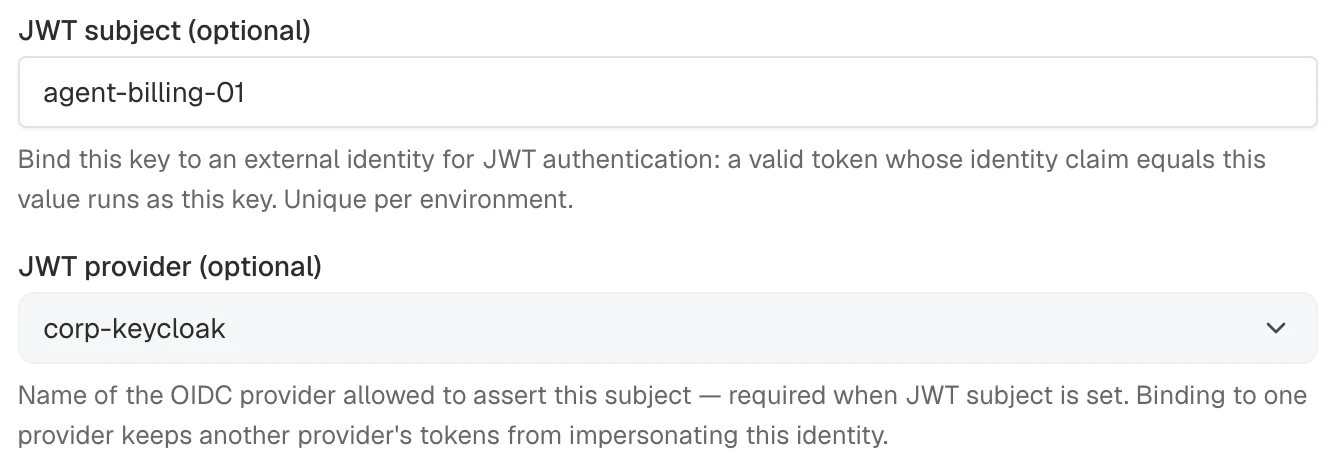
- Set JWT subject to
agent-billing-01and JWT provider tocorp-keycloaktogether.
- Select Create API key or Save changes. For a new key, save its plaintext if it will also be used for API-key authentication, then dismiss One-time view. JWT callers do not need that plaintext value.
To remove an existing binding, clear JWT subject, select Any enabled provider under JWT provider, and select Save changes. Both fields must be cleared together.
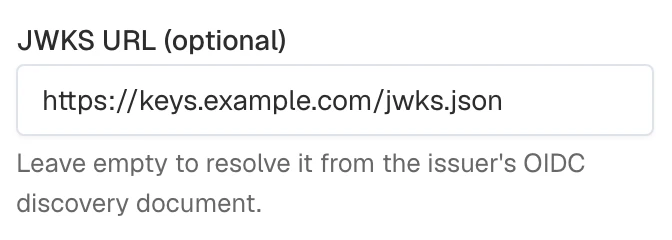
For an explicit signing-key endpoint, edit the provider and fill JWKS URL. Use this when discovery is unavailable or the keys are hosted on another origin:
Export the base URL, the admin token, the environment ID, and the model ID:
# AISIX_CP is the Admin API base URL; include /api and omit a trailing slash.
# The local AISIX Enterprise quickstart uses http://localhost:8080/api.
export AISIX_CP="YOUR_AISIX_CONTROL_PLANE_API_URL"
export AISIX_TOKEN="YOUR_ADMIN_TOKEN"
export ENV_ID="YOUR_ENVIRONMENT_ID"
export MODEL_ID="YOUR_MODEL_ID"
Register a Trust Provider
This example uses JWKS verification. Provide the issuer and at least one accepted audience:
OIDC_PROVIDER_RESPONSE=$(curl -sS -X POST "$AISIX_CP/environments/$ENV_ID/oidc_providers" \
  -H "Authorization: Bearer $AISIX_TOKEN" \
  -H "Content-Type: application/json" \
  -d '{
    "name": "corp-keycloak",
    "issuer": "https://sso.example.com/realms/agents",
    "audiences": ["aisix-gateway"],
    "required_scopes": ["ai.access"],
    "bound_claims": {
      "department": "ai-lab"
    }
  }')

export OIDC_PROVIDER_ID=$(printf '%s' "$OIDC_PROVIDER_RESPONSE" | jq -er '.oidc_provider.id')
printf '%s' "$OIDC_PROVIDER_RESPONSE" | jq
The response returns the created provider, including the defaults AISIX filled in:
{
  "oidc_provider": {
    "id": "b2c3d4e5-6789-4abc-def0-123456789abc",
    "env_id": "9be9891a-6a53-4bd8-a897-a03fe38a1ca5",
    "name": "corp-keycloak",
    "issuer": "https://sso.example.com/realms/agents",
    "audiences": ["aisix-gateway"],
    "identity_claim": "sub",
    "required_scopes": ["ai.access"],
    "bound_claims": {
      "department": "ai-lab"
    },
    "leeway_secs": 0,
    "enabled": true,
    "created_at": "2026-07-27T12:00:00Z",
    "updated_at": "2026-07-27T12:00:00Z"
  }
}
Bind a Caller API Key to an Identity
Create a caller API key with two identity fields set together:
jwt_subject: the external identity a verified token maps to. Set it to the value your token issuer puts in the claim named by the provider'sidentity_claim.jwt_provider: the name of the trust provider allowed to assert that subject. Only a token issued by this provider is ever mapped to the key.
curl -sS -X POST "$AISIX_CP/environments/$ENV_ID/api_keys" \
  -H "Authorization: Bearer $AISIX_TOKEN" \
  -H "Content-Type: application/json" \
  -d '{
    "display_name": "billing-agent",
    "allowed_models": ["'"$MODEL_ID"'"],
    "jwt_subject": "agent-billing-01",
    "jwt_provider": "corp-keycloak"
  }' | jq
The response contains the new key's metadata and one-time plaintext value. Store the plaintext only if the application will also use API-key authentication; JWT callers do not need it.
The jwt_provider and jwt_subject pair is unique within the environment, and both must be set together. Give each agent identity its own caller API key so model access, rate limits, and usage attribution apply independently. In AISIX Enterprise and AISIX Cloud, matching budgets apply to each identity.
For the open-source AISIX gateway, declare the OIDC provider and JWT-bound caller API key in resources.yaml. The model alias in allowed_models must also be defined in the file:
_format_version: "2"

provider_keys:
  - id: 83eba07c-0ad3-4b81-b760-247f2d978e95
    display_name: openai-prod
    provider: openai
    adapter: openai
    api_key: ${OPENAI_API_KEY}
    api_base: https://api.openai.com/v1

models:
  - id: b5d1e9b6-a895-4cc4-8812-95db86b857b0
    display_name: gpt-4o-prod
    provider: openai
    model_name: gpt-4o
    provider_key_id: 83eba07c-0ad3-4b81-b760-247f2d978e95

oidc_providers:
  - id: f1aac41c-d83d-41ef-b2d3-abae0b774fbe
    name: corp-keycloak
    issuer: https://sso.example.com/realms/agents
    audiences: ["aisix-gateway"]
    required_scopes: ["ai.access"]
    bound_claims:
      department: ai-lab

api_keys:
  - id: 733cfd25-85c2-45cb-a502-734de9b9bd97
    display_name: billing-agent
    key_hash: ${BILLING_AGENT_KEY_SHA256}
    allowed_models: ["gpt-4o-prod"]
    jwt_subject: agent-billing-01
    jwt_provider: corp-keycloak
❶ api_key supplies the model provider credential from OPENAI_API_KEY.
❷ key_hash reads the SHA-256 digest of the caller API key from BILLING_AGENT_KEY_SHA256.
AISIX requires the caller credential when loading any caller API key, even when the agent authenticates only with JWT tokens. Supply OPENAI_API_KEY and BILLING_AGENT_KEY_SHA256 to the gateway process. The plaintext caller key is a local intermediate for calculating the digest and does not need to be distributed to the agent:
export OPENAI_API_KEY="YOUR_PROVIDER_API_KEY"
BILLING_AGENT_KEY="$(openssl rand -hex 32)"
export BILLING_AGENT_KEY_SHA256="$(printf '%s' "$BILLING_AGENT_KEY" | openssl dgst -sha256 | awk '{print $NF}')"
Validate and load the file as described in the Resources File Reference. After it loads, use the same JWT request shown in the next section.
Authenticate a Request
Have the agent obtain a token from the issuing system. Set the model alias and token, then send the token on the proxy API exactly like a caller API key:
# AISIX_PROXY is the gateway origin; omit a trailing slash and endpoint path.
# The local quickstarts use http://127.0.0.1:3000.
export AISIX_PROXY="YOUR_AISIX_GATEWAY_URL"
export MODEL_ALIAS="YOUR_MODEL_ALIAS"
export AGENT_JWT="YOUR_AGENT_JWT"

curl -sS -X POST "$AISIX_PROXY/v1/chat/completions" \
  -H "Authorization: Bearer $AGENT_JWT" \
  -H "Content-Type: application/json" \
  -d '{
    "model": "'"$MODEL_ALIAS"'",
    "messages": [{"role": "user", "content": "Hello"}]
  }' | jq
AISIX verifies the token and maps it to the billing-agent key: its sub claim agent-billing-01 matches the key's jwt_subject, and the token's issuer resolves to the corp-keycloak provider named in the key's jwt_provider. The request then runs under that key's permissions. The token's aud must include aisix-gateway. It must also carry the ai.access scope and the department: ai-lab claim required by the provider.
Shared-Secret (HMAC) Providers
Some issuers sign tokens with a secret both sides hold rather than with a key pair published in a JWKS. Give the trust provider an hmac_secret to verify those tokens. The field is optional, and setting it changes how that one provider works:
- Tokens are accepted only under
HS256,HS384, orHS512. - Nothing is fetched: there is no JWKS request and no OIDC discovery.
jwks_urimust not be set. issuerandaudiencesbecome optional. Whenissueris set,issmust match it. A nonemptyaudienceslist requiresaudto contain a listed value. Omitting either field skips that check; an empty audience list also skips audience validation.
Everything else behaves as it does for a JWKS provider. The exp claim remains mandatory. Identity claims, scope and claim requirements, claim mappings, clock-skew allowance, and caller-key bindings work the same way.
A provider without hmac_secret is unchanged: it fetches signing keys, accepts only the asymmetric algorithms listed under Prerequisites, and rejects HMAC-signed tokens.
With a shared secret, the gateway holds a key that can also mint tokens. Leaking it allows an attacker to impersonate any identity the issuer can assert. Use a JWKS provider whenever the issuer can offer one. For the open-source AISIX gateway, keep the secret out of the file by referencing an environment variable.
Secret Handling
The secret's UTF-8 bytes are the HMAC key as-is. Nothing is base64-decoded or derived, so the issuer must sign with exactly the same byte string. The secret must be at least 32 bytes long.
A provider holds one secret. Rotate by updating the secret on the provider; tokens signed with the previous secret stop verifying as soon as the change reaches the gateway.
Configure a Shared-Secret Provider
- AISIX Enterprise or Cloud
- AISIX OSS
- Dashboard
- Admin API
Create the provider in the environment serving the application:
- Open OIDC providers and select New OIDC provider.
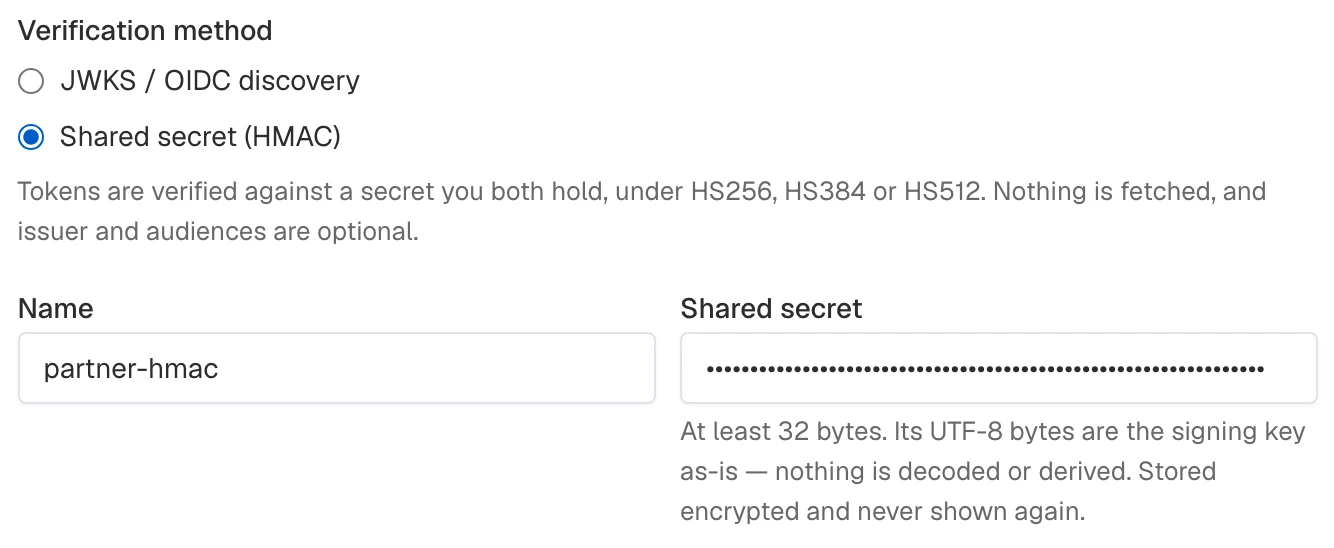
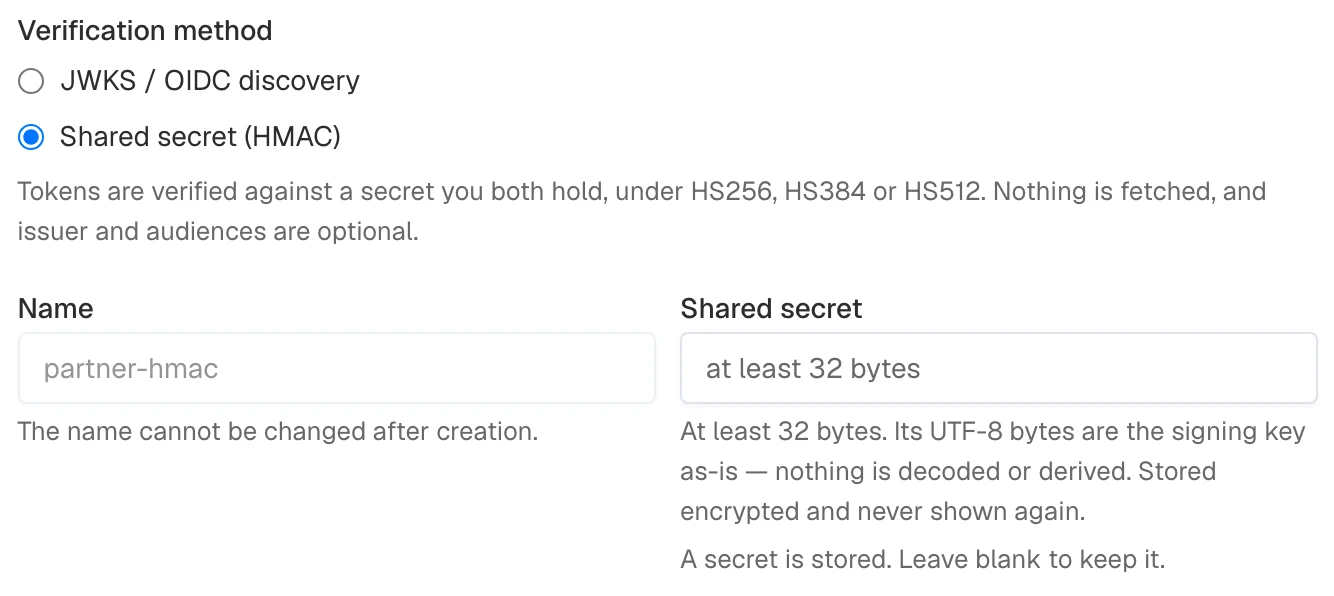
- Choose Shared secret (HMAC) under Verification method. Set Name to
partner-hmacand enter a Shared secret of at least 32 UTF-8 bytes.
- Add any issuer, audience, scope, or bound-claim requirements. This example keeps the
ai.accessscope and leaves issuer and audiences unset. - Select Create provider.
Bind a caller identity to the new provider:
- Open API keys and create or edit the caller key. For a new key, select its model under Allowed models; retain required access on an existing key.
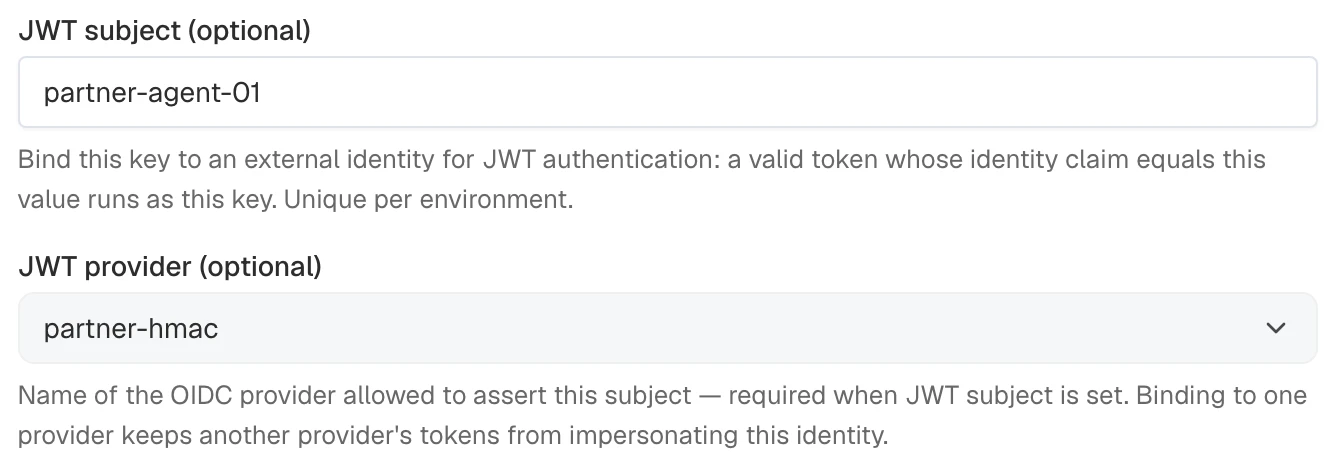
- Set JWT subject to
partner-agent-01and JWT provider topartner-hmactogether.
- Select Create API key or Save changes. For a new key, handle its one-time plaintext as described in the initial binding procedure. JWT callers do not need it.
The secret is never returned. On later edits, leave Shared secret blank to retain it, or enter a replacement and select Save changes to rotate it.
To switch the provider to JWKS, select JWKS / OIDC discovery, then enter Issuer URL and at least one value in Audiences. Saving this change clears the stored HMAC secret.
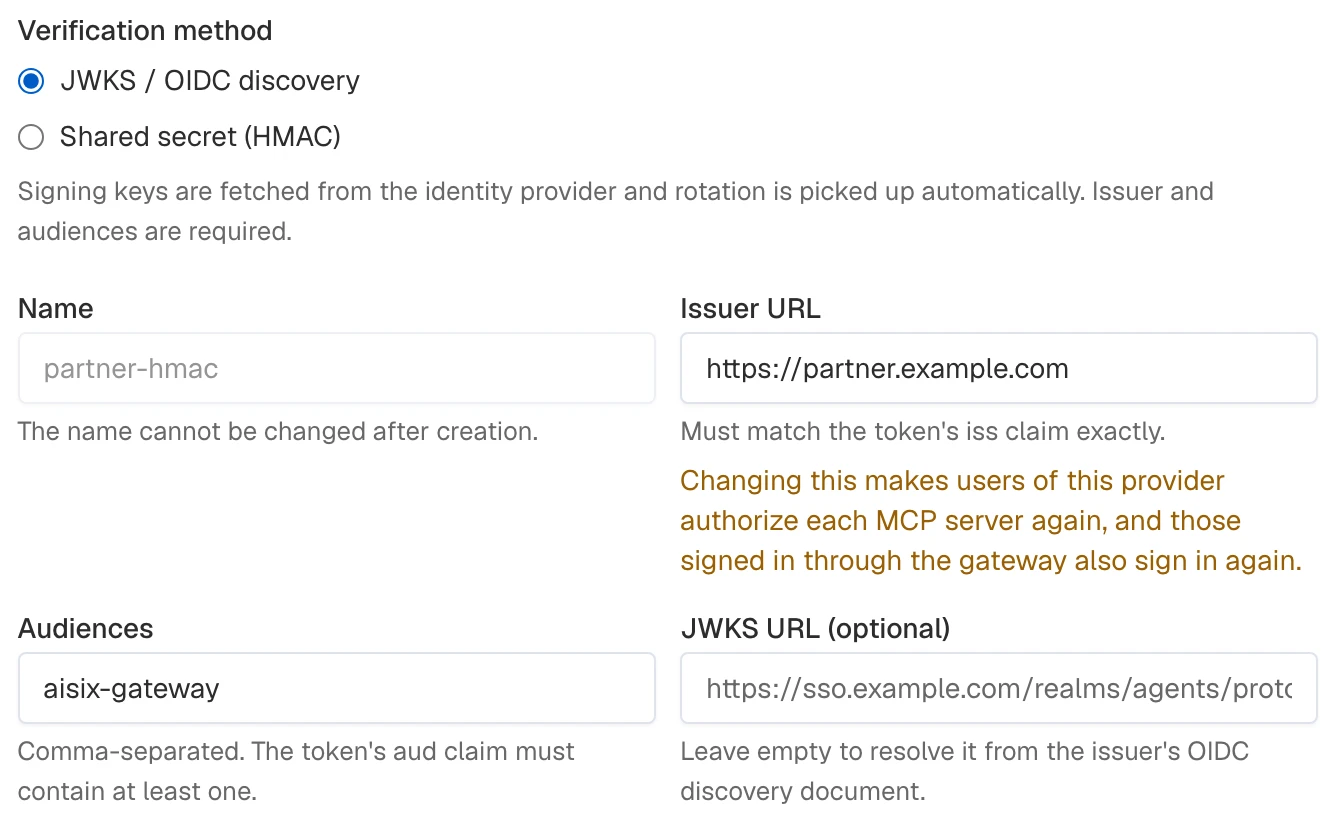
Select Save changes.
Export the connection values and the prepared model's ID:
# AISIX_CP includes /api and has no trailing slash.
export AISIX_CP="YOUR_AISIX_CONTROL_PLANE_API_URL"
export AISIX_TOKEN="YOUR_ADMIN_TOKEN"
export ENV_ID="YOUR_ENVIRONMENT_ID"
export MODEL_ID="YOUR_MODEL_ID"
In AISIX Enterprise and AISIX Cloud, send hmac_secret when creating the provider. This example pins no issuer and no audiences, so the token's iss and aud claims are not checked:
HMAC_PROVIDER_RESPONSE=$(curl -sS -X POST "$AISIX_CP/environments/$ENV_ID/oidc_providers" \
  -H "Authorization: Bearer $AISIX_TOKEN" \
  -H "Content-Type: application/json" \
  -d '{
    "name": "partner-hmac",
    "hmac_secret": "YOUR_SHARED_SECRET_OF_AT_LEAST_32_BYTES",
    "required_scopes": ["ai.access"]
  }')

export HMAC_PROVIDER_ID=$(printf '%s' "$HMAC_PROVIDER_RESPONSE" | jq -er '.oidc_provider.id')
printf '%s' "$HMAC_PROVIDER_RESPONSE" | jq
The secret is write-only. Read the provider to confirm that a secret is stored without exposing its value:
curl -sS \
  "$AISIX_CP/environments/$ENV_ID/oidc_providers/$HMAC_PROVIDER_ID" \
  -H "Authorization: Bearer $AISIX_TOKEN" | jq
The response reports "hmac_secret_set": true:
{
  "oidc_provider": {
    "id": "c3d4e5f6-7890-4abc-def0-123456789abc",
    "name": "partner-hmac",
    "audiences": [],
    "identity_claim": "sub",
    "required_scopes": ["ai.access"],
    "hmac_secret_set": true,
    "leeway_secs": 0,
    "enabled": true
  }
}
On an update, omit hmac_secret to keep the stored secret, send a new value to replace it, or send null to clear it. Rotate the stored secret with a focused update:
curl -sS -X PATCH \
  "$AISIX_CP/environments/$ENV_ID/oidc_providers/$HMAC_PROVIDER_ID" \
  -H "Authorization: Bearer $AISIX_TOKEN" \
  -H "Content-Type: application/json" \
  -d '{"hmac_secret":"YOUR_REPLACEMENT_SECRET_OF_AT_LEAST_32_BYTES"}' | \
  jq -e '.oidc_provider.hmac_secret_set == true'
The command prints true. Clearing the secret switches the provider back to JWKS mode, which then requires issuer and at least one audience.
Create a caller key bound to the HMAC provider and the identity it may assert:
curl -sS -X POST "$AISIX_CP/environments/$ENV_ID/api_keys" \
  -H "Authorization: Bearer $AISIX_TOKEN" \
  -H "Content-Type: application/json" \
  -d '{
    "display_name": "partner-agent",
    "allowed_models": ["'"$MODEL_ID"'"],
    "jwt_subject": "partner-agent-01",
    "jwt_provider": "partner-hmac"
  }' | jq '.api_key'
The command prints key metadata. The agent authenticates with its JWT.
For the open-source AISIX gateway, add the secret to the oidc_providers entry in resources.yaml through an environment variable, so the plaintext stays out of the file:
oidc_providers:
  - id: 7a6ec1e8-3a10-4c31-8463-19f6c122c46f
    name: partner-hmac
    hmac_secret: ${JWT_HMAC_SECRET}
    required_scopes: ["ai.access"]
Supply the same signing secret used by the issuing system to the gateway process:
export JWT_HMAC_SECRET="YOUR_SHARED_SECRET_OF_AT_LEAST_32_BYTES"
Generate a separate caller credential, then add its identity binding to the existing api_keys collection. Keep the prepared model, provider keys, other callers, and unrelated collections:
PARTNER_AGENT_KEY="$(openssl rand -hex 32)"
export PARTNER_AGENT_KEY_SHA256="$(printf '%s' "$PARTNER_AGENT_KEY" | openssl dgst -sha256 | awk '{print $NF}')"
The following entry grants the prepared model alias. Replace the example alias if yours differs:
api_keys:
  - id: c970ad88-53f0-44f8-90aa-42e3a87975c8
    display_name: partner-agent
    key_hash: ${PARTNER_AGENT_KEY_SHA256}
    allowed_models: ["gpt-4o-prod"]
    jwt_subject: partner-agent-01
    jwt_provider: partner-hmac
Validate the complete resources file and apply it through Reload a Resources File. If either environment variable is new to the running gateway, recreate it with those values.
Verify the HMAC Identity
Have the issuing system sign a token with the configured shared secret. With the default identity claim and this example's requirements, include:
| Claim | Value |
|---|---|
sub | partner-agent-01 |
scope | ai.access |
exp | A future expiration timestamp |
If you configured an issuer or audience, the token must satisfy those values too. Send this token using Authenticate a Request. It resolves through partner-hmac to the partner-agent caller key.
Provider Selection
When a token's iss matches exactly one enabled provider's issuer, that provider alone verifies the token. A mismatch of mode or algorithm there is a 401, with no fallback to another provider.
When no enabled provider matches the issuer, AISIX tries issuer-less shared-secret providers in name order. The first provider that verifies the token wins. AISIX rejects the token if none succeeds. JWKS providers are never candidates because they require an issuer.
Give each issuer-less shared-secret provider a distinct secret. When a token passes signature and registered-claim checks for several of these providers, the first in name order wins. Only that provider's scope, bound-claim, and identity policies apply.
Configuration Errors
AISIX rejects a provider that is configured inconsistently:
jwks_uriset together withhmac_secret.- A provider without
hmac_secretthat lacks anissueror at least one audience. - An
hmac_secretshorter than 32 bytes.
The AISIX Cloud Admin API answers 400 for each of these. In a resources file, the offending entry is rejected at load, reported by Configuration Status and counted in aisix_config_rejected_resources.
Key Rotation
This section covers providers verified against a JWKS. A shared-secret provider fetches nothing, so it is rotated by updating its hmac_secret.
When your identity provider introduces a signing key, an unrecognized key ID triggers a JWKS refresh. No configuration change or gateway restart is needed.
AISIX coalesces simultaneous outbound fetches for the same OIDC discovery document or JWKS URL. Requests wait for the shared fetch when the cache is empty, the configured JWKS URL has changed, or a token uses a newly rotated key. Requests that can use a stale cached result continue while the refresh runs.
After a fetch completes, successfully or unsuccessfully, AISIX waits at least one second before fetching the same discovery document or JWKS URL again. A request that needs new trust material during this interval may need to be retried.
AISIX treats cached discovery results and key sets as fresh for 10 minutes. The next authentication request after that interval triggers a refresh. Once the refreshed set omits a retired key, tokens signed by it stop authenticating.
If discovery or JWKS is unavailable, AISIX keeps the last successful result. Existing tokens can continue authenticating, but a retired key remains trusted until a later refresh succeeds.
Update or Remove a Trust Provider
Provider updates change which tokens the gateway trusts. Disable a provider to suspend verification, or delete it to remove its trust configuration.
- AISIX Enterprise or Cloud
- AISIX OSS
Use the dashboard or Admin API to change the existing provider.
- Dashboard
- Admin API
- Open OIDC providers and select Edit on the provider.
- Change the required fields. Changing the issuer or identity claim shows a warning because it disconnects affected per-user MCP sign-ins, as described below.
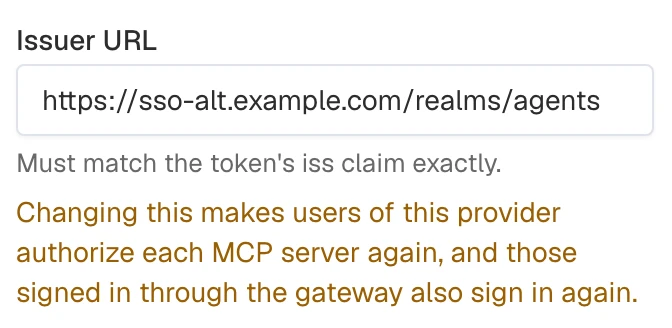
- Review the warning, then select Save changes.
Select Disable to pause JWT verification while retaining the provider, or Enable to resume it.
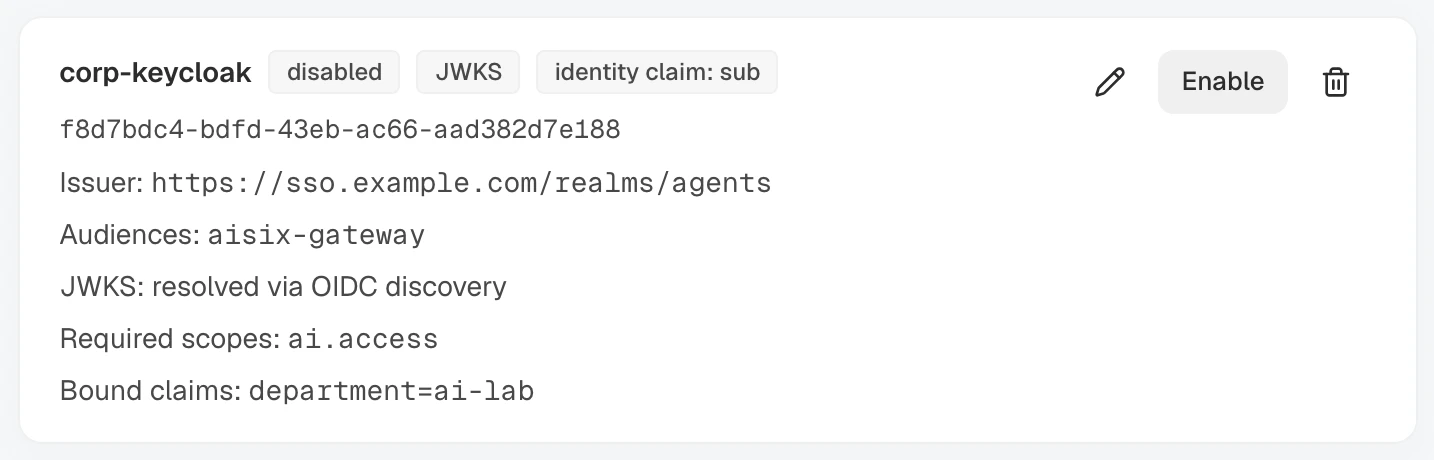
Select Delete and confirm to remove the provider. Existing key bindings and claim mappings remain configured but cannot resolve through it until a provider with that name exists again.
Use the Admin API to update an existing provider. Reuse the OIDC_PROVIDER_ID captured during creation; if you are starting here, replace the placeholder. This example reads the provider first, then disables it while keeping its configuration:
# AISIX_CP includes /api and has no trailing slash.
export AISIX_CP="YOUR_AISIX_CONTROL_PLANE_API_URL"
export AISIX_TOKEN="YOUR_ADMIN_TOKEN"
export ENV_ID="YOUR_ENVIRONMENT_ID"
export OIDC_PROVIDER_ID="${OIDC_PROVIDER_ID:-YOUR_OIDC_PROVIDER_ID}"

curl -sS "$AISIX_CP/environments/$ENV_ID/oidc_providers/$OIDC_PROVIDER_ID" \
  -H "Authorization: Bearer $AISIX_TOKEN" | \
  jq -e --arg id "$OIDC_PROVIDER_ID" '.oidc_provider.id == $id'

curl -sS -X PATCH "$AISIX_CP/environments/$ENV_ID/oidc_providers/$OIDC_PROVIDER_ID" \
  -H "Authorization: Bearer $AISIX_TOKEN" \
  -H "Content-Type: application/json" \
  -d '{"enabled": false}' | jq -e '.oidc_provider.enabled == false'
The GET and PATCH checks each print true. Set enabled to true to trust the provider again. You can also update its issuer, accepted audiences, JWKS endpoint, shared secret, identity claim, required scopes, bound claims, tag claims, or clock-skew allowance with the same PATCH operation. The provider name cannot be changed after creation.
Delete the provider to remove the trust entirely:
curl -sS -X DELETE "$AISIX_CP/environments/$ENV_ID/oidc_providers/$OIDC_PROVIDER_ID" \
  -H "Authorization: Bearer $AISIX_TOKEN" | \
  jq -e --arg id "$OIDC_PROVIDER_ID" '.deleted == true and .id == $id'
The command prints true when the provider is deleted. Deleting a provider does not affect the caller API keys or their jwt_subject bindings. Those keys can still authenticate with their plaintext values and can be associated with a new provider later. Disable or delete a caller key separately to revoke its plaintext credential.
Deleting a provider or changing its issuer or identity_claim also removes the upstream credentials stored for its users. They authorize each MCP server with per-user sign-in again, and those signed in through the gateway also sign in again. See What Disconnects Users.
Edit the provider under oidc_providers in resources.yaml. Set enabled: false to disable it while retaining its configuration, change its fields to update the trust policy, or remove the entry to delete the provider.
The caller API key remains in api_keys when you disable or remove its provider. Its plaintext value continues to authenticate. To remove the JWT identity mapping as well, delete both jwt_subject and jwt_provider from the key.
After each change, validate and reload the file. Follow Reload a Resources File for the complete workflow.
Choose Trust Provider Settings
The verification method determines which issuer, audience, and key settings apply:
| Field | Description |
|---|---|
issuer | Expected iss claim, compared exactly against the token. The control plane enforces uniqueness within an environment. In format-2 resources files, keep issuer values distinct among enabled providers: duplicate issuers can load, but tokens for that issuer fail authentication. It is required for JWKS verification and optional with hmac_secret; an issuer-less shared-secret provider does not check iss. |
audiences | Accepted aud values. JWKS verification requires at least one, and the token must contain a match. With hmac_secret, omit the field or use an empty list to skip audience validation. |
jwks_uri | Endpoint the signing keys are fetched from. Omit it to resolve the endpoint from the issuer's OIDC discovery document. It must not be set together with hmac_secret. |
hmac_secret | Shared secret that switches the provider to HMAC verification. Omit it for a provider verified against a JWKS. See Shared-Secret (HMAC) Providers. |
identity_claim | Claim path whose value selects the caller API key, matched against each key's jwt_subject, for example resource_access.account. Defaults to sub. |
required_scopes | Scopes that must all be present in the token's scope claim (a space-delimited string or an array). |
bound_claims | Additional claim requirements. Each key is a claim path. A string claim must equal one of the expected values; an array claim must contain one of them. |
tag_claims | Cost attribution tags read from the verified token on each request, as an object of tag key to claim path, for example {"department": "department", "subsidiary": "org.subsidiary"}. Per tag key, a value read this way takes precedence over the caller API key, its team, and its member. Keys match ^[a-z][a-z0-9_]{0,62}$, paths are non-empty, and at most 32 entries are allowed. In AISIX Enterprise and AISIX Cloud, each key must be declared in the organization. Requires a gateway at 1.9.0 or later. See Read Tags From JWT Claims. |
leeway_secs | Clock-skew allowance from 0 to 300 seconds for the time-based claims. Defaults to 0. |
login | The OAuth client (client_id, optional client_secret and scopes) the gateway signs users in with, for MCP clients configured with only a URL. It cannot be set with hmac_secret. Configure it on only one enabled provider in the environment. Multiple login providers can load from a format-2 file, but MCP sign-in fails. See Interactive MCP Sign-In. |
enabled | Whether the provider participates in authentication. Defaults to true. |
User information in issuer or jwks_uri (user:password@) is accepted and used as written. In AISIX Enterprise and AISIX Cloud, AISIX Cloud Admin API responses include these URLs and audit records store them as configured. Gateway logs can also include the issuer.
Prefer credential-free HTTPS endpoints or network-level access controls.
For a JWKS provider, omitting jwks_uri makes AISIX resolve and cache the signing-key endpoint from the issuer's discovery document. Discovery requires the document's issuer to match exactly and its advertised JWKS URL to use the same origin as the issuer. Provide jwks_uri explicitly when discovery is unreachable or the signing keys are hosted on another origin.
Claim Paths
identity_claim, bound_claims, tag_claims, and claim-mapping conditions use the same claim-path syntax.
A claim path can match a top-level claim name or use dot notation to select a nested value. For example, https://example.com/department can match a top-level claim with that exact name, while resource_access.account can select account from the resource_access claim.
If both interpretations are possible, the exact top-level claim name takes precedence. For example, a.b matches a top-level a.b claim before the nested b value under a.
Gateways earlier than 1.9.0 support only nested dot notation and cannot match top-level claim names containing periods.
Rejection Reasons
On OpenAI-style proxy routes, a rejected token carries a stable error.code so clients can react without parsing messages. Anthropic-style routes omit code and use the HTTP status and Anthropic-compatible error.type; see Headers and Error Codes.
OpenAI-style error.code | HTTP status | Meaning |
|---|---|---|
jwt_expired | 401 | The token's exp deadline has passed. Fetch a fresh token. |
jwt_invalid | 401 | The token is malformed or fails issuer, signature, signing algorithm, audience, required-claim, or not-before validation. |
jwt_claims_rejected | 403 | The token is valid but does not satisfy the provider's required_scopes or bound_claims. |
jwt_identity_unmapped | 401 | The configured identity claim is missing or is not a string, or the identity resolves to no key — no caller API key has matching jwt_provider and jwt_subject values and no claim mapping matched. Check the token claim, key binding, and mappings. |
jwks_unavailable | 503 | AISIX could not resolve or fetch the provider's signing keys. Check the OIDC discovery or JWKS endpoint, then retry. |
Next Steps
- JWT Claim Mappings: admit whole classes of identities — departments, groups, applications — through priority-ordered claim rules instead of per-identity bindings.
- Keycloak Integration: a verified end-to-end walkthrough from a Keycloak realm to mapped, attributed requests.
- Caller API Keys: manage the model access and other controls inherited by each mapped identity.
- Cost Attribution Tags: attribute cost to values read from the token, such as a department.
- API Key and Model Rate Limits: limit the request volume or token usage of JWT-authenticated callers.
- Configuration Propagation: understand how configuration changes reach AISIX gateways.