
Set Up Agent Gateway
AISIX exposes registered Agent-to-Agent (A2A) agents through caller-authenticated gateway endpoints at /a2a/<agent>. This setup connects an official A2A echo agent to an existing AISIX gateway and grants a test caller access. The official A2A Go SDK client then sends an A2A 1.0 message through the gateway.
The local Docker topology applies when the AISIX gateway container can join the test agent's network. This can be an AISIX Enterprise, AISIX Cloud, or AISIX OSS gateway. If a managed gateway cannot join that network, deploy the same echo server at an HTTPS endpoint the gateway can reach, then use that endpoint in the registration steps. This guide's AISIX OSS path uses the Docker quickstart topology.
After registration, every product path uses the same agent-card readiness check and SDK client call to verify the result.
Prerequisites
Before starting, prepare the following:
- Docker, cURL, and jq.
- For AISIX Enterprise, complete the AISIX Enterprise getting-started guide, then keep its shell and
aisix-dpgateway running. - For AISIX Cloud, obtain an environment, attached gateway, caller API key reserved for this example, and gateway URL from your organization.
- If you use the Dashboard to configure AISIX Enterprise or AISIX Cloud, sign in with permission to manage A2A agents and caller API keys.
- If you use the Admin API to configure AISIX Enterprise or AISIX Cloud, obtain a write-scoped admin token and the environment and caller API key resource IDs.
- For AISIX OSS, complete the AISIX OSS getting-started guide, then remain in its shell and working directory with the
aisix-quickstartgateway running.
Start an A2A Test Agent
The example runs the echo server provided by the official A2A Go SDK in Docker. When the AISIX gateway also runs in Docker, the agent and gateway join a temporary network, so the gateway can reach the agent without a restart. Use the echo server only for testing: it has no authentication and returns the caller's message text. The server publishes a dual A2A 0.3 and 1.0 compatibility card for checking client-facing discovery through AISIX. The SDK client example passes the test caller credential into this container; use a disposable caller key and remove the test container when finished.
- AISIX Enterprise or Cloud
- AISIX OSS
- Dashboard
- Admin API
Export the gateway origin, caller key plaintext, and gateway container name:
# Gateway origin only; omit a trailing slash and endpoint path.
export AISIX_PROXY="YOUR_AISIX_GATEWAY_URL"
export AISIX_API_KEY="YOUR_CALLER_API_KEY"
# The Enterprise quickstart uses aisix-dp. Use the actual name for another Docker deployment.
export AISIX_GATEWAY_CONTAINER="aisix-dp"
Export the gateway and control-plane values used throughout the guide:
# Gateway origin only; omit a trailing slash and endpoint path.
export AISIX_PROXY="YOUR_AISIX_GATEWAY_URL"
export AISIX_API_KEY="YOUR_CALLER_API_KEY"
# The Enterprise quickstart uses aisix-dp. Use the actual name for another Docker deployment.
export AISIX_GATEWAY_CONTAINER="aisix-dp"
# Include /api in AISIX_CP and omit a trailing slash.
export AISIX_CP="YOUR_AISIX_CONTROL_PLANE_API_URL"
export AISIX_TOKEN="YOUR_ADMIN_TOKEN"
export ENV_ID="YOUR_ENVIRONMENT_ID"
export API_KEY_ID="YOUR_CALLER_API_KEY_RESOURCE_ID"
If the managed gateway cannot join the local Docker network, run the same a2a-go command on a platform or host that exposes port 8080 through HTTPS. Export the complete public A2A JSON-RPC endpoint:
export A2A_AGENT_URL="https://YOUR_ECHO_AGENT_HOST"
Then skip the remaining local-network commands in this section and continue with Register the Agent and Grant Access.
Reuse the AISIX_PROXY and CALLER_API_KEY values from the quickstart, and identify its gateway container:
# The OSS quickstart uses aisix-quickstart. Use the actual name for another Docker deployment.
export AISIX_GATEWAY_CONTAINER="aisix-quickstart"
Create a temporary network and connect the running gateway to it:
docker network create aisix-a2a
docker network connect aisix-a2a "$AISIX_GATEWAY_CONTAINER"
Start the echo agent on the same network. The pinned Go SDK is downloaded and compiled inside the container, so the first startup can take about a minute:
docker run -d --name aisix-a2a-echo \
  --network aisix-a2a \
  golang:1.25-alpine \
  sh -c 'go run github.com/a2aproject/a2a-go/v2/cmd/a2a@v2.5.0 \
    serve --echo --card-compat --host 0.0.0.0 --port 8080 \
    --transport jsonrpc --protocol latest --name "AISIX A2A Echo"'
Wait until the agent is ready:
for attempt in $(seq 1 120); do
  docker logs aisix-a2a-echo 2>&1 | grep -q "Listening on" && break
  sleep 1
done

docker logs aisix-a2a-echo 2>&1 | grep "Listening on"
The final command prints the listener address. From the gateway container, the agent is available at http://aisix-a2a-echo:8080.
export A2A_AGENT_URL="http://aisix-a2a-echo:8080"
Register the Agent and Grant Access
The examples name the agent echo-agent, pin it to A2A 1.0, and grant it to the existing test caller.
- AISIX Enterprise or Cloud
- AISIX OSS
Register the organization-level agent, expose it to the test environment, then grant access to the caller key.
- Dashboard
- Admin API
- Open A2A agents and select New A2A agent.
- Set Name to
echo-agentand URL to the value ofA2A_AGENT_URL. - Select
1.0for Protocol version and None for Authentication. - Under Available in environments, select the environment attached to the test gateway.
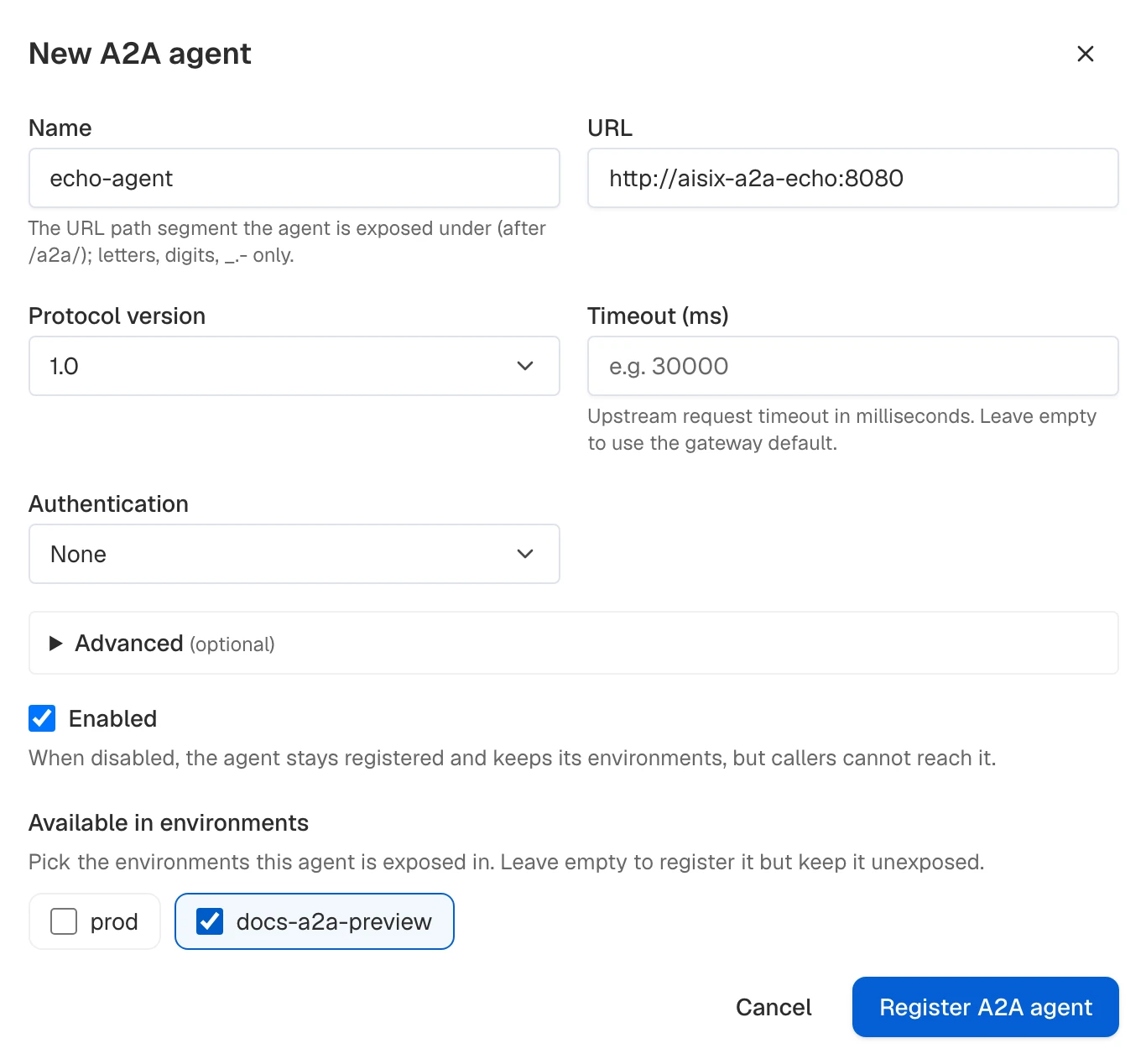
- Select Register A2A agent. Confirm that the saved agent is enabled and exposed to the intended environment.

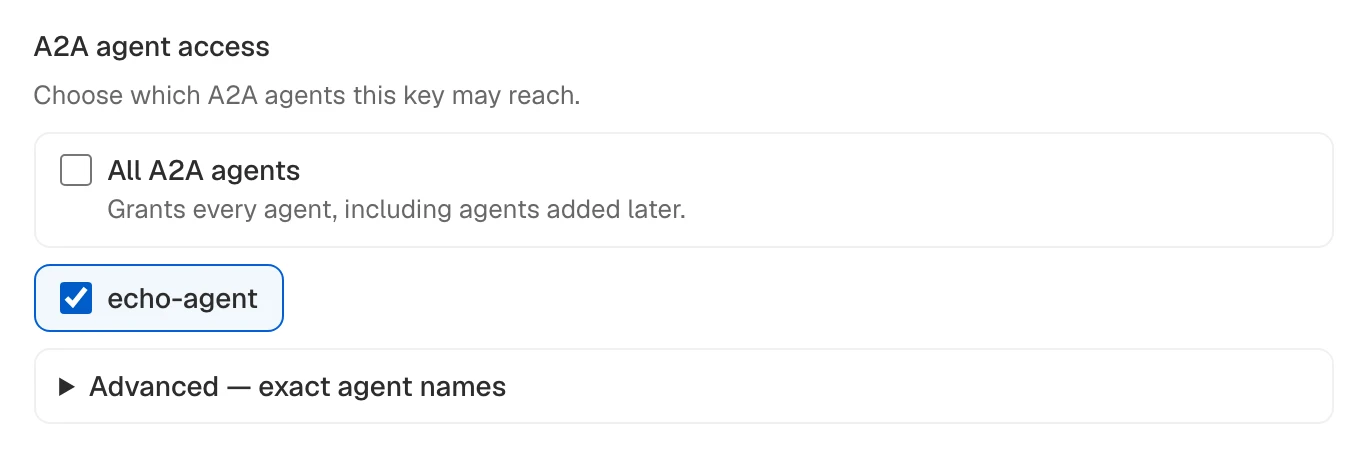
- Open the environment and select API keys. Select Edit on the test caller.
- Under A2A agent access, select
echo-agent, then select Save changes.
Use the caller key plaintext for verification:
export AISIX_A2A_KEY="$AISIX_API_KEY"
Register the test agent and expose it to the test environment:
A2A_AGENT_RESPONSE=$(curl -fsS -X POST "$AISIX_CP/a2a_agents" \
  -H "Authorization: Bearer $AISIX_TOKEN" \
  -H "Content-Type: application/json" \
  --data-binary @- <<EOF
{
  "name": "echo-agent",
  "url": "${A2A_AGENT_URL}",
  "protocol_version": "1.0",
  "auth_type": "none",
  "allowed_environments": ["${ENV_ID}"]
}
EOF
)

export A2A_AGENT_ID=$(echo "$A2A_AGENT_RESPONSE" | jq -er '.a2a_agent.id')
echo "$A2A_AGENT_RESPONSE" | jq
❶ protocol_version identifies the wire format that callers and the upstream agent use. AISIX forwards requests without translating between versions.
❷ allowed_environments controls which environments receive this organization-level resource.
Grant echo-agent to the test caller API key:
curl -fsS -X PATCH \
  "$AISIX_CP/environments/$ENV_ID/api_keys/$API_KEY_ID" \
  -H "Authorization: Bearer $AISIX_TOKEN" \
  -H "Content-Type: application/json" \
  -d '{"allowed_agents":["echo-agent"]}' | jq

export AISIX_A2A_KEY="$AISIX_API_KEY"
This update replaces the caller's previous agent list and retains its existing model access. The control plane projects both resources to the attached gateway automatically.
In the existing resources.yaml, add allowed_agents to the quickstart caller and add the a2a_agents collection. Keep the existing provider key and model entries unchanged:
api_keys:
  - id: 85b60b85-09dc-40fc-a403-5c7c8beb4e8d
    display_name: quickstart-caller
    key_hash: ${CALLER_API_KEY_SHA256}
    allowed_models:
      - gpt-4o-mini
    allowed_agents:
      - echo-agent

a2a_agents:
  - id: caa98342-938a-41b0-8a2c-f41a7ed2d64a
    name: echo-agent
    url: http://aisix-a2a-echo:8080
    protocol_version: "1.0"
    auth_type: none
❶ allowed_agents grants the quickstart caller the registered echo-agent.
❷ name becomes the caller-facing path segment under /a2a.
Validate the complete file inside the running gateway container, then reload it without restarting the container:
docker exec aisix-quickstart \
  aisix validate --resources /etc/aisix/resources.yaml

docker kill --signal HUP aisix-quickstart

export AISIX_A2A_KEY="$CALLER_API_KEY"
If the file cannot be read as a format-2 document set, the reload fails as a whole and the previous configuration keeps serving. If an individual resource row is rejected, its last-known-good value remains while other valid rows apply, and configuration status becomes degraded. Check docker logs aisix-quickstart and /status/config for details.
Verify with an A2A Client
The agent-card readiness check is the same for every path. First, wait until the gateway can fetch the registered agent's card. This preserves the projection tolerance needed by the control plane without sending a handcrafted JSON-RPC message:
for attempt in $(seq 1 45); do
  curl -fsS \
    "$AISIX_PROXY/a2a/echo-agent/.well-known/agent-card.json" \
    -H "Authorization: Bearer $AISIX_A2A_KEY" \
    >/dev/null 2>&1 && break
  sleep 2
done

curl -fsS \
  "$AISIX_PROXY/a2a/echo-agent/.well-known/agent-card.json" \
  -H "Authorization: Bearer $AISIX_A2A_KEY" \
  >/dev/null
Set the agent URL that the client can reach.
For a local Docker gateway, the quickstart and generated Docker configurations use port 3000 inside the gateway container:
export AISIX_A2A_URL="http://${AISIX_GATEWAY_CONTAINER}:3000/a2a/echo-agent"
Run the command-line client from the official A2A Go SDK inside the echo-agent container. --transport jsonrpc connects directly to the registered AISIX endpoint instead of resolving an agent card first:
docker exec aisix-a2a-echo \
  go run github.com/a2aproject/a2a-go/v2/cmd/a2a@v2.5.0 \
  send "$AISIX_A2A_URL" "Hello through AISIX" \
  --transport jsonrpc \
  --auth "Bearer $AISIX_A2A_KEY" \
  --output json | jq -e \
  '.artifacts[].parts[] | select(.text == "Hello through AISIX")'
When the gateway is not on the local Docker network, use its public origin and run the same client in a temporary container:
export AISIX_A2A_URL="${AISIX_PROXY}/a2a/echo-agent"

docker run --rm \
  -e AISIX_A2A_URL \
  -e AISIX_A2A_KEY \
  golang:1.25-alpine \
  sh -c 'go run github.com/a2aproject/a2a-go/v2/cmd/a2a@v2.5.0 \
    send "$AISIX_A2A_URL" "Hello through AISIX" \
    --transport jsonrpc \
    --auth "Bearer $AISIX_A2A_KEY" \
    --output json' | jq -e \
  '.artifacts[].parts[] | select(.text == "Hello through AISIX")'
The command prints the matching artifact part. AISIX authenticated the caller, checked its agent grant, and forwarded the SDK client's A2A 1.0 request to the echo agent.
Adapt the Setup for Your Agent
Replace the test URL with an A2A JSON-RPC endpoint reachable from the gateway. Set protocol_version to the wire format the agent supports, and send requests in that format. AISIX supports "1.0" and "0.3" but does not translate between them.
Configure a required upstream credential with auth_type and secret. See Upstream Authentication.
For AISIX Enterprise or AISIX Cloud, save the updated registration through the dashboard or Admin API; the control plane projects it to attached gateways automatically.
For AISIX OSS, validate the complete resources file and send SIGHUP when the running gateway already has every referenced environment variable. If you add or change an environment variable, recreate the container with the new value. See Reload a Resources File.
Clean Up
Keep the agent and caller grant if you plan to continue with the other Agent Gateway guides. Otherwise, remove the resources through the same management path you used to create them.
- AISIX Enterprise or Cloud
- AISIX OSS
Remove the caller grant before deleting the shared agent registration.
- Dashboard
- Admin API
- Open the environment and select API keys.
- Select Edit on the test caller, clear
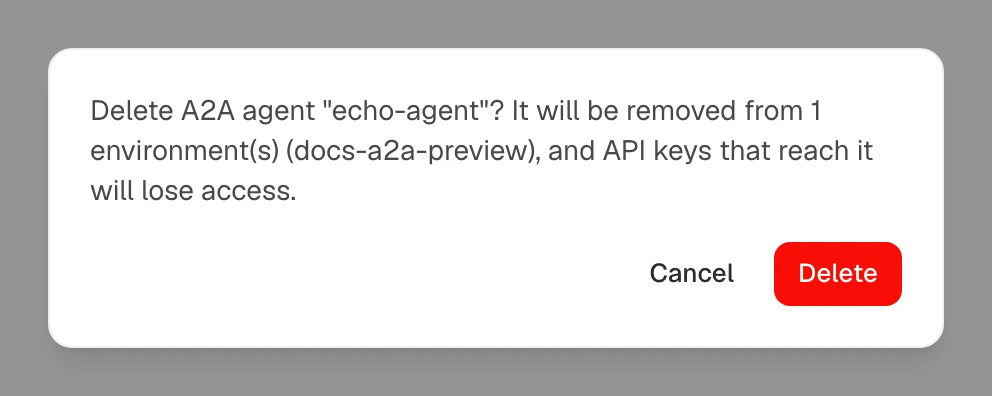
echo-agentfrom A2A agent access, and select Save changes. - Open A2A agents, select Delete on
echo-agent, and confirm the deletion.
Clear the test caller's agent grant, then delete the registration. If the caller has other agent grants, retain them in the update instead of sending an empty list:
curl -fsS -X PATCH \
  "$AISIX_CP/environments/$ENV_ID/api_keys/$API_KEY_ID" \
  -H "Authorization: Bearer $AISIX_TOKEN" \
  -H "Content-Type: application/json" \
  -d '{"allowed_agents":[]}' | jq

curl -fsS -X DELETE "$AISIX_CP/a2a_agents/$A2A_AGENT_ID" \
  -H "Authorization: Bearer $AISIX_TOKEN"
Remove the allowed_agents and a2a_agents additions from resources.yaml, validate the file, and send SIGHUP again.
Finally, remove the echo agent used for this guide.
If you deployed the echo server outside the local Docker network, remove it from that platform or host.
For a local Docker gateway, remove the test container and temporary network:
docker rm -f aisix-a2a-echo
docker network disconnect aisix-a2a "$AISIX_GATEWAY_CONTAINER"
docker network rm aisix-a2a
Next Steps
You have now registered an A2A agent, granted caller access, and sent an A2A 1.0 message through AISIX with the official SDK client. Use these guides to extend the setup:
- A2A Streaming and Agent-Card Discovery: consume a streamed task and verify the client-facing agent card through a public gateway origin.
- Configure upstream authentication: use a bearer token or API key for the upstream agent.
- Control agent access: grant exact agent names, name patterns, or every registered agent.
- Apply rate limits and budgets: govern A2A calls with caller rate limits and budgets in AISIX Enterprise and AISIX Cloud.
- Observability: review the usage events and metrics emitted by A2A calls.