
Upstream Authentication
Each registered Agent-to-Agent (A2A) agent defines whether and how AISIX authenticates to its upstream. AISIX presents the configured credential, if any, when fetching the agent card or forwarding a JSON-RPC call. Clients authenticate to AISIX with a caller API key. By default, AISIX does not forward caller headers to the agent. Configure caller-header forwarding when an agent needs a caller header, including the caller's credential.
This separation lets each upstream use the authentication scheme it requires while callers keep one AISIX credential. All three AISIX products support the same upstream authentication modes.
Prerequisites
- Complete Set Up Agent Gateway.
- If you use the Dashboard to configure AISIX Enterprise or AISIX Cloud, retain the registered agent and environment, then sign in with permission to edit A2A agents.
- If you use the Admin API to configure AISIX Enterprise or AISIX Cloud, retain
AISIX_CP,AISIX_TOKEN, andA2A_AGENT_ID. - For AISIX OSS, retain the complete resources file containing the registered agent.
- To run the optional end-to-end verification, keep the same shell, gateway, test agent, and temporary Docker network running.
Authentication Modes
Choose the mode that matches what the upstream agent expects:
auth_type | Required field | Upstream header |
|---|---|---|
none | None | No credential is sent. |
bearer | secret | Authorization: Bearer <secret> |
api_key | secret | x-api-key: <secret> |
auth_type defaults to none. Leave secret unset in that mode. A nonempty secret is required for bearer and api_key.
Use HTTPS for a credentialed upstream. When a bearer token or API key is configured on an http:// URL, the gateway logs a warning because the credential crosses the network in plaintext.
An agent that expects HTTP Basic authentication has no auth_type of its own. If the upstream cannot use the supported bearer-token or API-key modes, put the credentials in the agent url, as in https://user:password@agents.example.com/a2a, and leave auth_type as none.
The gateway uses the URL credentials for HTTP Basic authentication, but they do not receive the protections of secret. In AISIX Enterprise and AISIX Cloud, AISIX Cloud Admin API responses and audit events include the URL as written. Gateway logs can also include it with the credentials intact. Restrict access to the agent configuration, audit records, and gateway logs.
Configure Upstream Authentication
The following examples add bearer authentication to the setup guide's registered echo-agent. When adapting that entry to a credentialed upstream, also replace its URL. Use api_key instead when the upstream expects x-api-key. The echo agent itself does not validate credentials. To test credential forwarding locally, skip these examples and continue with Optional: Verify with a Local Test Proxy, which supplies its own token and final resource update.
- AISIX Enterprise or Cloud
- AISIX OSS
Configure the upstream credential on the agent registration.
- Dashboard
- Admin API
- Open A2A agents and select Edit on
echo-agent. - Set URL to the credentialed upstream endpoint.
- Select Bearer token under Authentication and enter the upstream credential in Bearer token. For an upstream that expects the
x-api-keyheader, select API key instead and enter that credential.
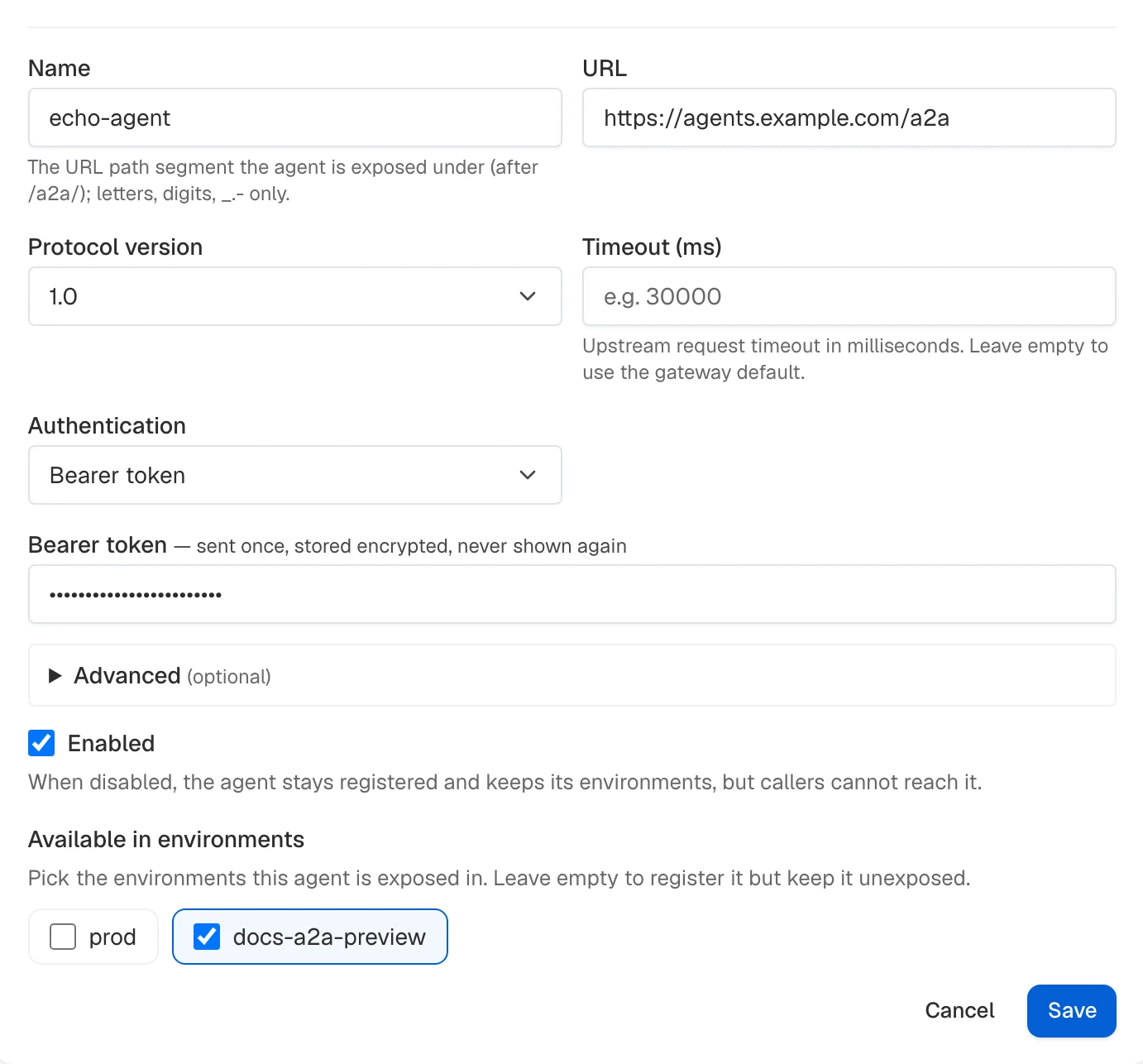
- Select Save.
The credential is write-only. On later edits, leave the credential field blank to retain it. Enter a new value to rotate it, or select None to clear it.
Export the credential, then update the registered agent:
export A2A_AGENT_TOKEN="YOUR_UPSTREAM_TOKEN"

curl -fsS -X PATCH "$AISIX_CP/a2a_agents/$A2A_AGENT_ID" \
  -H "Authorization: Bearer $AISIX_TOKEN" \
  -H "Content-Type: application/json" \
  --data-binary @- <<EOF | jq
{
  "auth_type": "bearer",
  "secret": "${A2A_AGENT_TOKEN}"
}
EOF
The credential is write-only: the control plane encrypts it at rest and does not include it in create, list, or update responses. Sending a new secret rotates the credential. Changing from a credentialed mode to none clears the stored credential.
Replace the existing echo-agent entry in a2a_agents with the updated entry below, which references a gateway environment variable. Preserve unrelated agents and collections:
a2a_agents:
  - id: caa98342-938a-41b0-8a2c-f41a7ed2d64a
    name: echo-agent
    url: http://aisix-a2a-echo:8080
    protocol_version: "1.0"
    auth_type: bearer
    secret: ${A2A_AGENT_TOKEN}
Set A2A_AGENT_TOKEN in the gateway process environment before loading the file. An unset or empty referenced variable causes validation to fail. If the variable is already available in the running container, validate the complete file and send SIGHUP:
docker exec aisix-quickstart \
  aisix validate --resources /etc/aisix/resources.yaml

docker kill --signal HUP aisix-quickstart
Adding or changing a container environment variable requires recreating that container with the new value. See Reload a Resources File for the validation and recreation workflow.
Credential Failures
The upstream credential never crosses to the calling client. The agent card served by AISIX contains the upstream agent's metadata with service URLs rewritten to the gateway, but it does not contain the configured credential.
If an upstream rejects an expired, rotated, or revoked credential, only calls to that agent fail. AISIX returns HTTP 502; the upstream status appears in the JSON-RPC error message, and the upstream response body is not proxied to the caller.
Forward Caller Headers to an Upstream Agent
An internal agent may need the caller's identity or tracing headers instead of only the gateway-held credential. Configure the header names that AISIX may forward. The list is empty by default and applies to both agent-card discovery and all JSON-RPC operations, including message, streaming, and task requests.
- AISIX Enterprise or Cloud
- AISIX OSS
- Dashboard
- Admin API
- Open A2A agents and select Edit on the agent.
- Expand Advanced. In Forward client headers, enter one header name or single-wildcard pattern per line.
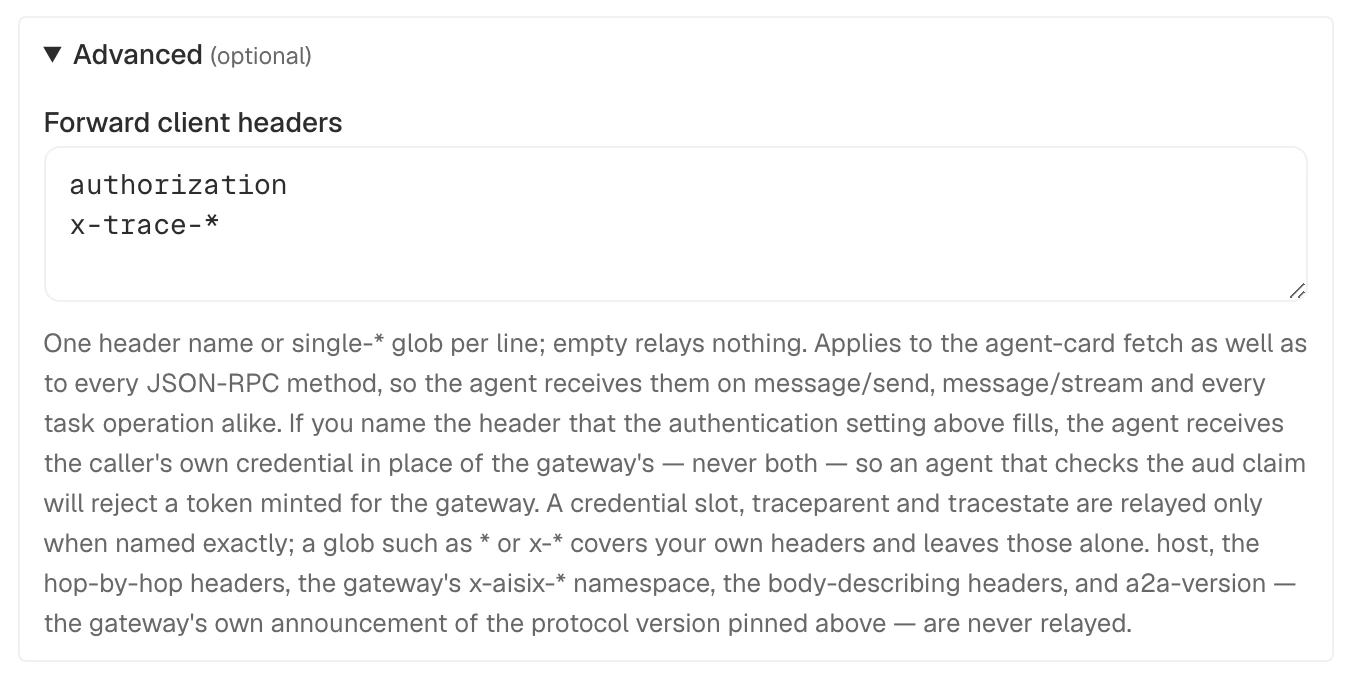
- Select Save. To stop forwarding caller headers, clear the box and save again.
Set the list when you create the agent or patch it later. A patch replaces the stored list; send an empty array to clear it:
curl -fsS -X PATCH "$AISIX_CP/a2a_agents/$A2A_AGENT_ID" \
  -H "Authorization: Bearer $AISIX_TOKEN" \
  -H "Content-Type: application/json" \
  -d '{
    "forward_client_headers": ["authorization", "x-trace-*"]
  }'
Merge the list into the existing agent entry in the complete resources file:
a2a_agents:
  - id: 56671479-1687-4b88-9abc-c3a1bacdb3cb
    name: invoice-processor
    url: https://agents.internal.example.com/a2a
    auth_type: none
    forward_client_headers:
      - authorization
      - x-trace-*
Preserve unrelated agent fields, entries, and collections. Validate the assembled complete resources file before reloading it.
Each entry is an exact header name or a name with a single * wildcard, matched case-insensitively. A forwarded header reaches the agent whatever AISIX would otherwise have done with it.
When an exact header name selects a credential header, AISIX sends the caller's value instead of the gateway-held credential. authorization is the slot bearer fills, and x-api-key the slot api_key fills. This allows an internal agent to continue authorizing requests with the end user's credential. An agent that validates the aud claim rejects a token minted for the gateway, so name a slot only for an agent you would trust with the caller's value.
A credential slot, and the trace-context headers traceparent and tracestate, are forwarded only when a pattern names them exactly. A glob such as * or x-* never matches them, because forwarding a credential or a trace context is an explicit act and does not follow from a broad wildcard grant. Headers That Must Be Named Exactly lists them; the same rules apply to the other gateway endpoints.
a2a-version is never forwarded. It announces the wire version pinned in protocol_version, and a caller's copy would override that pin. Caller Headers AISIX Never Forwards lists the other excluded headers, including host, hop-by-hop headers, the x-aisix-* namespace, and headers that describe a body AISIX re-serializes.
Optional: Verify with a Local Test Proxy
The configuration above defines the credential AISIX should send, but the echo agent from the setup guide accepts requests without authenticating them. It therefore cannot prove that the gateway presented the expected token. For an end-to-end local check, put a small bearer-authenticated reverse proxy in front of the agent and verify both accepted and rejected requests.
The proxy is for local testing only: it uses plain HTTP and removes the bearer token before forwarding an accepted request to the echo agent.
This local proxy applies whenever the AISIX gateway can join the aisix-a2a Docker network, including a Docker gateway connected to AISIX Cloud. For a managed gateway outside that network, deploy an equivalent authenticated proxy at an HTTPS endpoint the gateway can reach. Then use the shared Dashboard or Admin API authentication procedure above with that URL. The AISIX OSS verifier in this guide assumes the Docker quickstart topology.
The helper below contains the local proxy setup. Copy it as-is; the remaining steps configure and test AISIX.
Start the local bearer-checking proxy
Export a distinct upstream token, then define and start the test proxy on the existing Docker network:
export A2A_AGENT_TOKEN="a2a-upstream-test-token"

start_a2a_auth_proxy() {
  docker rm -f aisix-a2a-auth >/dev/null 2>&1 || true
  docker run -d --name aisix-a2a-auth \
    --network aisix-a2a \
    -e UPSTREAM_TOKEN="$1" \
    caddy:2.11.4-alpine \
    sh -c 'caddy run --config /dev/stdin --adapter caddyfile <<EOF
:8082 {
  @authorized header Authorization "Bearer $UPSTREAM_TOKEN"
  handle @authorized {
    reverse_proxy aisix-a2a-echo:8080 {
      header_up -Authorization
      header_up Host {upstream_hostport}
    }
  }
  handle {
    respond "upstream authentication failed" 401
  }
}
EOF'

  for attempt in $(seq 1 30); do
    docker logs aisix-a2a-auth 2>&1 |
      grep -q "serving initial configuration" && return
    sleep 1
  done
  docker logs aisix-a2a-auth >&2
  return 1
}

start_a2a_auth_proxy "$A2A_AGENT_TOKEN"
Configure AISIX to Use the Proxy
Update the existing echo-agent to use http://aisix-a2a-auth:8082, bearer authentication, and A2A_AGENT_TOKEN as its secret.
- AISIX Enterprise or Cloud
- AISIX OSS
Update the agent created by the setup guide. The attached gateway must be on the local test network.
- Dashboard
- Admin API
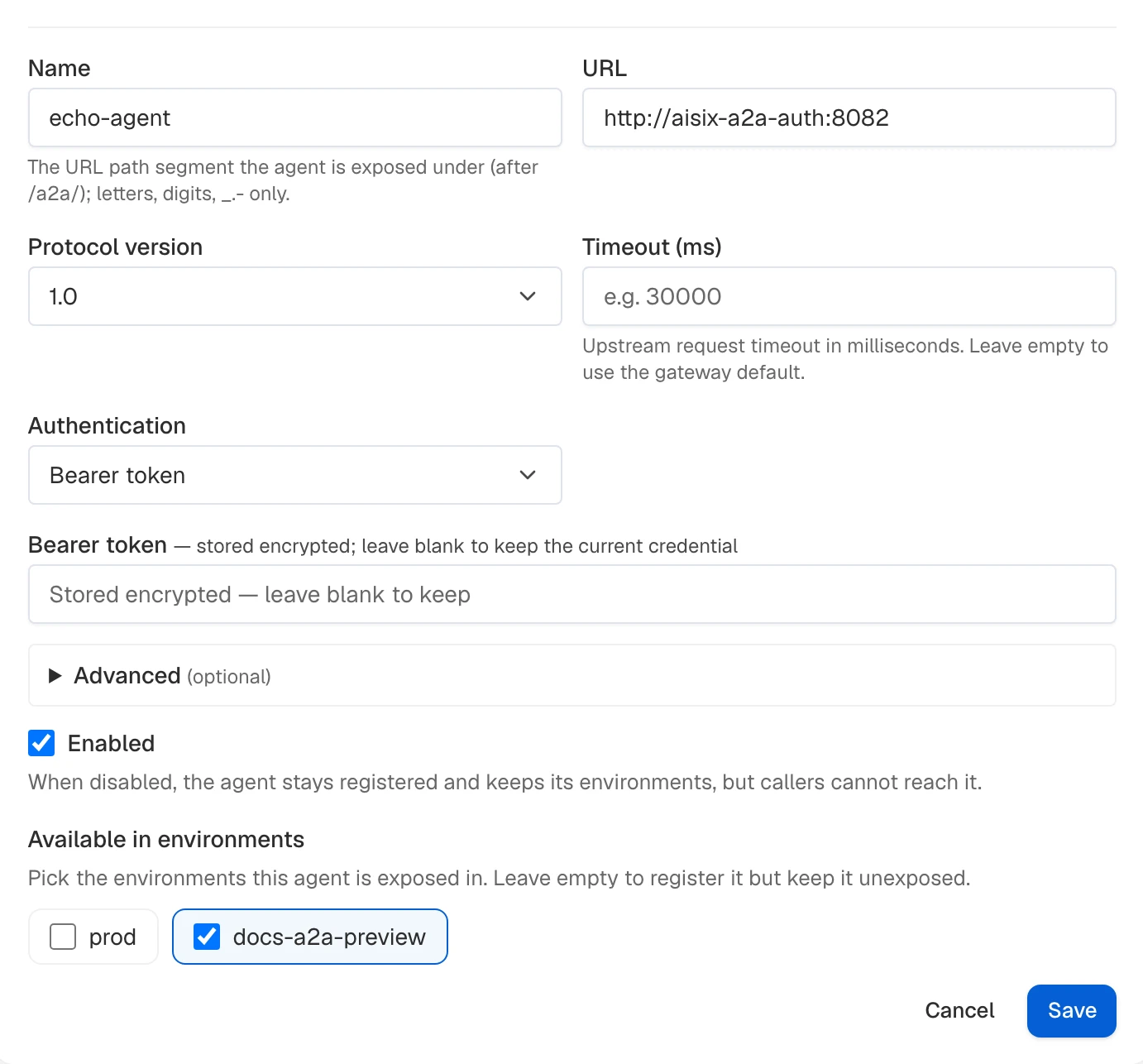
- Open A2A agents and select Edit on
echo-agent. - Set URL to
http://aisix-a2a-auth:8082and Authentication to Bearer token. - Enter the value of
A2A_AGENT_TOKENin Bearer token, then select Save. Leave Forward client headers empty so the proxy receives the gateway-held credential.
Update the agent URL and credential together. Clear any previous caller-header forwarding so the proxy receives the gateway-held token:
curl -fsS -X PATCH "$AISIX_CP/a2a_agents/$A2A_AGENT_ID" \
  -H "Authorization: Bearer $AISIX_TOKEN" \
  -H "Content-Type: application/json" \
  --data-binary @- <<EOF | jq
{
  "url": "http://aisix-a2a-auth:8082",
  "auth_type": "bearer",
  "secret": "${A2A_AGENT_TOKEN}",
  "forward_client_headers": []
}
EOF
For an open-source AISIX gateway, replace the existing echo-agent entry and preserve the other resources:
a2a_agents:
  - id: caa98342-938a-41b0-8a2c-f41a7ed2d64a
    name: echo-agent
    url: http://aisix-a2a-auth:8082
    protocol_version: "1.0"
    auth_type: bearer
    secret: ${A2A_AGENT_TOKEN}
Add A2A_AGENT_TOKEN to the gateway container environment. Because the setup guide did not start the container with this variable, validate the complete file with the variable and recreate the container. Keep the mounts, ports, and other environment variables from the quickstart. See Reload a Resources File.
For the open-source path, recreating the gateway container disconnects it from the temporary A2A network. Connect the replacement container before sending a test request:
docker network connect aisix-a2a "$AISIX_GATEWAY_CONTAINER"
Verify a Valid Credential
After the control plane projects the update or the open-source AISIX gateway restarts, send a request to the agent:
A2A_RESPONSE=$(curl -fsS -X POST "$AISIX_PROXY/a2a/echo-agent" \
  -H "Authorization: Bearer $AISIX_A2A_KEY" \
  -H "Content-Type: application/json" \
  -d '{
    "jsonrpc": "2.0",
    "id": "req-auth",
    "method": "SendMessage",
    "params": {
      "message": {
        "messageId": "msg-auth",
        "role": "ROLE_USER",
        "parts": [{"text": "Authenticated through AISIX"}]
      }
    }
  }')

echo "$A2A_RESPONSE" | jq -e \
  '.result.task.artifacts[].parts[] |
   select(.text == "Authenticated through AISIX")'
The command prints the matching text part. The proxy accepts a request only when it carries the gateway-held token, so this response confirms that AISIX replaced the caller's Authorization header with the upstream credential. That is the default; forward_client_headers is what changes it. The proxy removes that credential before forwarding to the echo agent.
Verify a Rejected Credential
Make the proxy expect a different token without changing the credential in AISIX:
start_a2a_auth_proxy "deliberately-wrong-token"

curl -sS -o /tmp/aisix-a2a-auth-failure.json -w "%{http_code}\n" \
  -X POST "$AISIX_PROXY/a2a/echo-agent" \
  -H "Authorization: Bearer $AISIX_A2A_KEY" \
  -H "Content-Type: application/json" \
  -d '{
    "jsonrpc": "2.0",
    "id": "req-wrong-auth",
    "method": "SendMessage",
    "params": {
      "message": {
        "messageId": "msg-wrong-auth",
        "role": "ROLE_USER",
        "parts": [{"text": "This call should fail"}]
      }
    }
  }'

jq -e \
  '.error.code == -32000 and
   .error.message == "upstream A2A request failed: upstream returned HTTP 401"' \
  /tmp/aisix-a2a-auth-failure.json

if grep -qF "$A2A_AGENT_TOKEN" /tmp/aisix-a2a-auth-failure.json || \
  grep -qF "$AISIX_A2A_KEY" /tmp/aisix-a2a-auth-failure.json; then
  echo "credential found in client response" >&2
  exit 1
fi
The request prints HTTP 502, the jq command prints true, and the credential check produces no output. AISIX includes the upstream status in a JSON-RPC error but does not proxy the upstream response body.
Restore the expected token and remove the temporary response file:
start_a2a_auth_proxy "$A2A_AGENT_TOKEN"
rm /tmp/aisix-a2a-auth-failure.json
Keep aisix-a2a-auth running while you use this authenticated local setup. Remove it before running the cleanup commands in the setup guide:
docker rm -f aisix-a2a-auth
Next Steps
You have now configured how AISIX authenticates to an upstream agent. Use these guides to control callers and traffic:
- Control Agent Access: scope caller API keys to specific agents or patterns.
- Rate Limits and Budgets: apply request and concurrency limits, and use budgets in AISIX Enterprise and AISIX Cloud.
- Observability: review the usage events and metrics emitted by A2A calls.
- Upstream Request Headers: the same
forward_client_headersfield on the other faces AISIX proxies through, and the full list of headers no pattern can reach.