
Expose a REST API as MCP Tools
An MCP server registry entry can be backed by a plain REST API instead of an upstream MCP server. Register the API's OpenAPI 3.x document with type set to openapi, and AISIX generates one MCP tool per operation. A tools/call executes as an HTTP request against the API's base URL, with the gateway-held credential attached when configured. The MCP caller never receives the credential, and the API needs no MCP server of its own.
This turns existing internal services, such as an ERP, inventory system, or payroll API, into agent-callable tools. Tool access control, traffic controls, guardrails, and observability apply through both the control-plane and resources-file paths. AISIX Enterprise and AISIX Cloud also provide server review and shared access policies.
Prerequisites
Before starting, prepare the following:
- For AISIX Enterprise, complete the AISIX Enterprise getting-started guide, then keep its shell and attached gateway running. For AISIX Cloud, obtain an environment, attached gateway, caller API key, and gateway URL from your organization. Dashboard users need permission to manage MCP servers and caller API keys. Admin API users need a write-scoped token from an identity with those resource permissions. To request AISIX Cloud access, contact API7.
- For an open-source AISIX gateway, complete Set Up MCP Gateway, then remain in its shell and working directory without cleaning up its temporary Docker network.
- cURL and jq for the control-plane example.
How Tools Are Generated
AISIX walks the document's paths and generates one tool per operation for the get, post, put, delete, and patch methods:
- Tool name: the operation's
operationId, lowercased, with any character outsidea-z,0-9,_, and-replaced by_, capped at 128 characters. An operation without anoperationIdis named<method>_<path>under the same rules. Tools are exposed to callers as<server-name>__<tool-name>, like every MCP tool. - Input schema: each
pathandqueryparameter becomes a property with its type, description,enumvalues, andrequiredflag. A JSON request body becomes a singlebodyobject property, marked required when the spec says so. Local$refs, including referenced component schemas inside the body, are resolved so the agent sees the real shape. Header and cookie parameters are not exposed because upstream headers belong to the gateway, not the caller. - Skipped operations: an operation whose request body has no
application/jsonvariant, such as amultipart/form-datafile upload, is skipped rather than generating a tool that cannot succeed.
Validation timing differs by management path. The AISIX Cloud Admin API validates the document during registration. It rejects a document that cannot be parsed, a Swagger 2.0 document, a document with no tool-generatable operations, or operationIds that collide after normalization. The create response returns the generated names in tool_names.
With resources.yaml, aisix validate checks that spec is a mapping and is not a Swagger document. The gateway generates tools when it loads the server from resources.yaml or etcd, using the same logic that serves them at runtime. It refuses a document with no usable paths or only unsupported operations, such as multipart/form-data uploads. In resources.yaml, aisix validate reports this as a load error. A server rejected from etcd appears in the rejected list of /status/config and in aisix_config_rejected_resources.
Normalized name collisions still load. They receive _2, _3, and subsequent suffixes so every operation remains reachable, and aisix validate prints a warning naming the colliding tool names while still exiting with status 0. List tools after loading the file to verify the generated surface.
Register a REST API
The registration shape differs between the control-plane and AISIX OSS management paths. In both cases, url is the REST API base URL, and generated calls are issued against <url><path>.
- AISIX Enterprise or Cloud
- AISIX OSS
- Dashboard
- Admin API
Register and Review the Server
- Open MCP servers and select New MCP server.
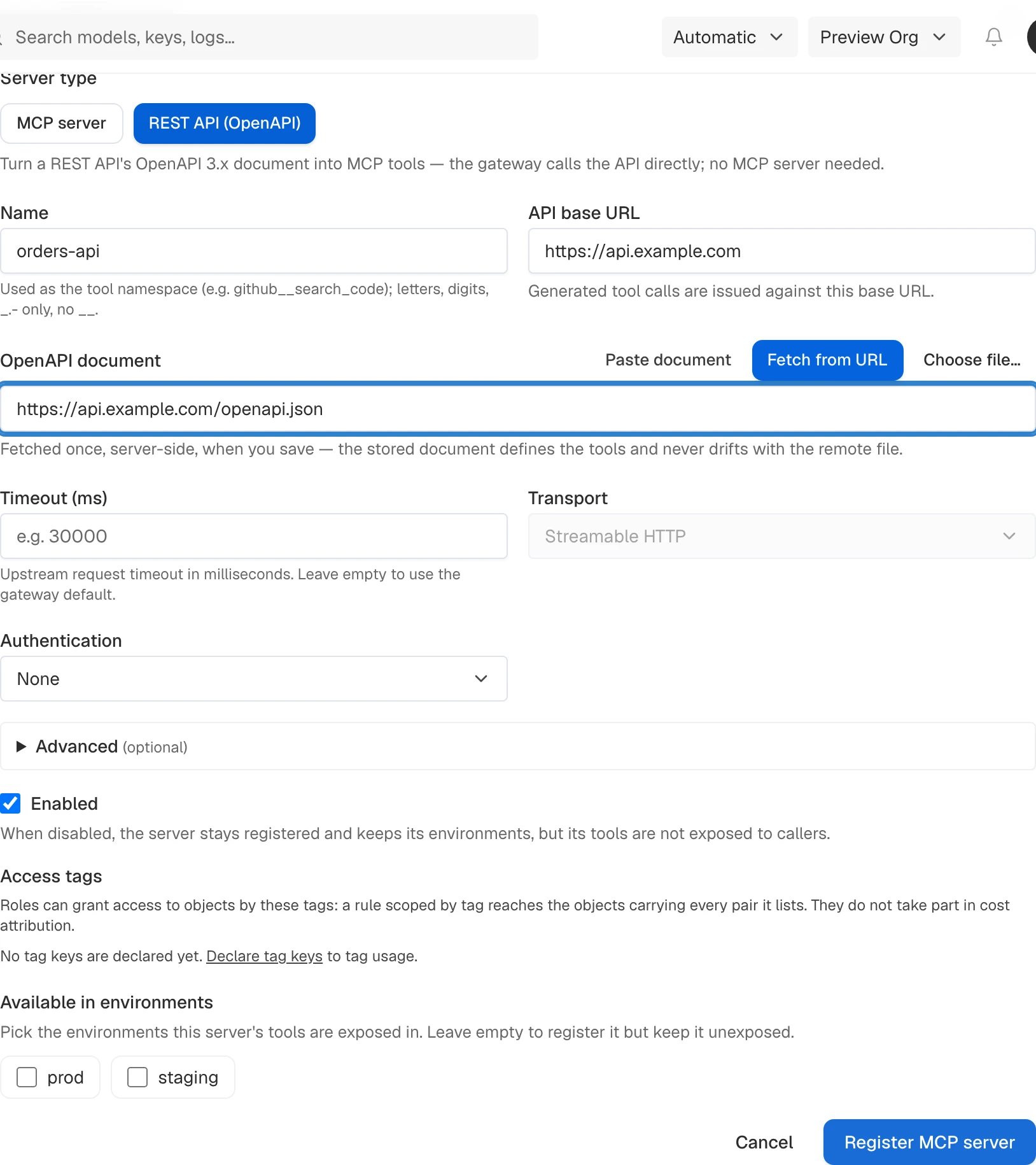
- Under Server type, select REST API (OpenAPI).
- Enter
httpbinin Name andhttps://httpbin.orgin API base URL. - Under OpenAPI document, choose Paste document. You can instead choose Fetch from URL, or select Choose file… to load a local
.json,.yaml, or.ymlfile into the editor.
Paste this document into the editor:
{
  "openapi": "3.0.0",
  "info": {
    "title": "HTTPBin",
    "version": "1.0.0"
  },
  "paths": {
    "/anything": {
      "get": {
        "operationId": "inspectRequest",
        "responses": {
          "200": {
            "description": "OK"
          }
        }
      }
    }
  }
}
- Choose the upstream Authentication and select the target under Available in environments.
- Select Register MCP server.
The server row shows an OpenAPI badge and a preview of generated tool names. Select View tools or View all N to open the tools page, where Search tools filters the Tool, Operation, and Description columns.
Grant the Tool to a Caller Key
- Open the environment and select API keys.
- If you have the plaintext of an existing caller key, select Edit. Otherwise, select New API key and enter a display name.
- Grant
httpbin__inspectrequestunder MCP tool access. - Select Save changes for an existing key, or Create API key for a new key.
- For a new key, copy the plaintext from the one-time view before dismissing it.
Export the plaintext key you copied:
export AISIX_MCP_KEY="YOUR_CALLER_API_KEY"
Provide the document in one of two ways:
spec_content: the document itself, as JSON or YAML text. Use this when the control plane cannot reach the API's network.spec_url: a URL the control plane fetches once during registration. The fetched document is validated, normalized, and stored; the data plane never re-fetches it, so the tool set only changes when you update the registry entry. An AISIX Enterprise control plane fetches URLs that resolve to private, internal, or loopback addresses by default. To refuse them, turn on SSRF protection withAISIX_CLOUD_SSRF_PROTECTION_ENABLED=truein the Docker Compose.env, orapi.outbound.ssrfProtection.enabled: truein the Helm values; then paste the document of a private server instead, or list its host in the allowed hosts. See Private Network Access.
The AISIX Cloud Admin API caps OpenAPI documents at 1 MiB.
Export the control-plane address, admin token, and environment ID:
# AISIX_CP includes /api and has no trailing slash
# The local AISIX Enterprise quickstart uses http://localhost:8080/api
export AISIX_CP="YOUR_AISIX_CONTROL_PLANE_API_URL"
export AISIX_TOKEN="YOUR_ADMIN_TOKEN"
export ENV_ID="YOUR_ENVIRONMENT_ID"
Register an HTTPBin endpoint and its OpenAPI document. This public endpoint makes the generated tool call reproducible without an internal API or upstream credential:
MCP_SERVER_RESPONSE=$(curl -fsS -X POST "$AISIX_CP/mcp_servers" \
  -H "Authorization: Bearer $AISIX_TOKEN" \
  -H "Content-Type: application/json" \
  -d '{
    "name": "httpbin",
    "type": "openapi",
    "url": "https://httpbin.org",
    "spec_content": "{\"openapi\":\"3.0.0\",\"info\":{\"title\":\"HTTPBin\",\"version\":\"1.0.0\"},\"paths\":{\"/anything\":{\"get\":{\"operationId\":\"inspectRequest\",\"responses\":{\"200\":{\"description\":\"OK\"}}}}}}",
    "auth_type": "none",
    "allowed_environments": ["'$ENV_ID'"]
  }')

echo "$MCP_SERVER_RESPONSE" | jq
export MCP_SERVER_ID=$(echo "$MCP_SERVER_RESPONSE" | jq -er '.mcp_server.id')
The response includes the generated tool_names:
{
  "mcp_server": {
    "id": "6f64f080-17d7-44d9-b995-6a353e71f6bc",
    "name": "httpbin",
    "type": "openapi",
    "url": "https://httpbin.org",
    "tool_names": ["inspectrequest"],
    "approval_status": "approved"
  }
}
Grant the generated tool to the caller API key created by the quickstart:
curl -fsS -X PATCH \
  "$AISIX_CP/environments/$ENV_ID/api_keys/$API_KEY_ID" \
  -H "Authorization: Bearer $AISIX_TOKEN" \
  -H "Content-Type: application/json" \
  -d '{"mcp_access":{"allow":["httpbin__inspectrequest"]}}' | jq

export AISIX_MCP_KEY="$AISIX_API_KEY"
The partial update retains the key's model access. If environment or team MCP access policies also apply to the key, those layers must allow httpbin__inspectrequest as well.
Send the initialize request and notifications/initialized notification from Verify MCP Tool Access with HTTP. Then poll until the projected tool appears:
for attempt in $(seq 1 45); do
  TOOLS_RESPONSE=$(curl -fsS -X POST "$AISIX_PROXY/mcp" \
    -H "Authorization: Bearer $AISIX_MCP_KEY" \
    -H "MCP-Protocol-Version: 2025-11-25" \
    -H "Content-Type: application/json" \
    -H "Accept: application/json, text/event-stream" \
    -d '{
      "jsonrpc": "2.0",
      "id": 2,
      "method": "tools/list",
      "params": {}
    }') || true

  if echo "$TOOLS_RESPONSE" | jq -e \
    '.result.tools | any(.name == "httpbin__inspectrequest")' >/dev/null 2>&1; then
    break
  fi
  sleep 2
done

echo "$TOOLS_RESPONSE" | jq -e \
  '.result.tools | any(.name == "httpbin__inspectrequest")'
The final command prints true. Call the generated tool and verify the URL HTTPBin received:
curl -fsS -X POST "$AISIX_PROXY/mcp" \
  -H "Authorization: Bearer $AISIX_MCP_KEY" \
  -H "MCP-Protocol-Version: 2025-11-25" \
  -H "Content-Type: application/json" \
  -H "Accept: application/json, text/event-stream" \
  -d '{
    "jsonrpc": "2.0",
    "id": 3,
    "method": "tools/call",
    "params": {
      "name": "httpbin__inspectrequest",
      "arguments": {}
    }
  }' | jq -e \
  '.result.content[] | select(.text | fromjson | .url == "https://httpbin.org/anything")'
The command prints the matching tool-result content block.
Set type: openapi on an mcp_servers entry and provide the document as a nested mapping under spec. The resources file does not accept the AISIX Cloud Admin API write fields spec_content or spec_url.
Start an HTTP fixture on the temporary Docker network created in Set Up MCP Gateway. The server exposes an empty directory over HTTP and requires no packages on the host:
docker run -d --name aisix-openapi-fixture \
  --network aisix-mcp \
  python:3.13-alpine \
  python3 -m http.server 8081 --bind 0.0.0.0 --directory /tmp
In the complete file from Set Up MCP Gateway, replace quickstart-caller and add fixture to mcp_servers. Keep the other resources unchanged:
api_keys:
  - id: 85b60b85-09dc-40fc-a403-5c7c8beb4e8d
    display_name: quickstart-caller
    key_hash: ${CALLER_API_KEY_SHA256}
    allowed_models:
      - gpt-4o-mini
    mcp_access: { allow: ["fixture__list_directory"] }

mcp_servers:
  - id: 67439bf8-46a4-4502-bc4b-b989342d7947
    name: fixture
    type: openapi
    url: http://aisix-openapi-fixture:8081
    auth_type: none
    spec:
      openapi: 3.0.0
      info:
        title: Local directory API
        version: 1.0.0
      paths:
        /:
          get:
            operationId: list_directory
            summary: List the fixture directory
            responses:
              "200":
                description: Directory listing returned successfully
This example reuses CALLER_API_KEY_SHA256, which is already present in the running gateway from the open-source quickstart. Validate and reload the complete resources file. Use the initialization request from Set Up MCP Gateway, then call the generated tool:
curl -sS -X POST "$AISIX_PROXY/mcp" \
  -H "Authorization: Bearer $AISIX_MCP_KEY" \
  -H "MCP-Protocol-Version: 2025-11-25" \
  -H "Content-Type: application/json" \
  -H "Accept: application/json, text/event-stream" \
  -d '{
    "jsonrpc": "2.0",
    "id": 2,
    "method": "tools/call",
    "params": {
      "name": "fixture__list_directory",
      "arguments": {}
    }
  }' | jq -e \
  '.result.content[] | select(.text | contains("Directory listing for /"))'
The command prints the matching tool-result content block. Remove the fixture container when you finish:
docker rm -f aisix-openapi-fixture
Review the Generated Tools in AISIX Enterprise or AISIX Cloud
- Dashboard
- Admin API
Each registered server's card lists the first few generated tool names and links to a tools page for that server, which lists every tool with:
- its
<server>__<tool>name, which is the form to copy into an API key'smcp_accessblock or an access policy pattern; - the HTTP operation it calls, such as
GET /items/{id}; - its description.
Use Search tools to filter the Tool, Operation, and Description columns.
Read the same listing from the Admin API:
curl -sS "$AISIX_CP/mcp_servers/$MCP_SERVER_ID/tools" \
  -H "Authorization: Bearer $AISIX_TOKEN"
The response has this shape:
{
  "data": [
    {
      "name": "inspectrequest",
      "namespaced_name": "httpbin__inspectrequest",
      "method": "GET",
      "path": "/anything",
      "description": "GET /anything"
    }
  ]
}
The listing is derived from the stored document and matches that document's generated tool surface. Approval, enabled state, environment assignment, and caller access still determine whether a gateway serves those tools. The endpoint applies only to type: openapi servers and returns 400 for an upstream MCP server.
Authenticate to the REST API
The upstream authentication modes apply as-is; the credential is attached to every generated tool call:
bearer:Authorization: Bearer <secret>.api_key: the key fromsecret, sent as thex-api-keyheader by default. REST APIs often expect a custom header: setapi_key_header(for exampleX-ERP-Key) to override the header name. This field exists only onopenapiservers withauth_type: api_key.oauth2: AISIX mints an access token from the configured client credentials and sends it as a bearer, with the same token caching as MCP upstreams.oauth_delegate: AISIX relays the caller's ownAuthorizationheader when the caller sent its gateway key inx-aisix-api-key. See Delegate the Caller's Token.oauth2_token_exchange: AISIX exchanges the caller's verified Entra ID token for a token to the REST API and sends it as a bearer. See Entra On-Behalf-Of Token Exchange.
Redirects are never followed on generated tool calls, so the credential cannot be re-sent to a host you did not configure.
Call Results and Errors
A successful response's body is returned as the tool result text. A non-2xx response returns a tool-level error result (isError: true) carrying HTTP <status> and the response body, so the agent can see and react to the failure. A missing required path parameter is reported the same readable way. AISIX also rejects a path value that contains / or \, or that equals . or .., to keep the request on the configured path.
Update the Document
Replacing the document regenerates the tool list.
- AISIX Enterprise or Cloud
- AISIX OSS
An approved replacement updates the review timestamp and starts projecting the new tool surface when the update returns. A role holding only mcp_server_submissions permissions stages the replacement instead, so the current tools remain live until approval.
- Dashboard
- Admin API
- Select Edit on the OpenAPI-backed server.
- Paste the new document into Replace OpenAPI document, or select Choose file….
- Select Save. Leaving the replacement empty keeps the current document.
- Open the tools page and confirm that the regenerated list matches the replacement.
To remove the registry entry from every environment, select Delete and confirm.
Update the server with spec_content or spec_url, then read its generated tools to verify the replacement. Re-uploading a document that normalizes to the stored version is not treated as a change. Changing api_key_header follows the same review behavior.
User-session updates record the reviewer; admin-token updates do not carry a user ID.
Replace the nested spec, validate the complete resources file, and reload the gateway. A rejected reload leaves the previous tool surface active. After a successful reload, list the tools and confirm that the generated surface matches the replacement document.
In AISIX Enterprise and AISIX Cloud, the server's type is fixed at creation. To switch between an MCP upstream and an OpenAPI backing, delete the entry and register a new one. In resources.yaml, change the entry and reload the file; the validated configuration replaces the previous runtime entry.
Next Steps
You can now expose a REST API as MCP tools through either management path. Use these guides to secure and govern the generated tools:
- Upstream Authentication: configure the credential AISIX sends to the REST API.
- Control Tool Access: choose which generated tools each caller API key may list and call.
- Review and Approve MCP Servers: review OpenAPI-backed servers and document changes before publishing them through the AISIX Cloud Admin API.