
Semantic Routing
A semantic router gives applications one stable model alias while AISIX selects a target based on the meaning of each request. AISIX embeds the request's latest user text, compares it with examples for each route, and dispatches to the best match. When no route reaches its threshold, AISIX uses a default target. Each target is a direct model or a model group.
Use semantic routing when requests should reach different models by topic without requiring the application to choose a model. For example, one alias can send legal questions to a reasoning model, translation requests to a multilingual model, and all other requests to a general-purpose model.
Semantic routers serve these endpoints:
/v1/chat/completions/v1/messages/v1/messages/count_tokens/v1/responses
So a coding agent such as Claude Code or Codex can call a semantic router directly. To keep an agent session on the route its first request matched, turn on session affinity.
This page describes the embedding-based decision backend. A semantic router can instead let TypeSafe's hosted jev decision model choose the route from each route's description, with no examples or thresholds. See Semantic Routing with TypeSafe Jev.
How Semantic Routing Works
For each request, AISIX uses the configured embedding model to compare the latest user text with route examples, then dispatches the request to one target.
AISIX embeds route examples on the first request that needs them and caches their vectors in the gateway process. It recomputes the vectors when the examples, embedding model, or embedding dimensions change. Each request therefore requires one embedding call for its latest user text, followed by local similarity calculations.
In AISIX Enterprise and AISIX Cloud, a semantic router has no price of its own. The embedding call is billed at the embedding model's price as an internal call. The routed request is billed at the selected target. See Bill a Semantic Router's Requests. The semantic-router form therefore has no sale-price section.
Prerequisites
Before starting, prepare the following:
- A provider key for an OpenAI-compatible
/v1/embeddingsendpoint that returns float vectors. - A default target and at least one route target. Each is a direct model or a model group.
- Targets that serve Chat Completions. AISIX Enterprise and AISIX Cloud reject models on non-chat providers, including
jina,runwayml, andtypesafe, and prevent referenced models from moving to those provider keys. - A caller API key that can call the semantic router alias.
- For AISIX Enterprise or AISIX Cloud, an environment with an attached gateway. Dashboard users need permission to manage models and caller API keys. AISIX Cloud Admin API users need a write-scoped admin token.
- For the open-source AISIX gateway, access to the declarative resources file and the gateway process.
Configure a Semantic Router
Create the embedding model, default model, and route targets before creating the semantic router. The control plane references these resources by model ID. The open-source AISIX gateway references them by display_name in the declarative resources file.
The embedding model's dimensions must match the number of values returned by its upstream endpoint. Set normalize to false only when AISIX must normalize the vectors before comparing them.
Each route requires a name, a target, and at least one example. The description is optional. A route-level threshold overrides the router-level threshold for that route.
- AISIX Enterprise or Cloud
- AISIX OSS
Create the embedding model and router in the environment serving the application.
- Dashboard
- Admin API
First create the embedding model in the environment:
- Open Models, select Create model, and choose Embedding model.
- Set Display name to
embedding-prod, Upstream model id totext-embedding-3-small, and select the embedding provider key. - Set Dimensions to
1536. Keep Upstream already returns L2-normalized vectors selected for this model.
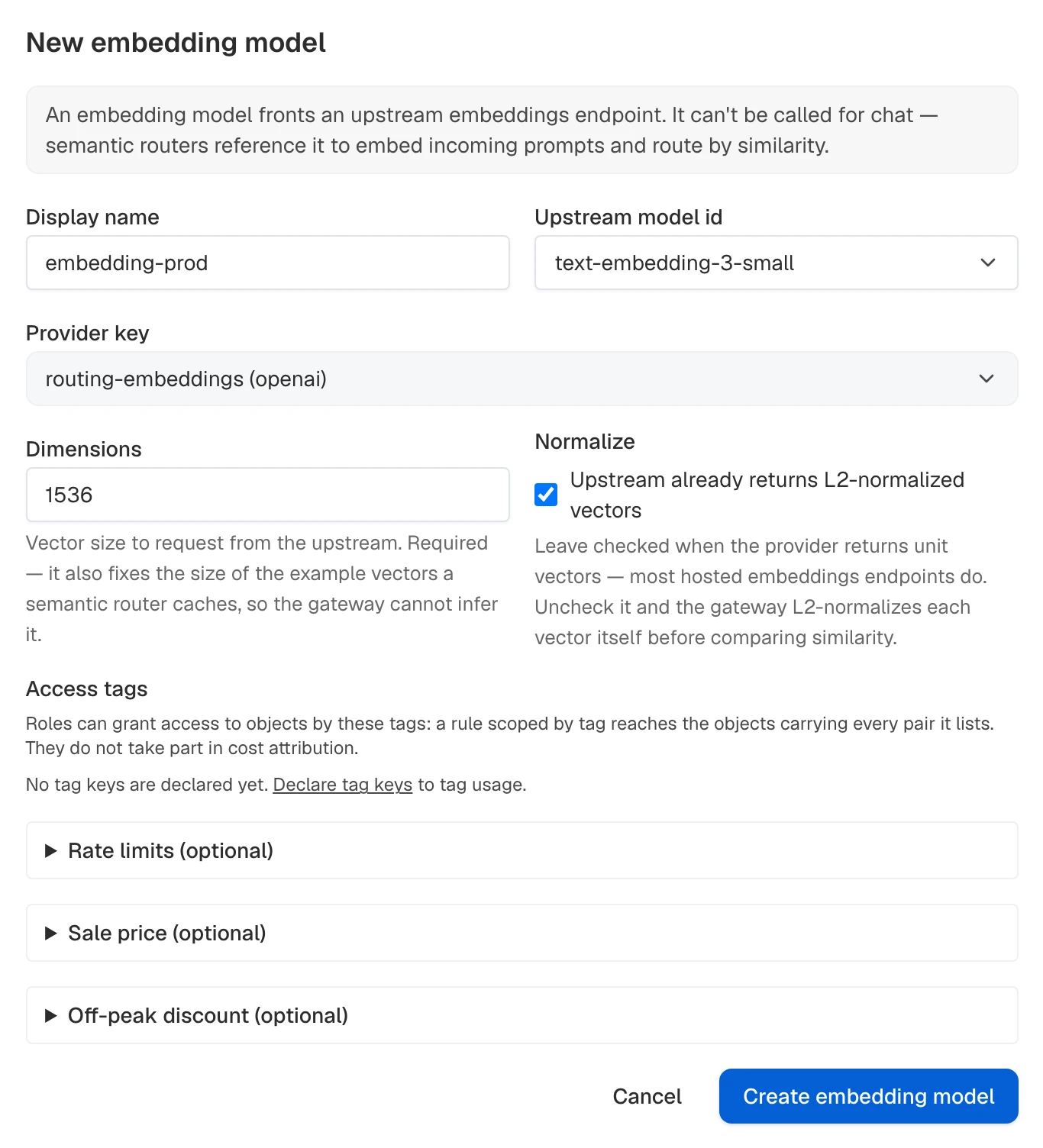
- Select Create embedding model.
Create the router:
- Select Create model again and choose Semantic router.
- Set Display name to
topic-router, keep Embedding similarity as the Decision backend, and selectembedding-produnder Embedding model.
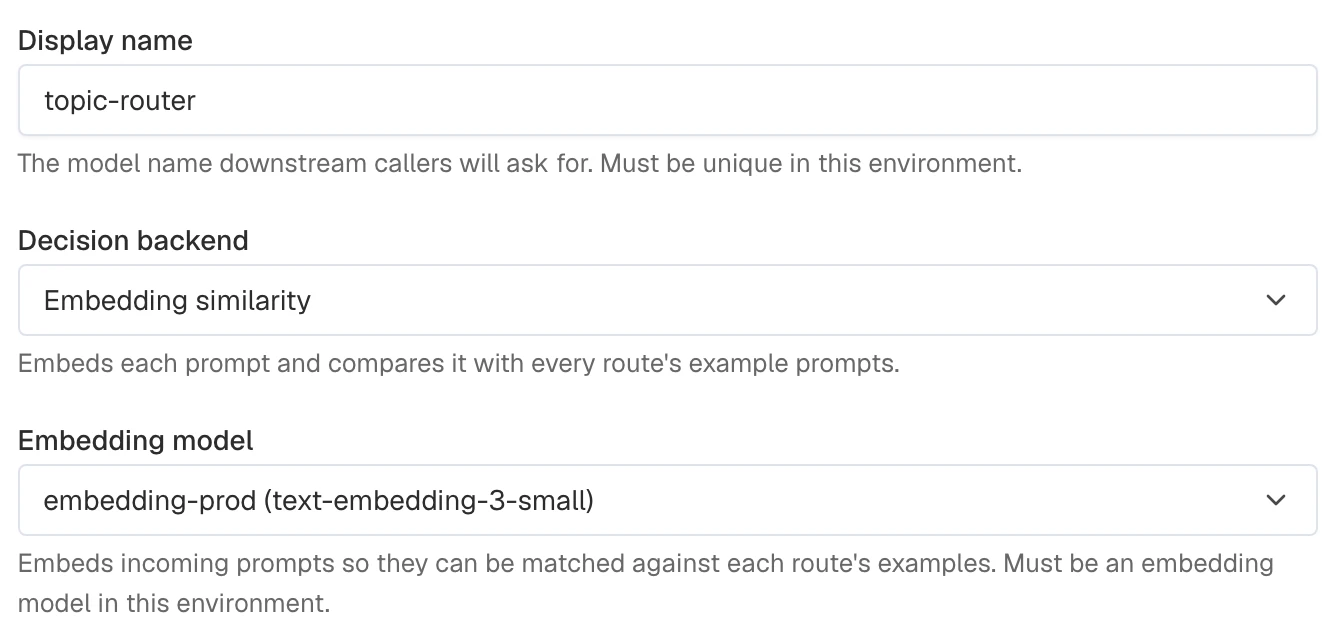
- Under Routes, add
legaland select the legal target. Enter the two Example prompts on separate lines and set its optional threshold to0.8:
Analyze this contract for legal risk
Review this NDA for liability exposure
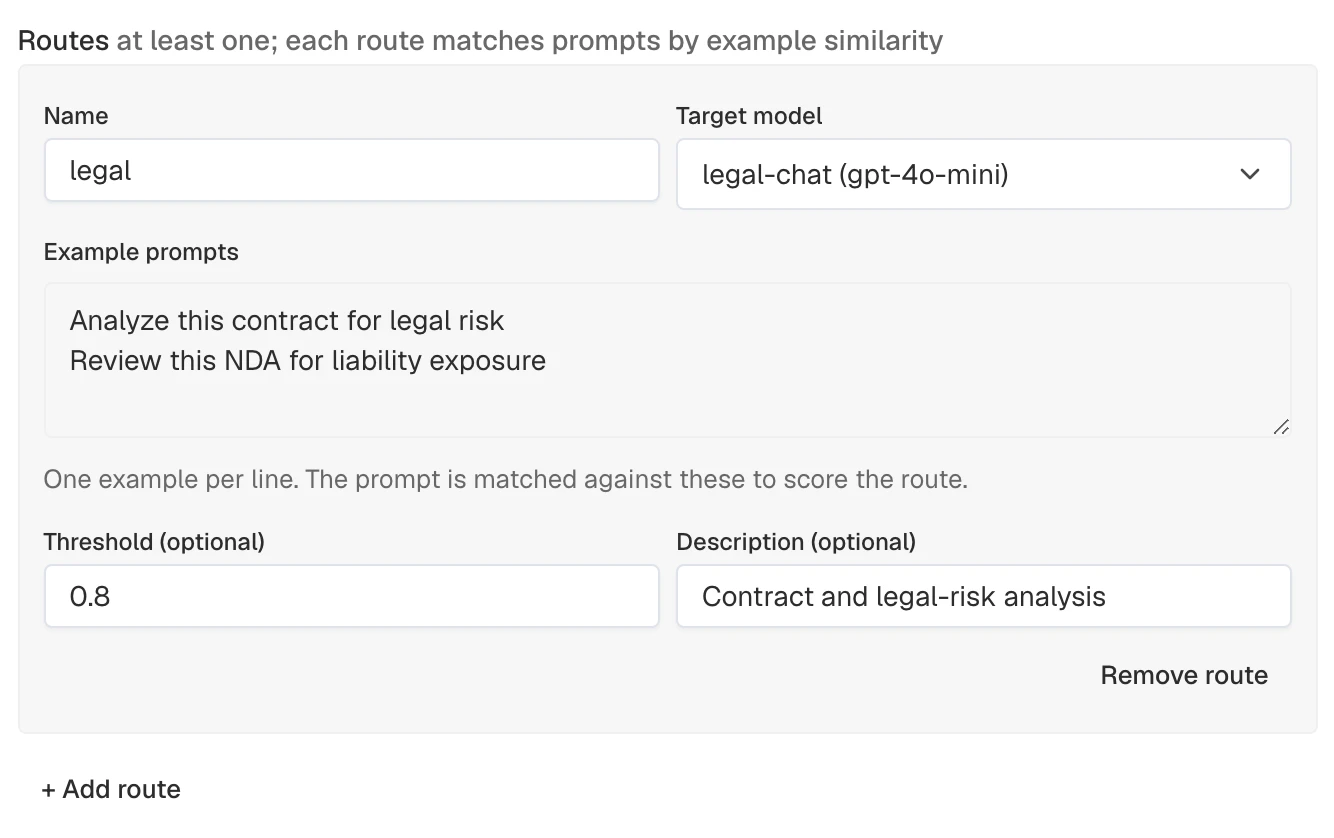
- Add
translation, select its target, and enterTranslate this paragraph to Frenchas its example prompt.
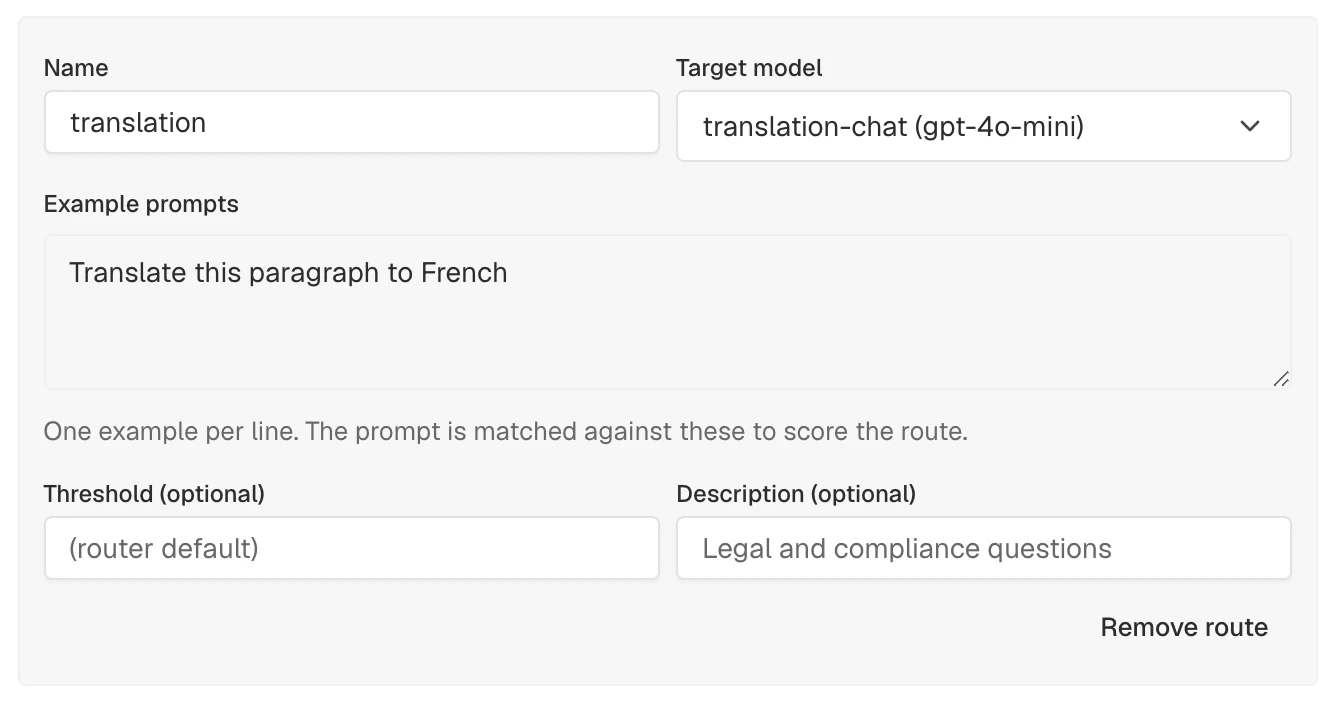
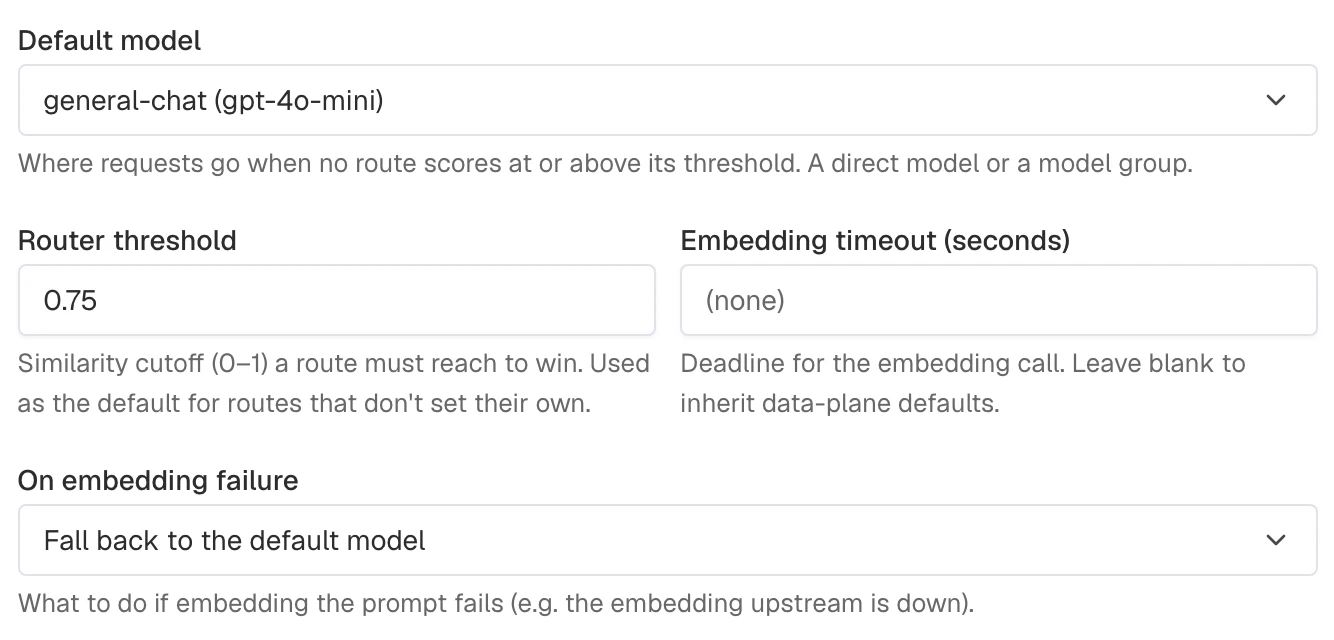
- Select the prepared default model and set Router threshold to
0.75. Keep On embedding failure set to fall back to the default model for this example.
- Select Create semantic router. Check the saved backend and route count. Reopen Edit to inspect the individual routes and default model.

An existing caller key with all-model access already grants the new alias. Otherwise:
- Open API keys in the same environment.
- Select Edit for an existing caller whose plaintext you have saved, or select New API key and enter a display name.
- Keep Selected models and select
topic-routerunder Allowed models, retaining any other required models.

Finish the key according to the path you chose:
- For an existing key, select Save changes.
- For a new key, select Create API key, copy its plaintext from One-time view, then select I've saved it.
Embedding-model and router rows support Edit and Delete. Remove a router's reference before deleting an embedding or target model that it uses. Deleting the router itself requires confirmation.
Export the control-plane connection details and the provider key used by the embedding model:
# AISIX_CP is the Admin API base URL; include /api and omit a trailing slash.
# The local AISIX Enterprise quickstart uses http://localhost:8080/api.
export AISIX_CP="YOUR_AISIX_CONTROL_PLANE_API_URL"
export AISIX_TOKEN="YOUR_ADMIN_TOKEN"
export ENV_ID="YOUR_ENVIRONMENT_ID"
export PROVIDER_KEY_ID="YOUR_EMBEDDING_PROVIDER_KEY_ID"
export API_KEY_ID="YOUR_CALLER_API_KEY_RESOURCE_ID"
Create the embedding model and capture its ID:
EMBEDDING_MODEL_ID=$(curl -sS -X POST "$AISIX_CP/environments/$ENV_ID/models" \
  -H "Authorization: Bearer $AISIX_TOKEN" \
  -H "Content-Type: application/json" \
  -d '{
    "kind": "embedding",
    "display_name": "embedding-prod",
    "model_name": "text-embedding-3-small",
    "provider_key_id": "'"$PROVIDER_KEY_ID"'",
    "embedding": {
      "dimensions": 1536,
      "normalize": true
    }
  }' | jq -r '.model.id')
Export the IDs of the target models. Each can be a direct model or a model group:
export DEFAULT_MODEL_ID="YOUR_DEFAULT_MODEL_ID"
export LEGAL_MODEL_ID="YOUR_LEGAL_MODEL_ID"
export TRANSLATION_MODEL_ID="YOUR_TRANSLATION_MODEL_ID"
Create the semantic router. Its default threshold applies to every route that does not define its own:
SEMANTIC_MODEL_ID=$(curl -sS -X POST "$AISIX_CP/environments/$ENV_ID/models" \
  -H "Authorization: Bearer $AISIX_TOKEN" \
  -H "Content-Type: application/json" \
  -d '{
    "kind": "semantic",
    "display_name": "topic-router",
    "semantic": {
      "embedding_model_id": "'"$EMBEDDING_MODEL_ID"'",
      "default_model_id": "'"$DEFAULT_MODEL_ID"'",
      "threshold": 0.75,
      "routes": [
        {
          "name": "legal",
          "target_model_id": "'"$LEGAL_MODEL_ID"'",
          "description": "Contract and legal-risk analysis",
          "examples": [
            "Analyze this contract for legal risk",
            "Review this NDA for liability exposure"
          ],
          "threshold": 0.8
        },
        {
          "name": "translation",
          "target_model_id": "'"$TRANSLATION_MODEL_ID"'",
          "examples": [
            "Translate this paragraph to French"
          ]
        }
      ]
    }
  }' | jq -r '.model.id')
If the caller key uses all-model access, it already grants the new router. Otherwise, read its current allowlist, append the router ID, and write the complete list back. The saved configuration is projected to attached gateways automatically:
curl -sS "$AISIX_CP/environments/$ENV_ID/api_keys" \
  -H "Authorization: Bearer $AISIX_TOKEN" \
  | jq -ec --arg key_id "$API_KEY_ID" --arg id "$SEMANTIC_MODEL_ID" '
      .data[] | select(.id == $key_id)
      | {allowed_models: ((.allowed_models // []) + [$id] | unique)}' \
  | curl -sS -X PATCH "$AISIX_CP/environments/$ENV_ID/api_keys/$API_KEY_ID" \
      -H "Authorization: Bearer $AISIX_TOKEN" \
      -H "Content-Type: application/json" \
      --data-binary @- | jq
The Dashboard tuning helpers call the embedding endpoint from the control plane, so that endpoint must be reachable from the control-plane services.
Add the embedding model and semantic router to the models collection. References in the semantic block use model display_name values:
models:
  - id: fa0a743f-703c-4b18-8f08-9371506cad15
    display_name: embedding-prod
    provider: openai
    model_name: text-embedding-3-small
    provider_key_id: 2f87ee16-6c99-4817-96fd-ff2b8ee08eb7
    embedding:
      dimensions: 1536
      normalize: true

  - id: 79de16c6-8204-4bd0-82a7-aebc4595ea85
    display_name: topic-router
    semantic:
      embedding_model: embedding-prod
      default: general-chat
      match:
        distance_metric: cosine
        aggregation: max
        threshold: 0.75
      routes:
        - name: legal
          target: legal-chat
          description: Contract and legal-risk analysis
          examples:
            - Analyze this contract for legal risk
            - Review this NDA for liability exposure
          threshold: 0.8
        - name: translation
          target: translation-chat
          examples:
            - Translate this paragraph to French
The complete resources file must also contain the referenced provider key and the general-chat, legal-chat, and translation-chat direct models. Add topic-router to the caller key's allowed_models, then validate and reload the file.
Verify Route Selection
Export the gateway URL and caller API key for the deployment you configured:
# Use the gateway origin without a trailing slash or endpoint path.
# The local quickstarts use http://127.0.0.1:3000.
export AISIX_PROXY="YOUR_AISIX_GATEWAY_URL"
export AISIX_API_KEY="YOUR_CALLER_API_KEY"
Send a request that should match the legal route:
curl -sSi -X POST "$AISIX_PROXY/v1/chat/completions" \
  -H "Authorization: Bearer $AISIX_API_KEY" \
  -H "Content-Type: application/json" \
  -d '{
    "model": "topic-router",
    "messages": [
      {"role": "user", "content": "Review this contract for liability risk."}
    ]
  }'
The response body retains topic-router as the caller-facing model name. Use the x-aisix-request-id response header to find the request's access-log line.
| Signal | Expected result |
|---|---|
| Access log | semantic_route="legal" |
| Debug response headers | x-aisix-route: legal and x-aisix-served-by naming the direct model |
Debug headers appear only when proxy.expose_debug_headers is enabled in the gateway startup configuration.
Send a prompt unrelated to every route to confirm that AISIX uses the default model. Its access-log line carries semantic_fallback instead of semantic_route, and the response omits x-aisix-route.
The request's access-log line records how the router decided: the matched route, its similarity score, and why the default model served the request when no route did. See Read the Semantic Routing Decision.
Tune Matching Behavior
AISIX applies these rules when selecting a route:
- Only one user turn is classified, chosen as described in What the Router Classifies.
- Each route's score is the highest cosine similarity between the request and that route's examples.
- A route matches when its score is at least its route-level threshold, or the router-level threshold when the route does not override it.
- When several routes match, the route with the highest score wins. When none match, AISIX uses the default model.
Test and Suggest Thresholds in the Dashboard
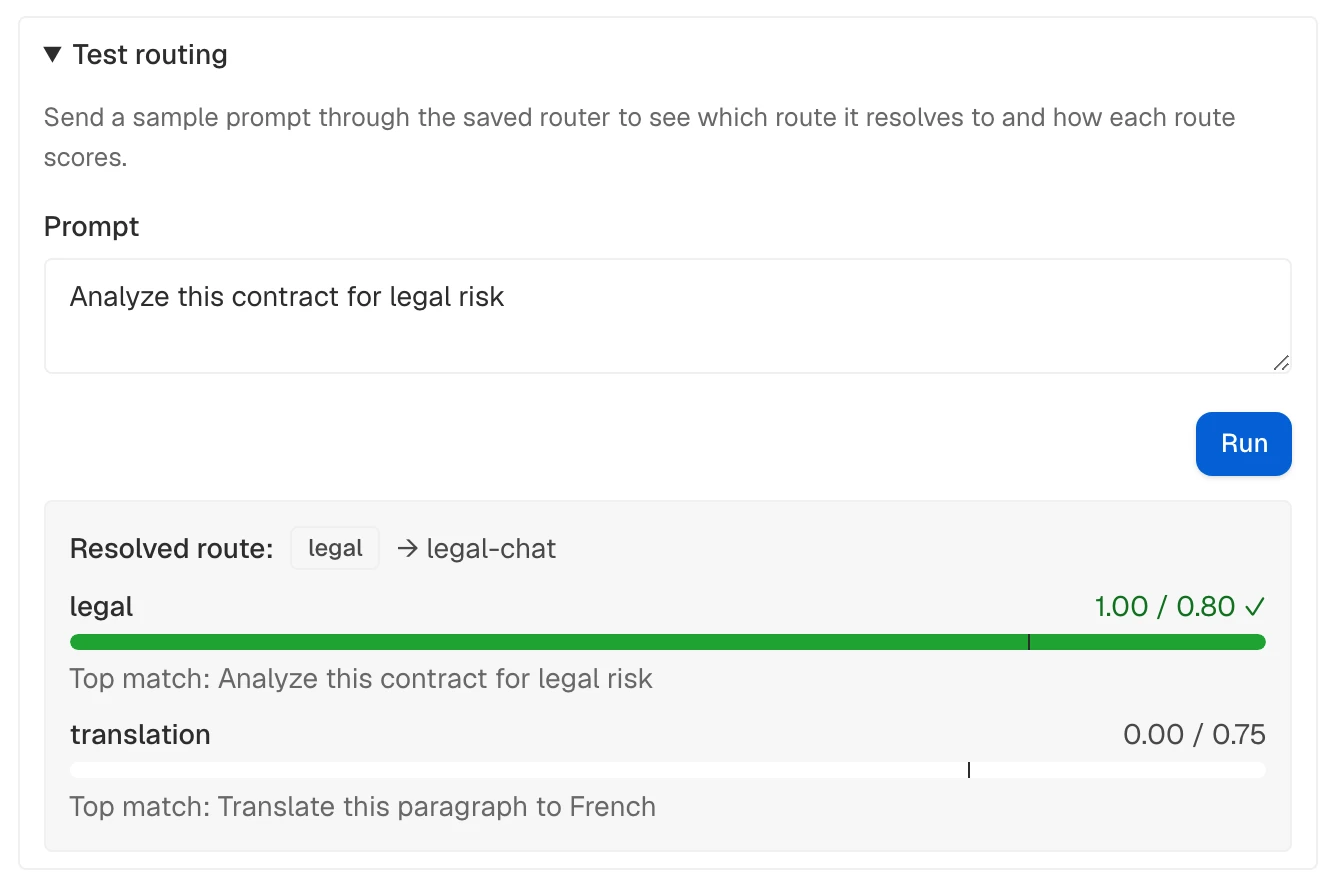
Select Edit on the router. Save any changed route examples before running Test routing or Auto-detect thresholds, because those helpers evaluate the saved configuration. The embedding endpoint must be reachable from the control-plane services.
For a routing test, expand Test routing, enter a representative prompt, and run the test. Inspect the selected route and each route's score against its threshold.
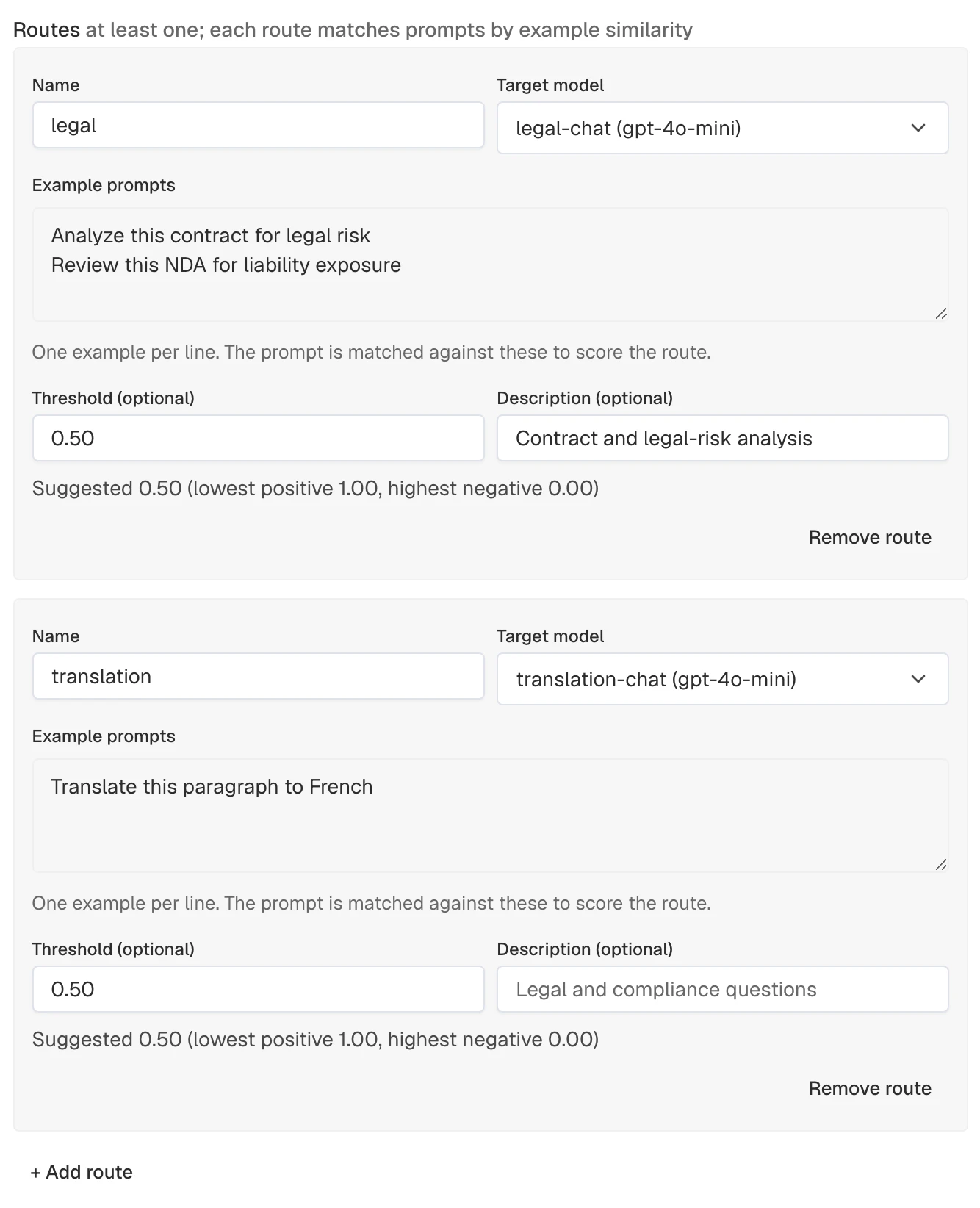
Select Auto-detect thresholds to fill the route threshold fields with suggestions. Review the suggested values and warnings, then select Save changes to apply them.
What the Router Classifies
AISIX classifies the newest non-empty user text and ignores tool-only turns. This keeps an agent loop focused on the user's latest request instead of a tool result. See Classified Input for the exact Chat Completions, Messages, Responses, and coding-agent rules.
Handle Embedding Failures
Use embedding_timeout_ms to bound the embedding call and on_embedding_failure to choose what happens after an embedding error or timeout. The default behavior is to use the router's default model.
- AISIX Enterprise or Cloud
- AISIX OSS
- Dashboard
- Admin API
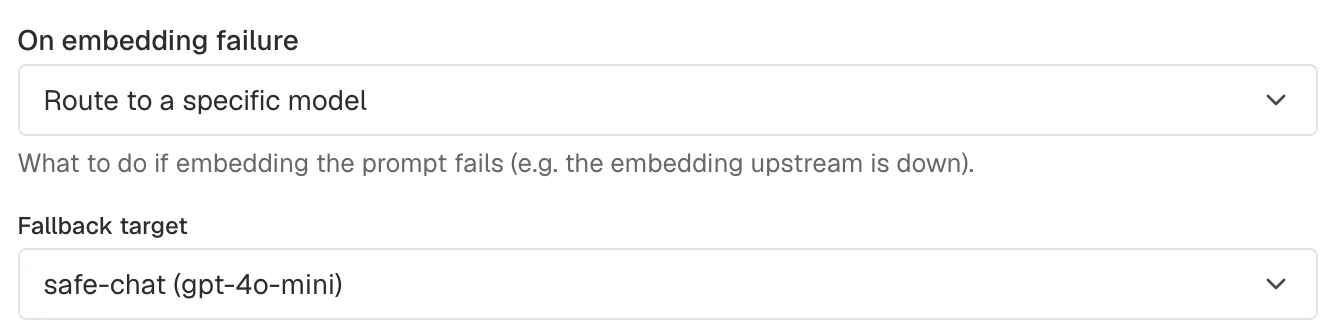
Edit the router and use On embedding failure to select the fallback behavior. To route failures to a prepared fallback model, choose the specific-model option, select that target, and save the changes.
The managed fallback policy is an object. To reject the request with 503:
{
  "semantic": {
    "embedding_timeout_ms": 500,
    "on_embedding_failure": {
      "mode": "fail"
    }
  }
}
Set mode to default to use the default model. To use another direct model or a model group, set mode to target and provide its target_model_id.
Use default, fail, or an object that names a direct model or a model group:
semantic:
  embedding_timeout_ms: 500
  on_embedding_failure:
    target: safe-chat
With fail, the 503 carries error.code semantic_routing_failed and a message naming the router and the reason, such as embedding_timeout. The access-log line records semantic_fallback="decision_failed" and error_class="semantic_decision_failed". See Semantic Routing Failures for the reasons.
Route to a Model Group
A route target, the default target, and the failure target can each be a model group (kind: routing) instead of a direct model. Use one when a route should spread its traffic over several deployments, or fail over between them, rather than reach a single model.
- AISIX Enterprise or Cloud
- AISIX OSS
The group must contain at least one member whose provider serves Chat Completions. AISIX rejects ensemble models, embedding models, and other semantic routers with 400. This validation runs when the router is saved; later group changes are not rechecked.
A gateway before 1.10.0 cannot serve a semantic route whose target is a group. AISIX Enterprise and AISIX Cloud reject the router with 422 DP_INCOMPATIBLE while an older gateway is registered in the environment.
- Dashboard
- Admin API
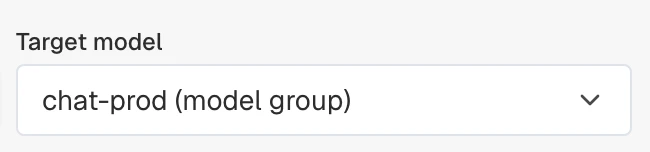
Edit the router and select the prepared group in the route, default, or failure target selector. Groups are marked model group. Select Save changes to apply the choice.
Reference the group by model ID in the same fields used for direct models:
| Use | Field |
|---|---|
| Route target | target_model_id |
| Default target | default_model_id |
| Embedding-failure target | on_embedding_failure.target_model_id |
Update the existing router with the appropriate field, using the request shape shown in Configure a Semantic Router.
In the complete resources file, name the group in target, default, or on_embedding_failure.target, the same way as a direct model. Preserve the router's other fields, then validate and reload the file.
After the router selects a group, the group applies its own strategy, failover, cooldown, and target limits. If no group member is available, the router uses its default target.
See Semantic Routing Decisions and Session Affinity for rate-limit, cost, metrics, fallback, and two-layer session-affinity behavior.
Pin a Session to Its Route
By default, a semantic router classifies each request independently, so one conversation can move between routes. Session affinity keeps later requests on the first matched route and skips further classification. It works with both the embedding backend and the TypeSafe jev backend.
Enable Session Affinity
Add a session_affinity block to the router's semantic configuration:
| Field | Default | Description |
|---|---|---|
enabled | false | Whether sessions are pinned. While it is false, existing pins are not used. |
ttl_seconds | 3600 | How long a pin lasts after the last request that used it, from 60 to 604800 seconds. |
Without the block, every request is classified.
Session affinity requires gateway 1.10.0 or later. An older gateway ignores the block and classifies every request. AISIX Enterprise and AISIX Cloud still save the router while such a gateway is registered, and the save warns that the gateway ignores the field.
- AISIX Enterprise or Cloud
- AISIX OSS
- Dashboard
- Admin API
Edit the semantic router, select Session affinity, and set Pin TTL (seconds). This example uses the default 3600 seconds. Select Save changes.

Update the router with the following block inside its semantic configuration, preserving its routes and other settings:
{
  "semantic": {
    "session_affinity": {
      "enabled": true,
      "ttl_seconds": 3600
    }
  }
}
Add the block to the router's semantic configuration in the resources file:
semantic:
  session_affinity:
    enabled: true
    ttl_seconds: 3600
How Pins Behave
The first request that matches a route creates the pin. Later requests with the same router, caller key, and session ID use that route without another classification call, and each request refreshes the TTL. Requests sent to the default or failure target do not create a pin.
Claude Code and Codex already send a recognized session ID. Other clients can send x-aisix-session-id with a stable conversation ID. AISIX Enterprise and AISIX Cloud share pins across gateways in an environment; AISIX OSS keeps them in the gateway process.
See Semantic Routing Decisions and Session Affinity for pin invalidation, side-request handling, session-ID precedence, capacity behavior, and access-log fields.
Next Steps
- Use Semantic Routing with TypeSafe Jev to choose routes by description rather than example similarity.
- Build route targets with Multi-Target Routing and Failover.
- Use Ensemble Models when one request should call several panel models and synthesize their answers.
- Add Guardrails when requests need policy checks before dispatch.