
Qwen Realtime
Qwen-Omni Realtime accepts audio over an OpenAI-style WebSocket event protocol. Applications connect to the AISIX Realtime endpoint with a stable model alias, while the gateway authenticates to Alibaba Cloud Model Studio and relays the session events.
This guide configures Qwen-Omni Realtime in the Singapore region and verifies a complete audio turn. For Chat Completions, Responses, and other Qwen APIs, see Qwen (Alibaba Cloud).
Prerequisites
Before starting, prepare the following:
- One AISIX setup:
- For AISIX Enterprise or AISIX Cloud, an environment with an attached gateway and permission to manage provider keys, models, and caller API keys. The Admin API path also requires a write-scoped admin token and the environment ID.
- For AISIX OSS, a running gateway that loads a complete format-v2 resources file.
- A Model Studio API key and workspace ID from the same region. Create the key in the international Model Studio console or the mainland China Model Studio console.
- Access to Qwen-Omni Realtime in the selected region. The Qwen-Omni Realtime documentation lists the supported regions and workspace endpoints.
- A short speech recording in a mono, 16 kHz, 16-bit PCM WAV file named
input.wav. - Python 3 and
pipfor session verification. The Admin API path also usescurlandjq.
Use the provider ID, workspace domain, and API key from one region:
| Region | Provider ID | Realtime API base |
|---|---|---|
| Singapore | alibaba | https://YOUR_WORKSPACE_ID.ap-southeast-1.maas.aliyuncs.com/api-ws/v1 |
| Beijing | alibaba-cn | https://YOUR_WORKSPACE_ID.cn-beijing.maas.aliyuncs.com/api-ws/v1 |
The examples below use Singapore. Keep the workspace domain and API key in the same region. Use the matching provider ID so usage and cost attribution stay with the correct regional catalog.
Configure Qwen Realtime
Create a dedicated regional provider key, a direct model alias, and a caller API key that can use the alias.
- AISIX Enterprise or Cloud
- AISIX OSS
- Dashboard
- Admin API
- Open Provider keys, then select New provider key.
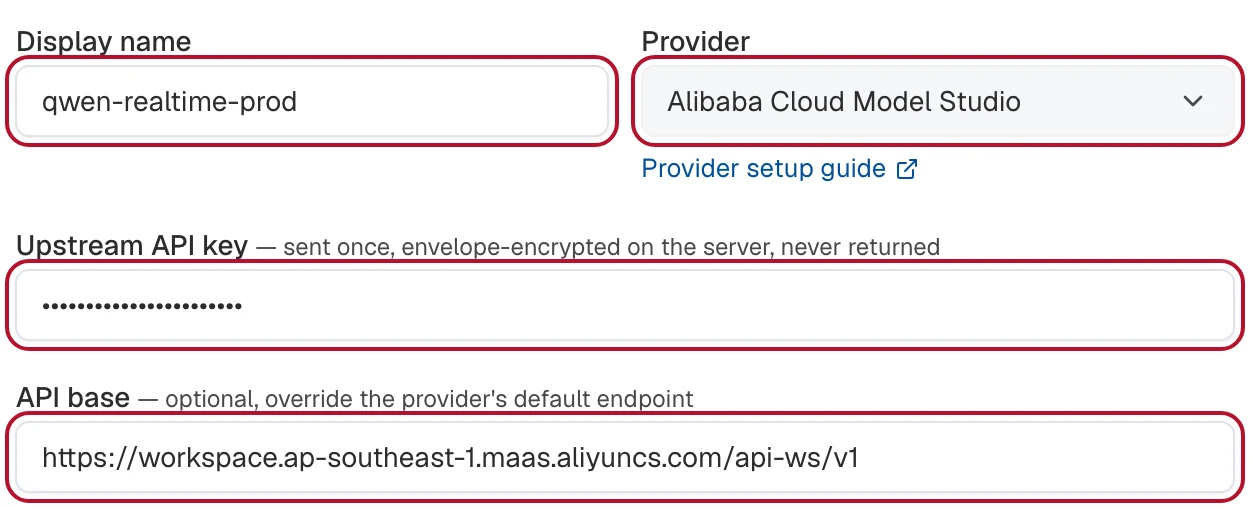
- Configure the provider key:
- Display name:
qwen-realtime-prod - Provider: Alibaba Cloud Model Studio
- Upstream API key: your Model Studio credential
- API base:
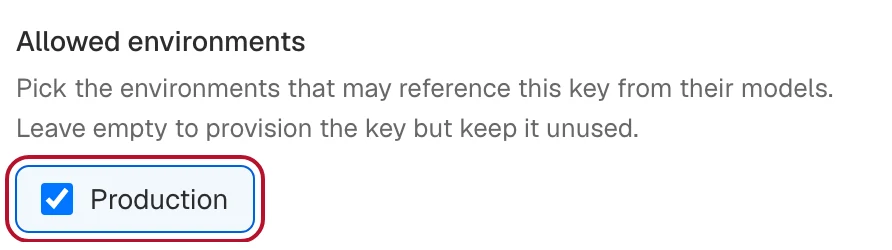
https://YOUR_WORKSPACE_ID.ap-southeast-1.maas.aliyuncs.com/api-ws/v1 - Allowed environments: the environment where the alias will run
- Display name:
The selected environment can reference this provider key from its models:
The API base is the regional /api-ws/v1 root and uses https://. Do not append /realtime; AISIX adds that path and changes the scheme to wss:// when it connects upstream.
- Select Create provider key.
- In the environment, open Models. Select New model, then Direct model.
- Configure the alias:
- Display name:
qwen-realtime-prod - Upstream model id:
qwen3.8-omni-flash-realtime - Provider key:
qwen-realtime-prod
- Display name:

Select the dedicated provider key for this model:

Realtime requires a direct model. A model group, ensemble, or semantic model is rejected before the WebSocket upgrade.
- Select Create model.
- Open API keys, then select New API key.
- Enter
qwen-realtime-calleras the display name. Keep Selected models, then open Allowed models.
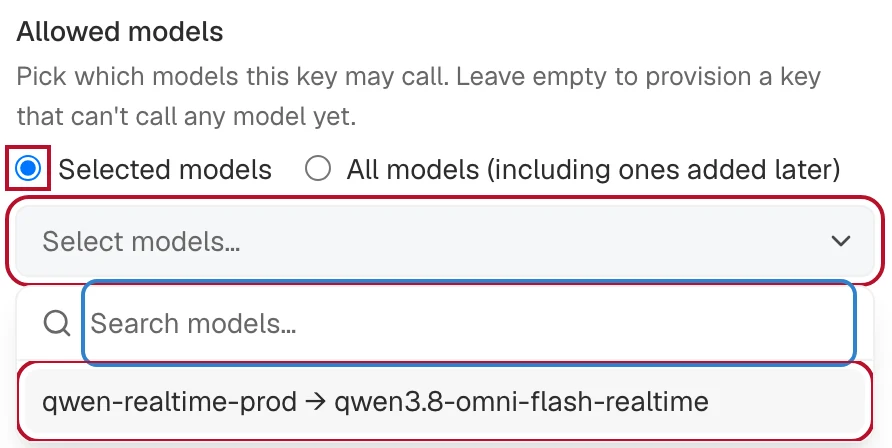
- Select
qwen-realtime-prod, then select Create API key. Copy the plaintext credential from the one-time view before dismissing it.
Export the copied credential for the verification client:
export AISIX_API_KEY="YOUR_CALLER_API_KEY"
Export the control-plane values and Model Studio credential:
set -euo pipefail

# Include /api and omit a trailing slash.
# The local AISIX Enterprise quickstart uses http://localhost:8080/api.
export AISIX_CP="YOUR_AISIX_CONTROL_PLANE_API_URL"
export AISIX_TOKEN="YOUR_ADMIN_TOKEN"
export ENV_ID="YOUR_ENVIRONMENT_ID"
export DASHSCOPE_API_KEY="YOUR_PROVIDER_API_KEY"
Create a dedicated Realtime provider key:
REALTIME_PROVIDER_KEY_ID=$(curl --fail-with-body -sS -X POST "$AISIX_CP/provider_keys" \
  -H "Authorization: Bearer $AISIX_TOKEN" \
  -H "Content-Type: application/json" \
  -d '{
    "display_name": "qwen-realtime-prod",
    "provider": "alibaba",
    "api_key": "'"${DASHSCOPE_API_KEY}"'",
    "api_base": "https://YOUR_WORKSPACE_ID.ap-southeast-1.maas.aliyuncs.com/api-ws/v1",
    "allowed_environments": ["'"${ENV_ID}"'"]
  }' | jq -er '.provider_key.id')
Set api_base to the regional HTTPS root ending in /api-ws/v1. The Admin API rejects a wss:// value.
AISIX appends /realtime, converts the scheme to WSS, and adds the upstream model query parameter. Including /realtime yourself would duplicate the path.
Create a direct model alias and a caller API key authorized for it:
REALTIME_MODEL_ID=$(curl --fail-with-body -sS -X POST "$AISIX_CP/environments/$ENV_ID/models" \
  -H "Authorization: Bearer $AISIX_TOKEN" \
  -H "Content-Type: application/json" \
  -d '{
    "display_name": "qwen-realtime-prod",
    "model_name": "qwen3.8-omni-flash-realtime",
    "provider_key_id": "'"${REALTIME_PROVIDER_KEY_ID}"'"
  }' | jq -er '.model.id')

REALTIME_CALLER_RESPONSE=$(curl --fail-with-body -sS -X POST "$AISIX_CP/environments/$ENV_ID/api_keys" \
  -H "Authorization: Bearer $AISIX_TOKEN" \
  -H "Content-Type: application/json" \
  -d '{
    "display_name": "qwen-realtime-caller",
    "allowed_models": ["'"${REALTIME_MODEL_ID}"'"]
  }')

AISIX_API_KEY=$(printf '%s' "$REALTIME_CALLER_RESPONSE" | jq -er '.plaintext')
REALTIME_CALLER_KEY_ID=$(printf '%s' "$REALTIME_CALLER_RESPONSE" | jq -er '.api_key.id')
export AISIX_API_KEY
Realtime requires a direct model. AISIX rejects a model group, ensemble, or semantic model before the WebSocket upgrade.
Export the provider credential and choose a caller API key:
export DASHSCOPE_API_KEY="YOUR_PROVIDER_API_KEY"
export CALLER_API_KEY="YOUR_CALLER_API_KEY"
export CALLER_API_KEY_SHA256="$(printf '%s' "$CALLER_API_KEY" | sha256sum | cut -d ' ' -f 1)"
On macOS, replace sha256sum with shasum -a 256.
For a new gateway, use this complete resources file. For an existing gateway, merge the entries into its current file, preserving its other resources:
_format_version: "2"

provider_keys:
  - id: a905f79c-23cd-465d-8984-f51e2740be03
    display_name: "qwen-realtime-prod"
    provider: "alibaba"
    adapter: "openai"
    api_key: ${DASHSCOPE_API_KEY}
    api_base: "https://YOUR_WORKSPACE_ID.ap-southeast-1.maas.aliyuncs.com/api-ws/v1"

models:
  - id: e1f283d5-7ec3-4870-aa55-713aa2e25890
    display_name: "qwen-realtime-prod"
    provider: "alibaba"
    model_name: "qwen3.8-omni-flash-realtime"
    provider_key_id: a905f79c-23cd-465d-8984-f51e2740be03

api_keys:
  - id: 630a4f2b-fc60-45ce-86d3-4761f82050a7
    display_name: "qwen-realtime-caller"
    key_hash: ${CALLER_API_KEY_SHA256}
    allowed_models:
      - "qwen-realtime-prod"
Validate the file before loading it:
aisix validate --resources resources.yaml
Apply the validated resources file with the referenced environment variables in the gateway process. If you use Docker, follow the resource-file workflow in the AISIX OSS getting-started guide.
Export the caller key for the verification client:
export AISIX_API_KEY="$CALLER_API_KEY"
Verify a Realtime Session
Extract the raw audio frames from input.wav:
export PCM_FILE="./input.pcm"

python3 - <<'PY'
import os
import wave
from pathlib import Path

with wave.open("input.wav", "rb") as source:
    if (source.getnchannels(), source.getframerate(), source.getsampwidth(), source.getcomptype()) != (1, 16000, 2, "NONE"):
        raise ValueError("Expected mono 16 kHz, 16-bit PCM WAV audio.")
    Path(os.environ["PCM_FILE"]).write_bytes(source.readframes(source.getnframes()))
PY
Install the WebSocket client and export the AISIX gateway origin:
python3 -m pip install websocket-client

# AISIX_PROXY uses http or https and has no endpoint path.
export AISIX_PROXY="YOUR_AISIX_GATEWAY_URL"
Save the following client as verify_qwen_realtime.py:
import base64
import json
import os
from pathlib import Path
from urllib.parse import urlencode, urlsplit, urlunsplit

import websocket


def receive_until(ws, expected):
    while True:
        event = json.loads(ws.recv())
        if event["type"] == "error":
            raise RuntimeError(event.get("error"))
        if event["type"] == "response.text.delta":
            print(event["delta"], end="", flush=True)
        if event["type"] == expected:
            return event


origin = urlsplit(os.environ["AISIX_PROXY"])
scheme = "wss" if origin.scheme == "https" else "ws"
url = urlunsplit((
    scheme,
    origin.netloc,
    "/v1/realtime",
    urlencode({"model": "qwen-realtime-prod"}),
    "",
))
audio = Path(os.environ["PCM_FILE"]).read_bytes()
if not audio or len(audio) % 2:
    raise ValueError("Provide non-empty 16-bit PCM audio.")

ws = websocket.create_connection(
    url,
    header=["Authorization: Bearer " + os.environ["AISIX_API_KEY"]],
    timeout=30,
)

try:
    receive_until(ws, "session.created")
    ws.send(json.dumps({
        "type": "session.update",
        "session": {
            "modalities": ["text"],
            "turn_detection": None,
            "audio": {"input": {"format": {
                "type": "pcm",
                "sample_rate": 16000,
                "sample_format": "s16le",
                "channels": 1,
            }}},
        },
    }))
    receive_until(ws, "session.updated")

    for offset in range(0, len(audio), 3200):
        ws.send(json.dumps({
            "type": "input_audio_buffer.append",
            "audio": base64.b64encode(audio[offset:offset + 3200]).decode("ascii"),
        }))
    ws.send(json.dumps({"type": "input_audio_buffer.commit"}))
    receive_until(ws, "input_audio_buffer.committed")
    ws.send(json.dumps({"type": "response.create"}))
    done = receive_until(ws, "response.done")
    status = done["response"]["status"]
    if status != "completed":
        raise RuntimeError(f"Response ended with status {status}: {done['response']}")
    print("\nResponse status: completed")
finally:
    ws.close()
Run the client:
python3 verify_qwen_realtime.py
A successful run receives session.created and session.updated, prints the text response, and finishes with a completed response.done event.
AISIX authenticates the caller, replaces the alias with the upstream model ID, and authenticates to Model Studio with the provider key.
Troubleshoot the Connection
Use the symptom that matches the connection failure, then repeat Verify a Realtime Session after applying the correction.
The WebSocket Handshake Fails
Check the AISIX caller key and model authorization. Authentication, model access, IP restrictions, and rate limits run before the gateway accepts the upgrade.
The Session Returns an Error Event
If the connection opens and then returns an error event, check that the DashScope API key, workspace domain, and model belong to the same region.
For gateway error behavior, see Upstream Connection Failures and Upstream Refusals After the Upgrade.
TLS Inspection Blocks the Upstream
The public Model Studio endpoint uses a publicly trusted certificate. If your deployment reaches it through TLS inspection or a private CA, configure the gateway's deployment-wide upstream trust. The provider key's tls block does not apply to Realtime.
The Forward Proxy Cannot Connect
For a forward proxy, the connection honors the gateway's HTTPS_PROXY, ALL_PROXY, and NO_PROXY environment variables. The proxy must support HTTP CONNECT; SOCKS proxies are not supported. See Reach the Upstream Through a Proxy.
Remove the Example Resources
Remove the test configuration when you no longer need it.
- AISIX Enterprise or Cloud
- AISIX OSS
- Dashboard
- Admin API
Delete the model before its provider key. The caller key can be removed at any point:
- Open API keys and delete
qwen-realtime-caller. - Open Models and delete
qwen-realtime-prod. - Open Provider keys and delete
qwen-realtime-prod.
Delete the example resources. The model must be removed before its provider key:
curl --fail-with-body -sS -X DELETE "$AISIX_CP/environments/$ENV_ID/api_keys/$REALTIME_CALLER_KEY_ID" \
  -H "Authorization: Bearer $AISIX_TOKEN"
curl --fail-with-body -sS -X DELETE "$AISIX_CP/environments/$ENV_ID/models/$REALTIME_MODEL_ID" \
  -H "Authorization: Bearer $AISIX_TOKEN"
curl --fail-with-body -sS -X DELETE "$AISIX_CP/provider_keys/$REALTIME_PROVIDER_KEY_ID" \
  -H "Authorization: Bearer $AISIX_TOKEN"
Remove the provider key, model, and caller API key entries from the active resources file. Preserve unrelated resources, validate the complete file, and reload or restart the gateway using the same process that applied it.