
Multi-Target Routing Patterns
Multi-target routing patterns let one alias optimize for cost, divide canary traffic, preserve session affinity, or filter targets by a request tag. Start with the direct models, caller API key, and environment variables from Multi-Target Routing and Failover.
Route by Cost, Latency, or Load
Metric-based strategies rank eligible targets instead of following declaration order:
| Strategy | Ranking signal |
|---|---|
least_cost | Combined input and output price per 1,000 tokens. Unpriced targets rank last. |
least_latency | Moving average of recent upstream latency, using time to first token for streams. Targets without samples are probed first. |
least_busy | (1 + in-flight requests) / max(weight, 1), lowest first. |
Create an alias that prefers the cheapest healthy target.
- AISIX Enterprise or Cloud
- AISIX OSS
- Dashboard
- Admin API
Create a model group as in Create the Model, choose Least cost as its strategy, and add the prepared targets. Create the group, then grant its alias to the caller API key.
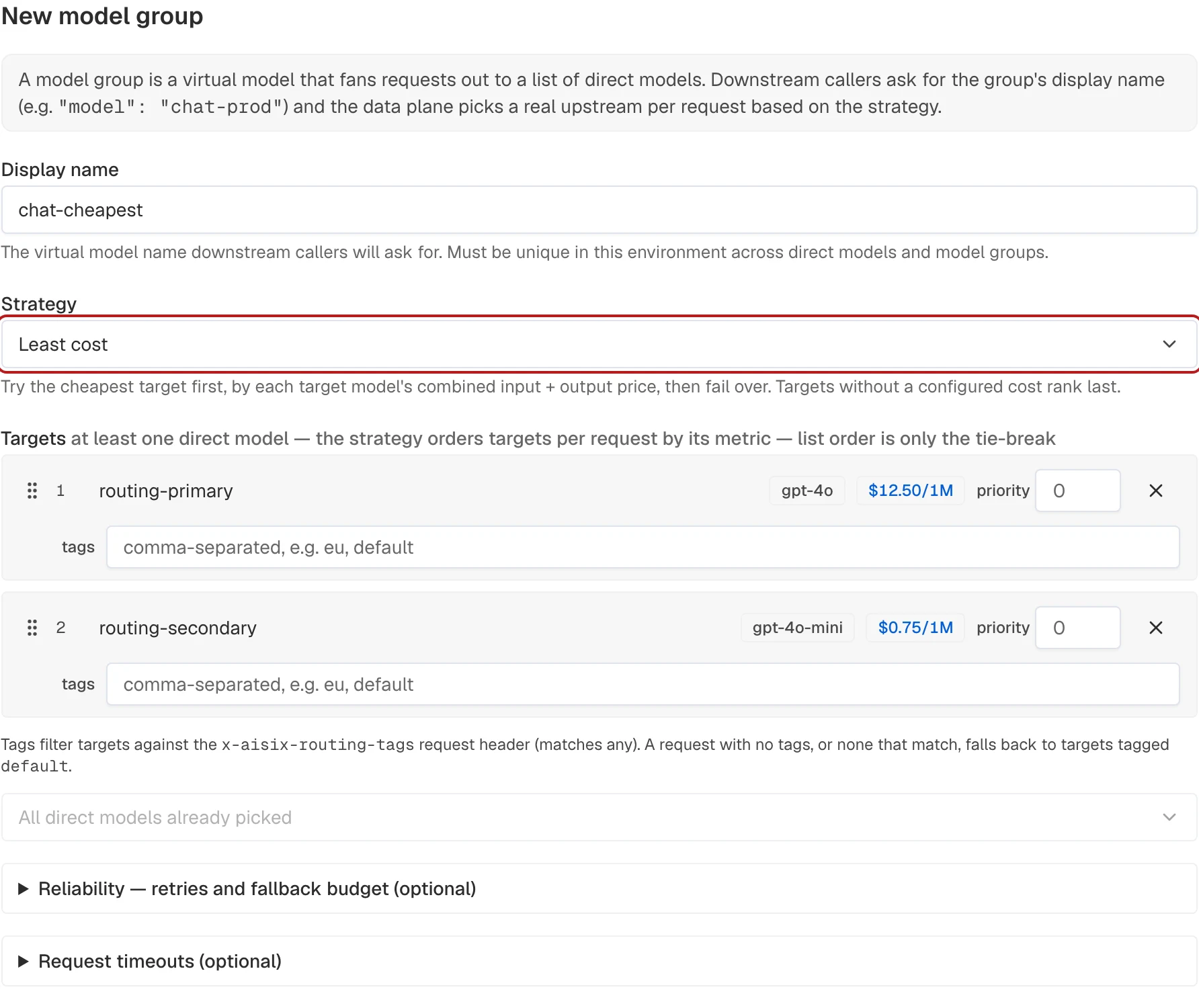
Create a group that ranks the prepared targets by price:
curl -sS -X POST "$AISIX_CP/environments/$ENV_ID/models" \
  -H "Authorization: Bearer $AISIX_TOKEN" \
  -H "Content-Type: application/json" \
  -d '{
    "kind": "routing",
    "display_name": "chat-cheapest",
    "routing": {
      "strategy": "least_cost",
      "targets": [
        {"model_id": "'"$PRIMARY_MODEL_ID"'"},
        {"model_id": "'"$SECONDARY_MODEL_ID"'"}
      ]
    }
  }'
Add this entry to the existing models collection. Preserve the other model entries and top-level collections:
- display_name: chat-cheapest
  routing:
    strategy: least_cost
    targets:
      - model: gpt-4o-primary
      - model: gpt-4o-secondary
AISIX Enterprise and AISIX Cloud rank exact provider and upstream-model pairs, using organization prices before catalog prices. Price changes re-rank existing groups. Model-group prices and off-peak discounts do not affect ranking. AISIX OSS instead reads the target model's cost block. See Model Pricing and Model Aliases.
Split Traffic for A/B Tests and Canary Releases
Consistent hashing keeps a session on one variant while distributing distinct session keys by target weight. A session can move when a target fails or the eligible targets, weights, or routing configuration change. Weights approximate the share of keys, not an exact percentage of requests.
- AISIX Enterprise or Cloud
- AISIX OSS
- Dashboard
- Admin API
Create a model group named chat-canary. Choose Consistent hashing, add the two targets, and set their weight values to 95 and 5. Create the group and grant the alias to the caller key as in the initial setup.
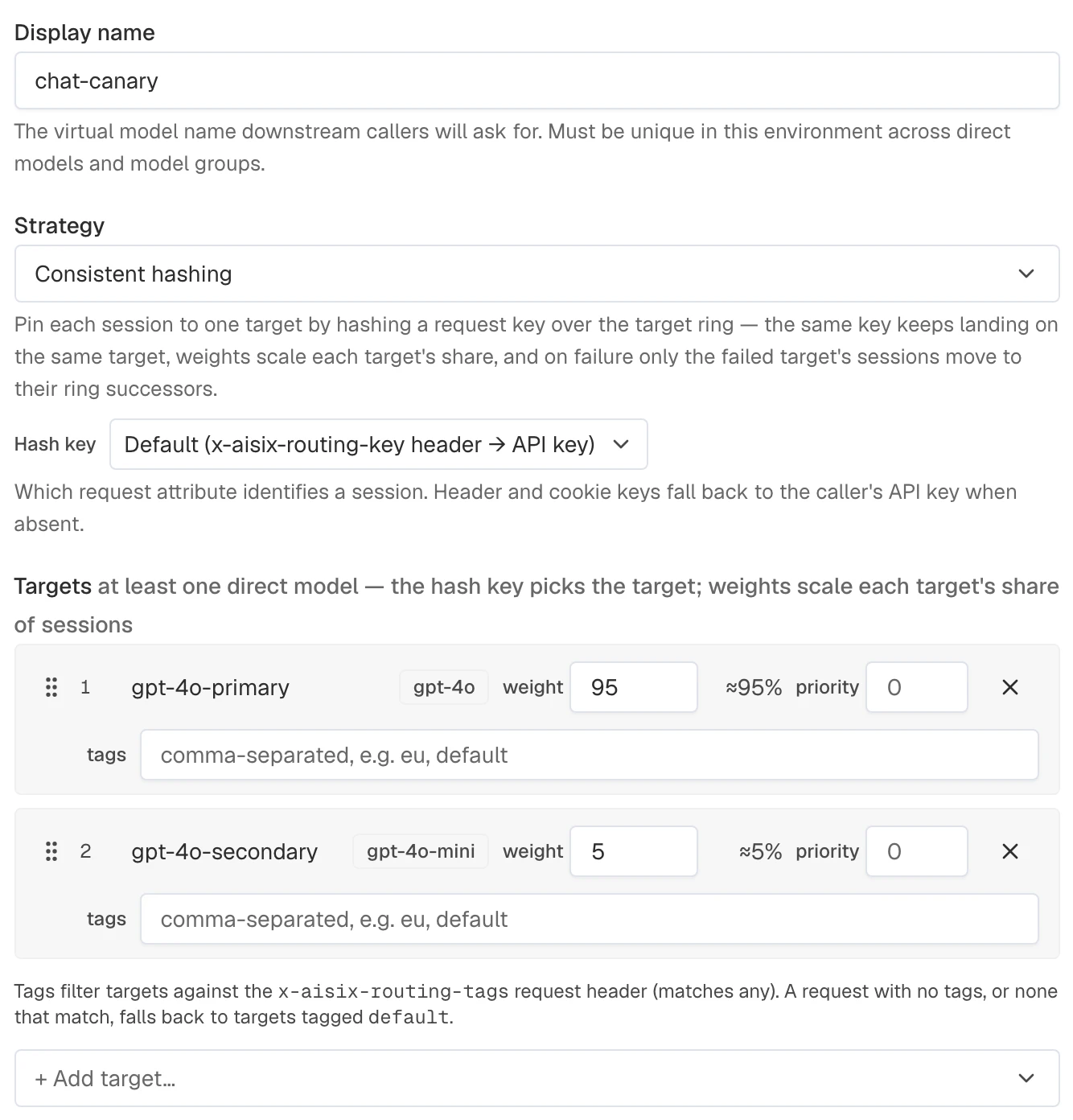
This example reuses the two prepared targets as the stable and canary variants. The allowlist update replaces the caller key's current list, so include every model the key should retain:
CANARY_MODEL_ID=$(curl -sS -X POST "$AISIX_CP/environments/$ENV_ID/models" \
  -H "Authorization: Bearer $AISIX_TOKEN" \
  -H "Content-Type: application/json" \
  -d '{
    "kind": "routing",
    "display_name": "chat-canary",
    "routing": {
      "strategy": "consistent_hash",
      "targets": [
        {"model_id": "'"$PRIMARY_MODEL_ID"'", "weight": 95},
        {"model_id": "'"$SECONDARY_MODEL_ID"'", "weight": 5}
      ]
    }
  }' | jq -r '.model.id')

curl -sS -X PATCH "$AISIX_CP/environments/$ENV_ID/api_keys/$API_KEY_ID" \
  -H "Authorization: Bearer $AISIX_TOKEN" \
  -H "Content-Type: application/json" \
  -d '{
    "allowed_models": ["'"$ROUTING_MODEL_ID"'", "'"$CANARY_MODEL_ID"'"]
  }'
Add this entry to the existing models collection. It configures a 95/5 split across the two prepared targets:
- display_name: chat-canary
  routing:
    strategy: consistent_hash
    targets:
      - model: gpt-4o-primary
        weight: 95
      - model: gpt-4o-secondary
        weight: 5
The default hash key is x-aisix-routing-key, with the caller API key as fallback. Send the header to pin a specific session or user:
curl -sS -X POST "$AISIX_PROXY/v1/chat/completions" \
  -H "Authorization: Bearer ${AISIX_API_KEY}" \
  -H "x-aisix-routing-key: session-1a2b" \
  -H "Content-Type: application/json" \
  -d '{
    "model": "chat-canary",
    "messages": [
      {"role": "user", "content": "Hello."}
    ]
  }'
Use weighted round-robin when individual requests, rather than sessions, should follow the split.
Set hash_on to an ordered list of header, cookie, API-key, or client-IP sources. The first non-empty value wins. This example prefers a session cookie:
{
  "routing": {
    "strategy": "consistent_hash",
    "hash_on": [
      {"type": "cookie", "name": "session_id"},
      {"type": "api_key"}
    ],
    "targets": []
  }
}
Pin Sessions with Pool Failover
Combine consistent hashing with priority tiers when active instances should share sessions and a standby pool should take over only after the active pool fails. This pattern keeps a session's KV cache warm on self-hosted inference backends such as vLLM or SGLang.
- AISIX Enterprise or Cloud
- AISIX OSS
- Dashboard
- Admin API
After preparing the four direct models, create a chat-pooled model group. Choose Consistent hashing, set Hash key to Custom header, and enter x-session-id. Add the active models first and keep their priority at 0. Set the two backup models' priority to -1, then create the group and grant caller access. Priority tiers control eligibility; weights distribute traffic within the selected tier.
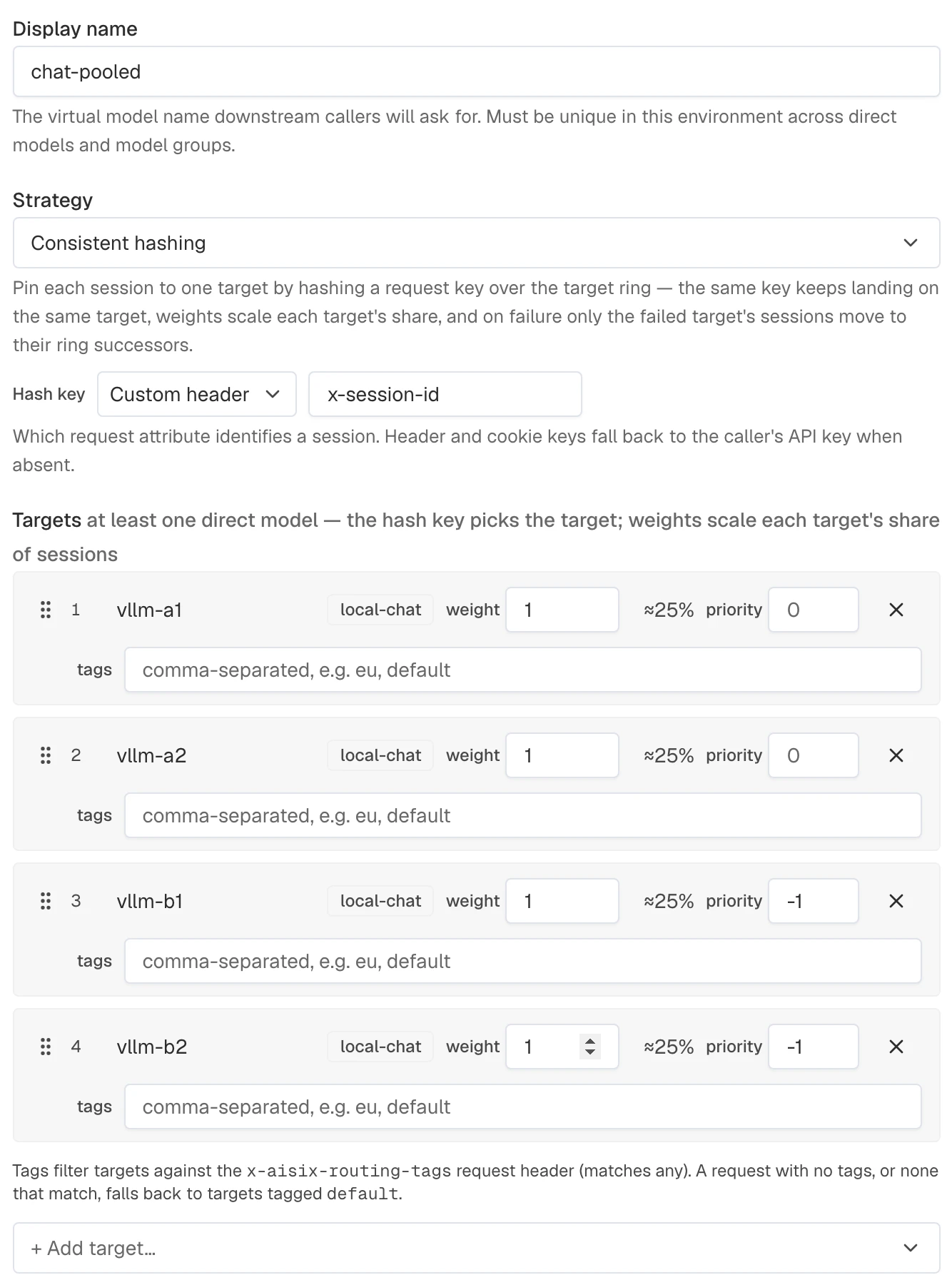
Create four direct models for the two pools and export their model IDs:
export VLLM_A1_ID="YOUR_ACTIVE_MODEL_1_ID"
export VLLM_A2_ID="YOUR_ACTIVE_MODEL_2_ID"
export VLLM_B1_ID="YOUR_BACKUP_MODEL_1_ID"
export VLLM_B2_ID="YOUR_BACKUP_MODEL_2_ID"
Create the multi-target model:
POOLED_MODEL_ID=$(curl -sS -X POST "$AISIX_CP/environments/$ENV_ID/models" \
  -H "Authorization: Bearer $AISIX_TOKEN" \
  -H "Content-Type: application/json" \
  -d '{
    "kind": "routing",
    "display_name": "chat-pooled",
    "routing": {
      "strategy": "consistent_hash",
      "hash_on": [
        {"type": "header", "name": "x-session-id"},
        {"type": "api_key"}
      ],
      "targets": [
        {"model_id": "'"$VLLM_A1_ID"'"},
        {"model_id": "'"$VLLM_A2_ID"'"},
        {"model_id": "'"$VLLM_B1_ID"'", "priority": -1},
        {"model_id": "'"$VLLM_B2_ID"'", "priority": -1}
      ]
    }
  }' | jq -r '.model.id')
After defining the four direct models for the active and backup pools, add this entry to models. Keep the other resources unchanged:
- display_name: chat-pooled
  routing:
    strategy: consistent_hash
    hash_on:
      - type: header
        name: x-session-id
      - type: api_key
    targets:
      - model: vllm-a1          # priority 0 = active pool
      - model: vllm-a2
      - model: vllm-b1
        priority: -1            # backup pool
      - model: vllm-b2
        priority: -1
The pool changes state as follows:
- A healthy active pool receives all traffic; each session stays on one active instance.
- If one active instance fails, only its sessions move to another active instance.
- If every active instance fails, sessions move to the backup pool within the same request.
- Cooldown or a background health check can remove a failed instance temporarily. Without either feature, it remains eligible and later requests continue trying it before falling through to a successor.
max_fallbacks caps how many targets one request may try across all tiers; by default every remaining target may be attempted.
Route by Request Tags
Target tags route requests by a signal such as a team, tier, or environment. Send the selected tags in the x-aisix-routing-tags header.
- AISIX Enterprise or Cloud
- AISIX OSS
- Dashboard
- Admin API
Create or edit a model group and enter premium in the primary target's tags field and default in the secondary target's field. Create or save the group, then grant its alias to the caller key if it is new.
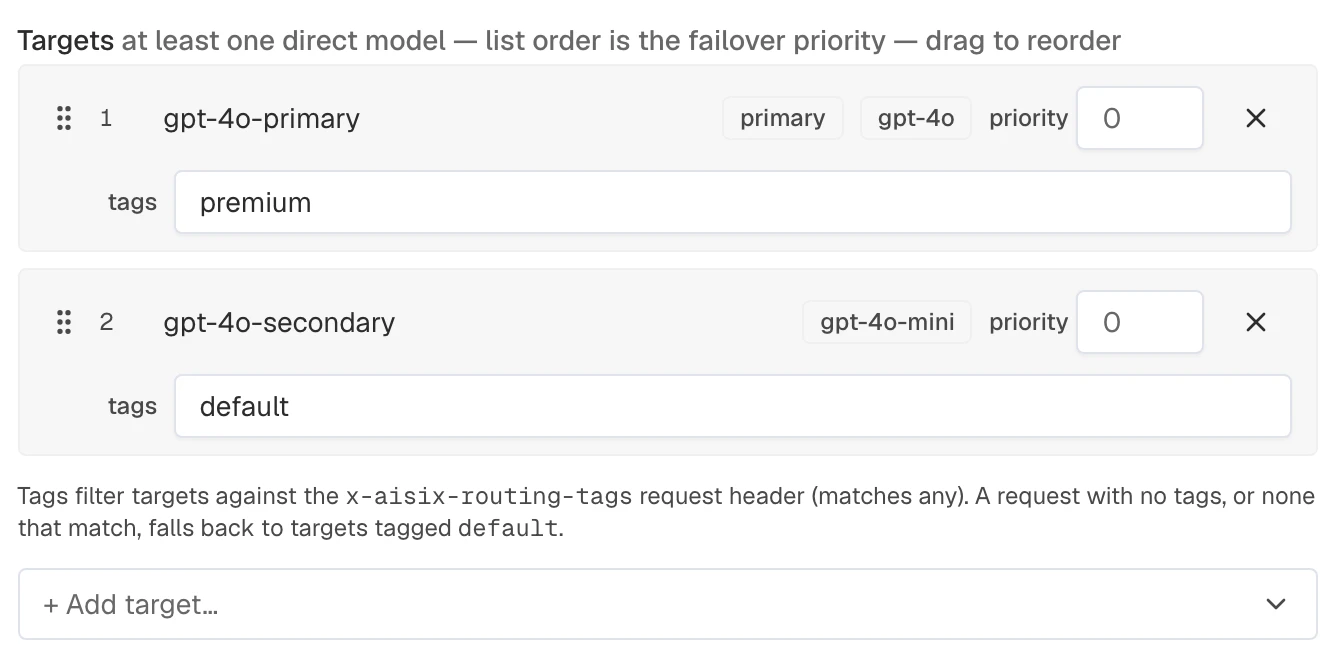
The following example tags the primary target as the premium tier and the secondary target as the default. The commands then add the new alias to the caller API key allowlist:
TIERED_MODEL_ID=$(curl -sS -X POST "$AISIX_CP/environments/$ENV_ID/models" \
  -H "Authorization: Bearer $AISIX_TOKEN" \
  -H "Content-Type: application/json" \
  -d '{
    "kind": "routing",
    "display_name": "chat-tiered",
    "routing": {
      "strategy": "failover",
      "targets": [
        {"model_id": "'"$PRIMARY_MODEL_ID"'", "tags": ["premium"]},
        {"model_id": "'"$SECONDARY_MODEL_ID"'", "tags": ["default"]}
      ]
    }
  }' | jq -r '.model.id')

curl -sS -X PATCH "$AISIX_CP/environments/$ENV_ID/api_keys/$API_KEY_ID" \
  -H "Authorization: Bearer $AISIX_TOKEN" \
  -H "Content-Type: application/json" \
  -d '{
    "allowed_models": ["'"$ROUTING_MODEL_ID"'", "'"$TIERED_MODEL_ID"'"]
  }'
Updating the caller key replaces its entire allowlist. Include the canary model ID if the key should retain access to that alias.
Add this entry to the existing models collection. It assigns the premium and default tags to the prepared targets:
- display_name: chat-tiered
  routing:
    strategy: failover
    targets:
      - model: gpt-4o-primary
        tags:
          - premium
      - model: gpt-4o-secondary
        tags:
          - default
The example request keeps only premium targets, then applies the configured strategy. Without a matching tag, AISIX prefers targets marked as the default. If no default exists, an untagged request can use every target, while a tagged request with no match is rejected.
curl -sS -X POST "$AISIX_PROXY/v1/chat/completions" \
  -H "Authorization: Bearer ${AISIX_API_KEY}" \
  -H "x-aisix-routing-tags: premium" \
  -H "Content-Type: application/json" \
  -d '{
    "model": "chat-tiered",
    "messages": [
      {"role": "user", "content": "Hello."}
    ]
  }'
The routing header is read from the request headers only. It is never forwarded to the upstream provider.
Next Steps
See Multi-Target Runtime Behavior for retry, fallback, endpoint, and streaming rules. Use Semantic Routing when target selection should depend on request meaning.